
+- Kodi Community Forum (https://forum.kodi.tv)
+-- Forum: Support (https://forum.kodi.tv/forumdisplay.php?fid=33)
+--- Forum: Skins Support (https://forum.kodi.tv/forumdisplay.php?fid=67)
+---- Forum: Confluence (https://forum.kodi.tv/forumdisplay.php?fid=125)
+---- Thread: [MOD] Horizontal Confluence Modded (/showthread.php?tid=103001)
RE: [MOD] Horizontal Confluence Modded - dibsta - 2012-05-15
(2012-03-13, 21:09)dibsta Wrote: Congrats Max
Hi al i know Max is busy but i hope someone can help
Im using Horizontal Confluence Modded
Here is my problem im trying to add favorite to Home screen using the Advance Mod Settings / Customize Home
The favorite is a Folder containing movies i can access this from the lower left favorites button, but when i access from the home screen mod all i get is a blank screen
Here are some screen shots hope this Helps
http://www.flickr.com/photos/57115311@N07/
Dibsta
Hi Max if got a bit of spare time you could sort this
Cheers Sami
Found problem the mod is not putting the correct path to favorite (Mod path ActivateWindow(10025,"X:\Coles Media\") but should be (ActivateWindow(10025,"X:\\Coles Media\\") backslash is missing
RE: [MOD] Horizontal Confluence Modded - butchabay - 2012-05-15
This is not skin related as it's happening on every skin i've tried !
RE: [MOD] Horizontal Confluence Modded - dibsta - 2012-05-15
Cheers for info
Sami
RE: [MOD] Horizontal Confluence Modded - chrisfia - 2012-05-15
Love the skin, excellent work! I do have one question though: Is it possible to edit which movies are in Movie Sets. I have some movies I would like to add to existing Sets, but cannot seem to find the option to do so. I've search the forum for this and can't seem to find it either.
RE: [MOD] Horizontal Confluence Modded - Kpitn - 2012-05-16
(2012-05-14, 21:33)mad-max Wrote: Anybody got a cool feature request?
Looking for some new stuff to code?
I take advantage to hand a layer on the integration of the Frost's add-on to manage the saga

RE: [MOD] Horizontal Confluence Modded - rintje - 2012-05-19
Hi Max,
I'm using your great mod in combination with OpenElec 2.0 Beta 3.
When playing a video while running in debug mode, i noticed that the log is swarmed with log entries like the following:
Quote:11:34:21 T:139810487584576 DEBUG: Error: Requested setting (pvrplayback.signalquality) was not found. It must be case-sensitive
11:34:25 T:139810120320768 DEBUG: Previous line repeats 88 times.
I suspect this even causes hickups during playback. The entries don't show up when the official confluence skin is enabled.
Any ideas?
RE: [MOD] Horizontal Confluence Modded - mad-max - 2012-05-19
(2012-05-19, 11:42)rintje Wrote: Hi Max,This comes from the fact that you do not run a PVR build of XBMC...
I'm using your great mod in combination with OpenElec 2.0 Beta 3.
When playing a video while running in debug mode, i noticed that the log is swarmed with log entries like the following:
Quote:11:34:21 T:139810487584576 DEBUG: Error: Requested setting (pvrplayback.signalquality) was not found. It must be case-sensitive
11:34:25 T:139810120320768 DEBUG: Previous line repeats 88 times.
I suspect this even causes hickups during playback. The entries don't show up when the official confluence skin is enabled.
Any ideas?
The setting should not affect the playback in any way...
RE: [MOD] Horizontal Confluence Modded - snavaro - 2012-05-22
(2012-05-14, 21:33)mad-max Wrote: Anybody got a cool feature request?Since you asked, how about an option to delete a show/movie when I finish watching it (or 95% of it, since I don't roll through the trailing credits)?. Right now, stopping the show returns me to the list of shows. Then I have to hit the context menu and select "Remove from Library" and then I have to confirm at least twice before deleting. I prefer the way that Tivo or Netflix handles this.
Looking for some new stuff to code?
I know there are many who save every episode/movie they have ever watched, but I am not one of them.
Thanks.
RE: [MOD] Horizontal Confluence Modded - Greg_ - 2012-05-22
(2012-04-11, 17:54)WeirdH Wrote: Hi mad-max, are you schon fully verheiratet? Congratulations..!
I may have found a bug in the skin when combined with the 'The Trailers' addon (from XBMC repo). Navigating the list of trailers in this addon gets really sluggish when I enable the 'extrafanart' option in MOD-settings. With extrafanart off, everything works as expected. Is it something on my end alone? Because I like my extrafanarts..

I'm experiencing the same issue. I noticed the issue this weekend, but didn't realize this was the problem until I found this post. I unchecked 'extrafanart', and the speed of "The Trailers" addon went back to normal, thanks for shortening my troubleshooting WeirdH. Does anyone know another skin I can test to see if it's a "The Trailers" issue? I have Transparency, but unlike this skin, it's extrafanart is broken down by category, so I'm not sure if that would be able to test it.
edit: I found this from the author of The Trailers. Hopefully someone can suggest a solution: https://github.com/XBMC-Addons/plugin.video.the.trailers/issues/9
edit2: Based on the error logged in the first post of the link, and dersphere's last reply, apparently the skin is trying to access a virtual folder without checking to see if it exists, and the skin is freezing up while it tries to access a non-existent folder. I tried to create an "extrafanart" folder in the addon's folder as a workaround, but that did not work.
Quote:Aeon Nox should either skip retrieving of extrafanart subdirs for virtual folders (plugin://...) or check in any way if a folder exists before accessing it.
Btw. this message takes place in any xbmcswift addon (because it (virtually) extends the VFS)...
RE: [MOD] Horizontal Confluence Modded - Mudislander - 2012-05-22
(2012-05-19, 11:42)rintje Wrote: Hi Max,
I'm using your great mod in combination with OpenElec 2.0 Beta 3.
When playing a video while running in debug mode, i noticed that the log is swarmed with log entries like the following:
Quote:11:34:21 T:139810487584576 DEBUG: Error: Requested setting (pvrplayback.signalquality) was not found. It must be case-sensitive
11:34:25 T:139810120320768 DEBUG: Previous line repeats 88 times.
I suspect this even causes hickups during playback. The entries don't show up when the official confluence skin is enabled.
Any ideas?
Just out of interest as it's similar http://forum.xbmc.org/showthread.php?tid=132103
RE: [MOD] Horizontal Confluence Modded - matt77303 - 2012-05-22
In lowlist make the watched thumb/coverart darker so they stand out?
Option for animated backgrounds
Explain what db-editor does?
Matt
RE: [MOD] Horizontal Confluence Modded - twinvipers - 2012-05-25
I wanted to increase the font size when in the "Pictures" menu when viewing my picture files in "List" view.
I guess I could edit the font.xml but which "font" in the xml controls the list view text? and will it affect other texts with in the skin as well?
thanks
RE: [MOD] Horizontal Confluence Modded - rintje - 2012-05-26
Hi Max, i am using your mod for creating an OpenElec installation on a dedicated box with the goal to make a children-friendly home appliance. Your mod is very suitable due to its customization options and kiosk mode.
'Less is more' for this purpose. Therefor i'm attempting to disable all buttons, behaviours and menu routes which are too technical or irrelevant and may lead my 'target audience' into total panic about what to do next.
I was wondering if an option could be introduced to hide the shutdown button in the main menu (and maybe the search button as well)? In an home appliance, this is taken care of by a button on the remote control.
RE: [MOD] Horizontal Confluence Modded - vismak - 2012-05-26
Hi mad-max
Your mod is excellent
I'm using it with my raspberry pi openelec xbmc.
It is working perfect except a little font bug.
In the main horizontal menu every small "o" appears as a capital.(I use greek fonts locale in the settings).If i return to the normal confluence the bug dissapears.
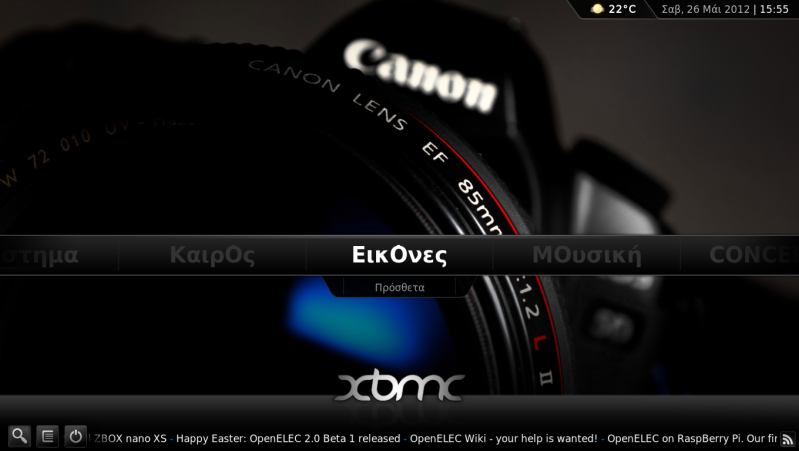
Thanks !!!!
RE: [MOD] Horizontal Confluence Modded - Devo7v - 2012-05-26
This mod is fantastic. One problem I'm having though is I cannot get the music information to fade out when the visualization is full screen. I have the option checked to "Hide Controls in MusikVisualization (Fade-Effect)" from the MOD options, but the seek bar, album art, and other information remain on the screen no matter what. With the original Confluence skin this information would fade out after a few seconds and only reappear when the track changed. In the mod, I don't think the option does anything.
Also it looks like that item wasn't translated properly, it should be "Hide Controls during Music Visualization (Fade Effect)" rather than what I wrote above.
Additionally, I have a request, I like that when music is playing it shows the spinning disc. I have a lot of disc art in the file tags as well as in the album folder. Is there a way to use the disc art I have rather than the generic disc? I have the files in each album folder named as "Album [CD].jpg"
Thanks for all your work on this, it looks amazing and should probably end up being the default skin.