
+- Kodi Community Forum (https://forum.kodi.tv)
+-- Forum: Support (https://forum.kodi.tv/forumdisplay.php?fid=33)
+--- Forum: Skins Support (https://forum.kodi.tv/forumdisplay.php?fid=67)
+---- Forum: Aeon MQ (https://forum.kodi.tv/forumdisplay.php?fid=68)
+---- Thread: [RELEASE] Aeon MQ 3 (/showthread.php?tid=107793)
Pages:
1
2
3
4
5
6
7
8
9
10
11
12
13
14
15
16
17
18
19
20
21
22
23
24
25
26
27
28
29
30
31
32
33
34
35
36
37
38
39
40
41
42
43
44
45
46
47
48
49
50
51
52
53
54
55
56
57
58
59
60
61
62
63
64
65
66
67
68
69
70
71
72
73
74
75
76
77
78
79
80
81
82
83
84
85
86
87
88
89
90
91
92
93
94
95
96
97
98
99
100
101
102
103
104
105
106
107
108
109
110
111
112
113
114
115
116
117
118
119
120
121
122
123
124
125
126
127
128
129
130
131
132
133
134
135
136
137
138
139
140
141
142
143
144
145
146
147
148
149
150
151
152
153
154
155
156
157
158
159
160
161
162
163
164
165
166
167
168
169
170
171
172
173
174
175
176
177
178
179
180
181
182
183
184
185
186
187
188
189
190
191
192
193
194
195
196
197
198
199
200
201
202
203
204
205
206
207
208
209
210
211
212
213
214
215
216
217
218
219
220
221
222
223
224
225
- imthebrain - 2011-09-21
Does any one know if mq3 skin will be adding TV view with ClearLOGO??
This new skin is much faster then mq2...good work...
- borys991 - 2011-09-21
clubwerks Wrote:I guess I don't see how you populated that playlist. If it's empty, there's your problem.
thx clubwerks, you were right! I re-checked again how I populated playlist and it turned out that I made the wrong playlist RULE. I have changed new rule playlist from PATH IS H:/ASIAN CINEMA/ into PLAYLIST IS ASIAN CINEMA.xml and now it is working great!
btw, don't know what does playlist rule PATH IS refer to. I thought it was path to my source but i was wrong.
thx a lot for pointing that out. Im Happy now

borys
- Zero3ffect - 2011-09-21
Awesome work Marcos! I hope it is OK if I post some criticism/ideas/questions with regards to the skin.
1. I'd like to see the return of the option to select a blank backdrop in the libraries. If not, it's no big deal as it is an easy workaround.
2. Personally, I tend not to use sub menus very often so a nice addition would be that if there are no links in a sub menu, you can't activate it.
3. [BUG] When adding a video folder to your library, you can't select the box to name the folder unless you use the mouse.
4. Are there any plans to release an uncompressed version of the textures.xbt?
5. [BUG] In the Videos sub menu in Shortcuts/Backdrops, it shows Favorites as disabled when it is really enabled and vice versa.
6. Would it be possible for Landscape to have a fixed list like Showcase?
7. [BUG?] In MQ2, I used Landscape for my TV shows and for the episode list. I used a fanart backdrop for the list of TV shows and a blank one for the episode list. In MQ3, there seem to be no independent settings so the show and episode list must be the same.
- clubwerks - 2011-09-21
borys991 Wrote:thx clubwerks, you were right! I re-checked again how I populated playlist and it turned out that I made the wrong playlist RULE. I have changed new rule playlist from PATH IS H:/ASIAN CINEMA/ into PLAYLIST IS ASIAN CINEMA.xml and now it is working great!
btw, don't know what does playlist rule PATH IS refer to. I thought it was path to my source but i was wrong.
thx a lot for pointing that out. Im Happy now
borys
I've often found that using PATH CONTAINS is much easier. For example, I have a subfolder with all my full BDs with HD audio. I named the folder DTSHDMA. I made a playlist of my full BDs just by using PATH CONTAINS DTSHDMA.
- splnuts - 2011-09-21
Maybe Im missing something but is there an alternate viewtype for music? I am unable to change the viewtype from the side menu and when going to enable viewtypes there are none that apply to music.
- clubwerks - 2011-09-21
splnuts Wrote:Maybe Im missing something but is there an alternate viewtype for music? I am unable to change the viewtype from the side menu and when going to enable viewtypes there are none that apply to music.
The viewtypes for music are a menu within the viewtypes menu. You have to go to the right from the video library viewtypes.
- im85288 - 2011-09-21
Does anyone know how to get the Cinema menu item shown as it was in MQ2? I know you can select Cinema from the info when playing a movie but I really liked the menu item of MQ2.
How to add new submenu items? - markimark - 2011-09-21
I try it again.
Does anybody know how to add new items to the submenu or is this not possible anymore with the new version? Thanks for any help.
- clubwerks - 2011-09-21
im85288 Wrote:Does anyone know how to get the Cinema menu item shown as it was in MQ2? I know you can select Cinema from the info when playing a movie but I really liked the menu item of MQ2.
You have to have the Cinema Experience installed. Then you can turn it on in the settings>skins>shortcuts menu.
- Maken - 2011-09-21
markimark Wrote:I try it again.
Does anybody know how to add new items to the submenu or is this not possible anymore with the new version? Thanks for any help.
This thread is cluttered with people who don't try to figure anything out on their own before they post something. Respectfully, we don't need you constantly asking the same question, thereby adding to the mess.
- clubwerks - 2011-09-21
Plus, I think we already determined that it's not a feature of MQ3 because he gave you 5 Favorites and 5 VPlaylists each with 5 submenus. If you can't make something work out of that, I'm not sure what to say. Asking the say question over and over won't make that feature appear.
- Elektro2000 - 2011-09-22
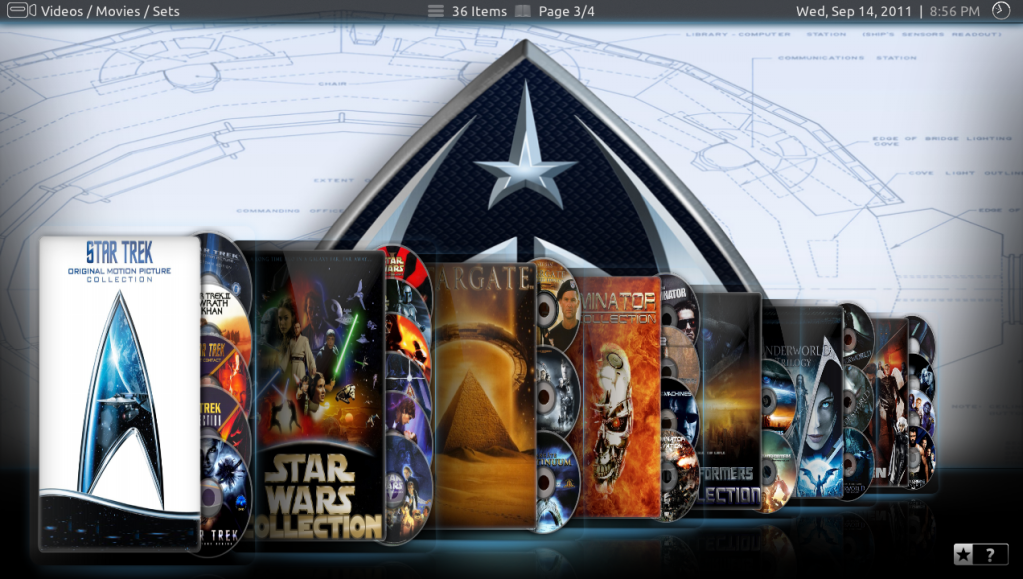
Hi all! Could somebody explain me how to make my Movie-Sets look like the sets of Rygrath?
I mean that the DVDs are looking out of the boxes, I tried almost everything but can't make it look like that. Many thanks...
- markimark - 2011-09-22
@Maken & @clubwerks
This has become y very rude forum here and we do not need people like you here either. I will keep asking until some is found to answer my question. This is what the forum should about and not about smart guys like you. A simple "NO, it is not possible anymore" would have been enough.
I have tried many times and it is not working as it was in version 2. I was wondering if that feature was skipped or what else the reason youd be why I can not add a new submenu to the tv section anymore.
Why should I create a whole new tv section and then have to disable to default tv section, just to get a customized subsection? Does not make sense to me.
- clubwerks - 2011-09-22
No, it is not possible anymore.
- clubwerks - 2011-09-22
Elektro2000 Wrote:Hi all! Could somebody explain me how to make my Movie-Sets look like the sets of Rygrath?
I mean that the DVDs are looking out of the boxes, I tried almost everything but can't make it look like that. Many thanks...
Aren't those just his images? I think he's made a playlist that includes movie sets and changed the movieset thumb to some custom images that he made.