
+- Kodi Community Forum (https://forum.kodi.tv)
+-- Forum: Support (https://forum.kodi.tv/forumdisplay.php?fid=33)
+--- Forum: General Support (https://forum.kodi.tv/forumdisplay.php?fid=111)
+---- Forum: Windows (https://forum.kodi.tv/forumdisplay.php?fid=59)
+---- Thread: Another External Player Code, but Very Simple to Setup (/showthread.php?tid=116724)
Pages:
1
2
3
4
5
6
7
8
9
10
11
12
13
14
15
16
17
18
19
20
21
22
23
24
25
26
27
28
29
30
31
32
33
34
35
36
37
38
39
40
41
42
43
44
45
46
47
48
49
50
51
52
53
54
55
56
57
58
59
60
61
62
63
64
65
66
67
68
69
70
71
72
73
74
75
76
77
78
79
80
81
82
83
84
85
86
87
88
89
90
91
92
93
94
95
96
97
98
99
100
101
102
103
104
105
106
107
108
109
110
111
112
113
114
115
116
117
118
119
120
121
122
123
124
125
126
127
128
129
130
131
132
133
134
135
136
137
138
139
140
141
142
143
144
145
146
147
148
149
150
151
152
153
154
RE: Another External Player Code, but Very Simple to Setup - bluray - 2012-09-13
(2012-09-13, 10:08)smuller Wrote:Yes, I am using W7 64-bit....(2012-09-10, 01:19)bluray Wrote:(2012-09-09, 21:43)smuller Wrote: We are trying to hide the desktop part and perhaps even if possible the tmt screen so it will go directly to the movie.The only way to hide the desktop is by using this "<hidexbmc>false</hidexbmc>" code, set Windows taskbar to auto hide and set TMT5 to launch in fullscreen. I don't think there is a way to hide TMT5 screen completely. It is how TMT5 launch the movie......
Cheers, Steve
If you don't want to see Windows 7 completely, you have to do this- Customizing Windows for XBMC.....
Hi bluray, I changed the code to <hidexbmc>false</hidexbmc> but it still shows up ;( Any other suggestions and are you also using Windows 7 64-bit?
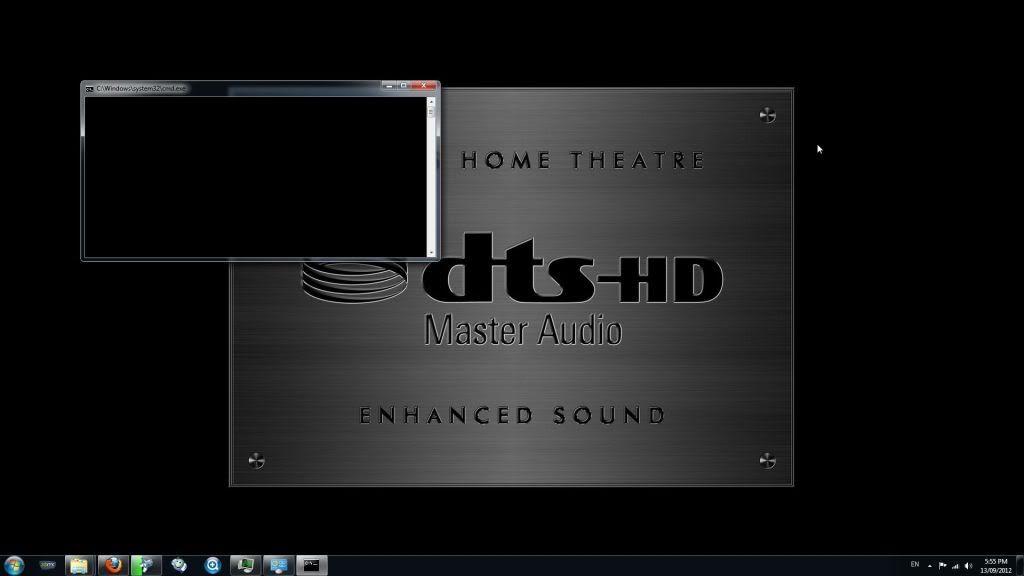
Hmmmm....I thought that you set taskbar to "Auto-hide". Why did the taskbar still exposed on the bottom of the page? Is DTS-HD your desktop background?
With <hidexbmc>false</hidexbmc>, you should never see the desktop. It should jump from XBMC UI directly to TMT5 screen. I don't see my desktop with this code....
RE: Another External Player Code, but Very Simple to Setup - jimboynyc76 - 2012-09-13
(2012-09-13, 00:21)bluray Wrote: @jimboy-
Download the files below and save all three files in "C:\Users\Administrator\AppData\Roaming\XBMC\userdata" folder......launch XBMC and insert your favorite blu-ray disc, and then click "Play Disc" option withink XBMC UI to start the movie....
-playercorefactory.xml
-playdisc.bat
-playbdmv.bat
Thank you so much!...what a headache that was!!...works pretty well so far - I still get the annoying Windows-window/toolbar at the bottom when it goes to TMT5...but disappears after I click play on the film/bluray menu to start the actual movie. So thanks!! And it doesn't revery back to XBMC when I click stop...but I can control that with my iPhone/ipad - so not too bothered.
Quick question - probe not of this post - why does XBMC sometimes duplicate the movies in the lists?...I have 3 of 1 film and a lot of duplicates...weird...still trying to get the thing to behave how I want it - and not too kid/wife friendly atm....sure that comes in time though....
Jim
RE: Another External Player Code, but Very Simple to Setup - bluray - 2012-09-13
(2012-09-13, 21:29)jimboynyc76 Wrote:I'm glad that it is working now. To get back to XBMC, you need to press STOP button and then BACK button on MCE remote.....(2012-09-13, 00:21)bluray Wrote: @jimboy-
Download the files below and save all three files in "C:\Users\Administrator\AppData\Roaming\XBMC\userdata" folder......launch XBMC and insert your favorite blu-ray disc, and then click "Play Disc" option withink XBMC UI to start the movie....
-playercorefactory.xml
-playdisc.bat
-playbdmv.bat
Thank you so much!...what a headache that was!!...works pretty well so far - I still get the annoying Windows-window/toolbar at the bottom when it goes to TMT5...but disappears after I click play on the film/bluray menu to start the actual movie. So thanks!! And it doesn't revery back to XBMC when I click stop...but I can control that with my iPhone/ipad - so not too bothered.
(2012-09-13, 21:29)jimboynyc76 Wrote: Quick question - probe not of this post - why does XBMC sometimes duplicate the movies in the lists?...I have 3 of 1 film and a lot of duplicates...weird...still trying to get the thing to behave how I want it - and not too kid/wife friendly atm....sure that comes in time though....You might want to clean your library within XBMC.....
Jim
RE: Another External Player Code, but Very Simple to Setup - smuller - 2012-09-14
(2012-09-13, 16:10)bluray Wrote:(2012-09-13, 10:08)smuller Wrote:Yes, I am using W7 64-bit....(2012-09-10, 01:19)bluray Wrote: The only way to hide the desktop is by using this "<hidexbmc>false</hidexbmc>" code, set Windows taskbar to auto hide and set TMT5 to launch in fullscreen. I don't think there is a way to hide TMT5 screen completely. It is how TMT5 launch the movie......
If you don't want to see Windows 7 completely, you have to do this- Customizing Windows for XBMC.....
Hi bluray, I changed the code to <hidexbmc>false</hidexbmc> but it still shows up ;( Any other suggestions and are you also using Windows 7 64-bit?
Hmmmm....I thought that you set taskbar to "Auto-hide". Why did the taskbar still exposed on the bottom of the page? Is DTS-HD your desktop background?
With <hidexbmc>false</hidexbmc>, you should never see the desktop. It should jump from XBMC UI directly to TMT5 screen. I don't see my desktop with this code....
Hi bluray, yes it is on autohide but it popped up when I made the screenshot. The DTS-HD logo is indeed my windows desktop background.
----------------------------------------
XBMC 11 Eden
TMT 5.3 Retail version
ATI 6450 with drivers 12.8
Windows 7 64-bit Enterprise Edition
Denon 1912 Receiver
Samsung 59D8000 Plasma
-------------------------------------
<playercorefactory>
<players>
<player name="ISO_Player" type="ExternalPlayer" audio="false" video="true">
<filename>C:\Users\HTPC-SteveM\AppData\Roaming\XBMC\userdata\PlayISO.bat</filename>
<args>"{1}" /fullscreen</args>
<hidexbmc>true</hidexbmc>
<hideconsole>false</hideconsole>
<warpcursor>none</warpcursor>
</player>
</players>
<rules action="prepend">
<!-- Bluray ISO -->
<rule filetypes="iso" filename=".*_3dbd.*" player="ISO_Player"/>
</rules>
</playercorefactory>
-----------------------------------------------
@echo off
"C:\Program Files (x86)\Elaborate Bytes\VirtualCloneDrive\VCDMount.exe" /d=0 %1
"C:\Program Files (x86)\ArcSoft\TotalMedia Theatre 5\uMCEPlayer5.exe" O:
RE: Another External Player Code, but Very Simple to Setup - bluray - 2012-09-14
(2012-09-14, 00:06)smuller Wrote: -------------------------------------Hmmm, I thought that you changed "<hidexbmc>true</hidexbmc>" with "<hidexbmc>false</hidexbmc>". Why is your playercorefactory still show "<hidexbmc>true</hidexbmc>" ? You need to change it to "<hidexbmc>false</hidexbmc>" to hide desktop.....
<playercorefactory>
<players>
<player name="ISO_Player" type="ExternalPlayer" audio="false" video="true">
<filename>C:\Users\HTPC-SteveM\AppData\Roaming\XBMC\userdata\PlayISO.bat</filename>
<args>"{1}" /fullscreen</args>
<hidexbmc>true</hidexbmc>
<hideconsole>false</hideconsole>
<warpcursor>none</warpcursor>
</player>
</players>
<rules action="prepend">
<!-- Bluray ISO -->
<rule filetypes="iso" filename=".*_3dbd.*" player="ISO_Player"/>
</rules>
</playercorefactory>
-----------------------------------------------
@echo off
"C:\Program Files (x86)\Elaborate Bytes\VirtualCloneDrive\VCDMount.exe" /d=0 %1
"C:\Program Files (x86)\ArcSoft\TotalMedia Theatre 5\uMCEPlayer5.exe" O:
RE: Another External Player Code, but Very Simple to Setup - smuller - 2012-09-14
(2012-09-14, 00:24)bluray Wrote:(2012-09-14, 00:06)smuller Wrote: -------------------------------------Hmmm, I thought that you changed "<hidexbmc>true</hidexbmc>" with "<hidexbmc>false</hidexbmc>". Why is your playercorefactory still show "<hidexbmc>true</hidexbmc>" ? You need to change it to "<hidexbmc>false</hidexbmc>" to hide desktop.....
<playercorefactory>
<players>
<player name="ISO_Player" type="ExternalPlayer" audio="false" video="true">
<filename>C:\Users\HTPC-SteveM\AppData\Roaming\XBMC\userdata\PlayISO.bat</filename>
<args>"{1}" /fullscreen</args>
<hidexbmc>false</hidexbmc>
<hideconsole>false</hideconsole>
<warpcursor>none</warpcursor>
</player>
</players>
<rules action="prepend">
<!-- Bluray ISO -->
<rule filetypes="iso" filename=".*_3dbd.*" player="ISO_Player"/>
</rules>
</playercorefactory>
-----------------------------------------------
@echo off
"C:\Program Files (x86)\Elaborate Bytes\VirtualCloneDrive\VCDMount.exe" /d=0 %1
"C:\Program Files (x86)\ArcSoft\TotalMedia Theatre 5\uMCEPlayer5.exe" O:
Sorry, I changed it back to <hidexbmc>true</hidexbmc> since it did not work, it is on <hidexbmc>false</hidexbmc> now but still with the same result.
RE: Another External Player Code, but Very Simple to Setup - bluray - 2012-09-14
(2012-09-14, 01:27)smuller Wrote:Try the exact codes below, and set TMT5 to launch in fullscreen-(2012-09-14, 00:24)bluray Wrote:(2012-09-14, 00:06)smuller Wrote: -------------------------------------Hmmm, I thought that you changed "<hidexbmc>true</hidexbmc>" with "<hidexbmc>false</hidexbmc>". Why is your playercorefactory still show "<hidexbmc>true</hidexbmc>" ? You need to change it to "<hidexbmc>false</hidexbmc>" to hide desktop.....
<playercorefactory>
<players>
<player name="ISO_Player" type="ExternalPlayer" audio="false" video="true">
<filename>C:\Users\HTPC-SteveM\AppData\Roaming\XBMC\userdata\PlayISO.bat</filename>
<args>"{1}" /fullscreen</args>
<hidexbmc>false</hidexbmc>
<hideconsole>false</hideconsole>
<warpcursor>none</warpcursor>
</player>
</players>
<rules action="prepend">
<!-- Bluray ISO -->
<rule filetypes="iso" filename=".*_3dbd.*" player="ISO_Player"/>
</rules>
</playercorefactory>
-----------------------------------------------
@echo off
"C:\Program Files (x86)\Elaborate Bytes\VirtualCloneDrive\VCDMount.exe" /d=0 %1
"C:\Program Files (x86)\ArcSoft\TotalMedia Theatre 5\uMCEPlayer5.exe" O:
Sorry, I changed it back to <hidexbmc>true</hidexbmc> since it did not work, it is on <hidexbmc>false</hidexbmc> now but still with the same result.
playercorefactory.xml
<playercorefactory>
<players>
<player name="ISO_Player" type="ExternalPlayer" audio="false" video="true">
<filename>C:\Users\HTPC-SteveM\AppData\Roaming\XBMC\userdata\PlayISO.bat</filename>
<args>"{1}"</args>
<hidexbmc>false</hidexbmc>
</player>
</players>
<rules action="prepend">
<!-- Bluray ISO -->
<rule filetypes="iso" filename=".*_3dbd.*" player="ISO_Player"/>
</rules>
</playercorefactory>
-----------------------------------------------
playiso.bat
@echo off
"C:\Program Files (x86)\Elaborate Bytes\VirtualCloneDrive\VCDMount.exe" /d=0 %1
"C:\Program Files (x86)\ArcSoft\TotalMedia Theatre 5\uTotalMediaTheatre5.exe" O:
You shouldn't see desktop after your click ISO movie. It should jump from XBMC UI directly to TMT5, and then start playing movie using TMT5 in fullscreen........
RE: Another External Player Code, but Very Simple to Setup - smuller - 2012-09-14
(2012-09-14, 03:00)bluray Wrote:(2012-09-14, 01:27)smuller Wrote:Try the exact codes below, and set TMT5 to launch in fullscreen-(2012-09-14, 00:24)bluray Wrote: Hmmm, I thought that you changed "<hidexbmc>true</hidexbmc>" with "<hidexbmc>false</hidexbmc>". Why is your playercorefactory still show "<hidexbmc>true</hidexbmc>" ? You need to change it to "<hidexbmc>false</hidexbmc>" to hide desktop.....
Sorry, I changed it back to <hidexbmc>true</hidexbmc> since it did not work, it is on <hidexbmc>false</hidexbmc> now but still with the same result.
playercorefactory.xml
<playercorefactory>
<players>
<player name="ISO_Player" type="ExternalPlayer" audio="false" video="true">
<filename>C:\Users\HTPC-SteveM\AppData\Roaming\XBMC\userdata\PlayISO.bat</filename>
<args>"{1}"</args>
<hidexbmc>false</hidexbmc>
</player>
</players>
<rules action="prepend">
<!-- Bluray ISO -->
<rule filetypes="iso" filename=".*_3dbd.*" player="ISO_Player"/>
</rules>
</playercorefactory>
-----------------------------------------------
playiso.bat
@echo off
"C:\Program Files (x86)\Elaborate Bytes\VirtualCloneDrive\VCDMount.exe" /d=0 %1
"C:\Program Files (x86)\ArcSoft\TotalMedia Theatre 5\uTotalMediaTheatre5.exe" O:
You shouldn't see desktop after your click ISO movie. It should jump from XBMC UI directly to TMT5, and then start playing movie using TMT5 in fullscreen........
I copy/paste it but it still goes to desktop first, everything else works fine.
RE: Another External Player Code, but Very Simple to Setup - bluray - 2012-09-14
(2012-09-14, 03:29)smuller Wrote:That is weird....I tried the same playercorefactory on three HTPC's in my house, and all three HTPC works the same way "jumping from XBMC directly to TMT5 without showing desktop"......(2012-09-14, 03:00)bluray Wrote:(2012-09-14, 01:27)smuller Wrote: Sorry, I changed it back to <hidexbmc>true</hidexbmc> since it did not work, it is on <hidexbmc>false</hidexbmc> now but still with the same result.Try the exact codes below, and set TMT5 to launch in fullscreen-
playercorefactory.xml
<playercorefactory>
<players>
<player name="ISO_Player" type="ExternalPlayer" audio="false" video="true">
<filename>C:\Users\HTPC-SteveM\AppData\Roaming\XBMC\userdata\PlayISO.bat</filename>
<args>"{1}"</args>
<hidexbmc>false</hidexbmc>
</player>
</players>
<rules action="prepend">
<!-- Bluray ISO -->
<rule filetypes="iso" filename=".*_3dbd.*" player="ISO_Player"/>
</rules>
</playercorefactory>
-----------------------------------------------
playiso.bat
@echo off
"C:\Program Files (x86)\Elaborate Bytes\VirtualCloneDrive\VCDMount.exe" /d=0 %1
"C:\Program Files (x86)\ArcSoft\TotalMedia Theatre 5\uTotalMediaTheatre5.exe" O:
You shouldn't see desktop after your click ISO movie. It should jump from XBMC UI directly to TMT5, and then start playing movie using TMT5 in fullscreen........
I copy/paste it but it still goes to desktop first, everything else works fine.
There must be something else causing it to show desktop....when I can think of something else, I'll let you know....
RE: Another External Player Code, but Very Simple to Setup - smuller - 2012-09-14
Thanks bluray, I think dpar on page 105 has the exact same problem. Perhaps it's also possible to start the BAT file (cmd) minimized, not sure.
Thanks for all your help
RE: Another External Player Code, but Very Simple to Setup - bluray - 2012-09-14
(2012-09-14, 06:18)smuller Wrote: Thanks bluray, I think dpar on page 105 has the exact same problem. Perhaps it's also possible to start the BAT file (cmd) minimized, not sure.That is the thing, I and many others don't see BAT command and desktop as you and dpar......the only time I see the desktop is when I use this "<hidexbmc>true</hidexbmc>", and the BAT command never show up......
Thanks for all your help
RE: Another External Player Code, but Very Simple to Setup - smuller - 2012-09-14
It's a big mystery ;-(
RE: Another External Player Code, but Very Simple to Setup - cekkk - 2012-09-14

It's work.
I was regardless!

Great job!
Thanks!
RE: Another External Player Code, but Very Simple to Setup - bluray - 2012-09-14
(2012-09-14, 14:37)cekkk Wrote:I'm glad you got it to work....enjoy it...
It's work.
I was regardless!
Great job!
Thanks!

RE: Another External Player Code, but Very Simple to Setup - andcbii - 2012-09-15
Can anyone help me? I'm having problems getting this to work with power dvd 12. it will open up up power dvd but it looks like the iso isn't mounting. I'm using DVDFab virtual drive. my virtual drive is "F"
Saved under:
C:\Users\Andrew\AppData\Roaming\XBMC\userdata
PlayDisc.bat:
"%ProgramFiles(x86)%\CyberLink\PowerDVD12\PDVDLaunchPolicy.exe" F:
PlayISO.bat
"C:\Program Files\DVDFab Virtual Drive\vdrive.exe" /d=0 %1
"%ProgramFiles(x86)%\CyberLink\PowerDVD12\PDVDLaunchPolicy.exe" F:
"C:\Program Files\DVDFab Virtual Drive\vdrive.exe" /d=0 /u
PlayBDMV.bat
set pth=%1
set pth=%pth:BDMV\index.bdmv=%
"%ProgramFiles(x86)%\CyberLink\PowerDVD12\PDVDLaunchPolicy.exe" %pth% exit
playercorefactory.xml
<playercorefactory>
<players>
<player name="ISO_Player" type="ExternalPlayer" audio="false" video="true">
<filename>C:\Users\Andrew\AppData\Roaming\XBMC\userdata\PlayISO.bat</filename>
<args>"{1}"</args>
<hidexbmc>false</hidexbmc>
<hideconsole>true</hideconsole>
<warpcursor>none</warpcursor>
</player>
<player name="BDMV_Player" type="ExternalPlayer" audio="false" video="true">
<filename>C:\Users\Andrew\AppData\Roaming\XBMC\userdata\PlayBDMV.bat</filename>
<args>"{1}"</args>
<hidexbmc>false</hidexbmc>
<hideconsole>true</hideconsole>
<warpcursor>none</warpcursor>
</player>
<player name="Disc_Player" type="ExternalPlayer" audio="false" video="true">
<filename>C:\Users\Andrew\AppData\Roaming\XBMC\userdata\PlayDisc.bat</filename>
<args>"{1}"</args>
<hidexbmc>false</hidexbmc>
<hideconsole>true</hideconsole>
<warpcursor>none</warpcursor>
</player>
<player name="Universal_Player" type="ExternalPlayer" audio="false" video="true">
<filename>C:\Users\Andrew\AppData\Roaming\XBMC\userdata\PDVDLaunchPolicy.exe</filename>
<args>"{1}"</args>
<hidexbmc>false</hidexbmc>
<hideconsole>true</hideconsole>
<warpcursor>none</warpcursor>
</player>
</players>
<rules action="prepend">
<!-- Bluray ISO -->
<rule filenames="iso" filetypes="iso" player="ISO_Player"/>
<!-- Bluray BDMV -->
<rule filenames="bdmv" filetypes="bdmv" player="BDMV_Player"/>
<!-- Bluray M2TS -->
<rule filenames="m2ts" filetypes="m2ts" player="Universal_Player"/>
<!-- Bluray MKV -->
<rule filenames="mkv" filetypes="mkv" player="Universal_Player"/>
<!-- Bluray AVI -->
<rule filenames="avi" filetypes="avi" player="Universal_Player"/>
<!-- Bluray TS -->
<rule filenames="ts" filetypes="ts" player="Universal_Player"/>
<!-- Bluray Disc -->
<rule filenames="BD" name="F:\\.*" filetypes="bdmv" player="Disc_Player"/>
</rules>
</playercorefactory>
****UPDATE*****
I was able to get this to work using
"C:\Program Files\DVDFab Virtual Drive\vdrive.exe" /M:F %1
in the playiso.bat file.