
+- Kodi Community Forum (https://forum.kodi.tv)
+-- Forum: Support (https://forum.kodi.tv/forumdisplay.php?fid=33)
+--- Forum: Skins Support (https://forum.kodi.tv/forumdisplay.php?fid=67)
+---- Forum: Skin Archive (https://forum.kodi.tv/forumdisplay.php?fid=179)
+----- Forum: Fusion Migma (https://forum.kodi.tv/forumdisplay.php?fid=135)
+----- Thread: [RELEASE] Fusion Migma v2 (/showthread.php?tid=120867)
- butchabay - 2012-02-02
JohnVee Wrote:Hi butchabay,
Nice update and thanks for adding the Posterwrap view in AL! Looks great!
One question though....Wouldn't it be better to just press "i" for info, rather then have "press down twice for info" on every screen?
The movie and TV section work that way, so it would be nice to keep it the same throughout the skin...Plus it would add less clutter on the screen.
Just putting in my 2 cents here and hope I don't offend. You're doing an amazing job so far!
Thanks
If i could do it that way, but sadly it's not possible.
You can map a key to "ActivateWindow(1122)" if you want.
- TerranQ - 2012-02-02
zepfan Wrote:Hey Butchbay, I've been busy for a while so no XBMC time, but I finally got some time and check out this skin. Great work! I have noticed a couple things. My videos screen does not work, for example video files doesn't work but tv/movies library does. It's just a black screen, it's the same thing with the addons under settings. Are they not done yet or am I an anomaly? I'm on the linux nightly (most recent as of 1/30 from mario-sitz ppa).
Exact same problem I've always had with this skin! I'm on Windows 7, Eden beta 2 currently. I've always just had a black screen when going into videos and addons
- butchabay - 2012-02-02
TerranQ Wrote:Exact same problem I've always had with this skin! I'm on Windows 7, Eden beta 2 currently. I've always just had a black screen when going into videos and addons
So you had or still have the problem?
- zepfan - 2012-02-02
butchabay Wrote:@zepfan
Sadly i can't test on linux, using beta 2 on win7, working here.
You may try deleting and installing the skin again?
You're using the passion repo?
Logfile: http://sedtech.org/xbmc/xbmc.log
But I think the issue could be here:
Code:
02:29:19 T:140142243428320   DEBUG: ------ Window Deinit (Home.xml) ------

02:29:19 T:140142243428320   DEBUG: ------ Window Init (MyVideoNav.xml) ------

02:29:19 T:140142243428320    INFO: Loading skin file: MyVideoNav.xml

02:29:19 T:140142243428320 WARNING: Skin has invalid include: Animation_ZoomInZoomOut

02:29:19 T:140142243428320 WARNING: Skin has invalid include: Animation_ZoomedByMenu

02:29:19 T:140142243428320 WARNING: Skin has invalid include: Animation_TallPanelFloat

02:29:19 T:140142243428320 WARNING: Previous line repeats 1 times.

02:29:19 T:140142243428320 WARNING: Skin has invalid include: Animation_ZoomInZoomOut

02:29:19 T:140142243428320 WARNING: Skin has invalid include: Animation_ZoomedByMenu

02:29:19 T:140142243428320 WARNING: Skin has invalid include: Animation_HiddenByMusicInfo

02:29:19 T:140142243428320 WARNING: Skin has invalid include: Animation_HiddenByInfo

02:29:19 T:140142243428320 WARNING: Skin has invalid include: Animation_ZoomInZoomOut

02:29:19 T:140142243428320 WARNING: Skin has invalid include: Animation_ZoomedByMenu

02:29:19 T:140142243428320 WARNING: Skin has invalid include: Animation_HiddenByMusicInfo

02:29:19 T:140142243428320 WARNING: Skin has invalid include: Animation_HiddenByInfo

02:29:19 T:140142243428320 WARNING: Skin has invalid include: Animation_PanelFloat

02:29:19 T:140142243428320 WARNING: Previous line repeats 1 times.

02:29:19 T:140142243428320 WARNING: Skin has invalid include: Animation_ZoomInZoomOut

02:29:19 T:140142243428320 WARNING: Skin has invalid include: Animation_ZoomedByMenu

02:29:19 T:140142243428320 WARNING: Skin has invalid include: Animation_ZoomInZoomOut

02:29:19 T:140142243428320 WARNING: Skin has invalid include: Animation_ZoomedByMenu

02:29:20 T:140142243428320   ERROR: unmatched parentheses in IsEmpty(ListItem.Property(Artist_Formed)

02:29:20 T:140142243428320   ERROR: unmatched parentheses in IsEmpty(ListItem.Property(Artist_Born)

02:29:20 T:140142243428320   ERROR: unmatched parentheses in IsEmpty(ListItem.Property(Artist_YearsActive)

02:29:20 T:140142243428320   ERROR: unmatched parentheses in IsEmpty(ListItem.Property(Artist_Died)

02:29:20 T:140142243428320   ERROR: Control has invalid animation type (no condition or no type)

02:29:20 T:140142243428320   ERROR: Previous line repeats 1 times.

02:29:20 T:140142243428320   DEBUG: CGUIMediaWindow::GetDirectory ()

02:29:20 T:140142243428320   DEBUG:   ParentPath = []
Also found this fyi:
Code:
02:29:14 T:140142243428320 WARNING: CreateFile, successfuly opened </home/peter/.xbmc/addons/skin.fusion.migma.v2.svn/720p/DialogSeekbar.xml> instead of </home/peter/.xbmc/addons/skin.fusion.migma.v2.svn/720p/DialogSeekBar.xml>- butchabay - 2012-02-02
zepfan Wrote:Logfile: http://sedtech.org/xbmc/xbmc.log
But I think the issue could be here:
Code:02:29:19 T:140142243428320 DEBUG: ------ Window Deinit (Home.xml) ------
02:29:19 T:140142243428320 DEBUG: ------ Window Init (MyVideoNav.xml) ------
02:29:19 T:140142243428320 INFO: Loading skin file: MyVideoNav.xml
02:29:19 T:140142243428320 WARNING: Skin has invalid include: Animation_ZoomInZoomOut
02:29:19 T:140142243428320 WARNING: Skin has invalid include: Animation_ZoomedByMenu
02:29:19 T:140142243428320 WARNING: Skin has invalid include: Animation_TallPanelFloat
02:29:19 T:140142243428320 WARNING: Previous line repeats 1 times.
02:29:19 T:140142243428320 WARNING: Skin has invalid include: Animation_ZoomInZoomOut
02:29:19 T:140142243428320 WARNING: Skin has invalid include: Animation_ZoomedByMenu
02:29:19 T:140142243428320 WARNING: Skin has invalid include: Animation_HiddenByMusicInfo
02:29:19 T:140142243428320 WARNING: Skin has invalid include: Animation_HiddenByInfo
02:29:19 T:140142243428320 WARNING: Skin has invalid include: Animation_ZoomInZoomOut
02:29:19 T:140142243428320 WARNING: Skin has invalid include: Animation_ZoomedByMenu
02:29:19 T:140142243428320 WARNING: Skin has invalid include: Animation_HiddenByMusicInfo
02:29:19 T:140142243428320 WARNING: Skin has invalid include: Animation_HiddenByInfo
02:29:19 T:140142243428320 WARNING: Skin has invalid include: Animation_PanelFloat
02:29:19 T:140142243428320 WARNING: Previous line repeats 1 times.
02:29:19 T:140142243428320 WARNING: Skin has invalid include: Animation_ZoomInZoomOut
02:29:19 T:140142243428320 WARNING: Skin has invalid include: Animation_ZoomedByMenu
02:29:19 T:140142243428320 WARNING: Skin has invalid include: Animation_ZoomInZoomOut
02:29:19 T:140142243428320 WARNING: Skin has invalid include: Animation_ZoomedByMenu
02:29:20 T:140142243428320 ERROR: unmatched parentheses in IsEmpty(ListItem.Property(Artist_Formed)
02:29:20 T:140142243428320 ERROR: unmatched parentheses in IsEmpty(ListItem.Property(Artist_Born)
02:29:20 T:140142243428320 ERROR: unmatched parentheses in IsEmpty(ListItem.Property(Artist_YearsActive)
02:29:20 T:140142243428320 ERROR: unmatched parentheses in IsEmpty(ListItem.Property(Artist_Died)
02:29:20 T:140142243428320 ERROR: Control has invalid animation type (no condition or no type)
02:29:20 T:140142243428320 ERROR: Previous line repeats 1 times.
02:29:20 T:140142243428320 DEBUG: CGUIMediaWindow::GetDirectory ()
02:29:20 T:140142243428320 DEBUG: ParentPath = []
Also found this fyi:
Code:02:29:14 T:140142243428320 WARNING: CreateFile, successfuly opened </home/peter/.xbmc/addons/skin.fusion.migma.v2.svn/720p/DialogSeekbar.xml> instead of </home/peter/.xbmc/addons/skin.fusion.migma.v2.svn/720p/DialogSeekBar.xml>
I'm going crazy i can't find any of these includes in myvideonav.xml
Started debugging on my system and have the same missing includes error.
Same for IsEmpty(ListItem.Property(Artist_Formed) ... etc.
If someone else can help please ?
- keibertz - 2012-02-02
I was able to finde some of your missing includes in neon Skin file Includes_Animations.xml
Quote:<include name="Animation_ZoomInZoomOut">
<animation type="WindowOpen">
<effect type="zoom" time="100" center="640,360" start="50" end="100" tween="cubic" easing="out" />
<effect type="fade" time="100" start="0" end="100" />
</animation>
<animation type="WindowClose">
<effect type="zoom" time="100" center="640,360" start="100" end="50" tween="cubic" easing="in" />
<effect type="fade" time="100" start="100" end="0" />
</animation>
</include>
<include name="Animation_HiddenByMusicInfo">
<animation type="Conditional" condition="Window.IsActive(2001)">
<effect type="zoom" time="100" center="640,360" start="100" end="20" tween="cubic" easing="in" />
<effect type="fade" time="100" start="100" end="0" />
</animation>
</include>
<include name="Animation_HiddenByInfo">
<animation effect="fade" start="100" end="0" time="100" condition="Window.IsActive(movieinformation) | Window.IsActive(addoninformation) | Window.IsActive(songinformation)">Conditional</animation>
</include>
You use this includes in Viewtype_Episodes.xml and Viewtype_Banners.xml
Quote:<include>Animation_ZoomInZoomOut</include>
<include>Animation_ZoomedByMenu</include>
will report if i finde more
EDIT:
in file Viewtype_Grid.xml
Quote:<include>Animation_ZoomInZoomOut</include>
<include>Animation_ZoomedByMenu</include>
<include>Animation_HiddenByMusicInfo</include>
<include>Animation_HiddenByInfo</include>
<include>Animation_PanelFloat</include>
<include>Animation_TallPanelFloat</include>
I think invalide mean missing includes ...
EDIT2:
All this properties are used in file Viewtype_Icon.xml
Quote:12:09:15 T:6720 ERROR: unmatched parentheses in IsEmpty(ListItem.Property(Artist_Formed)
12:09:15 T:6720 ERROR: unmatched parentheses in IsEmpty(ListItem.Property(Artist_Born)
12:09:15 T:6720 ERROR: unmatched parentheses in IsEmpty(ListItem.Property(Artist_YearsActive)
12:09:15 T:6720 ERROR: unmatched parentheses in IsEmpty(ListItem.Property(Artist_Died)
EDIT3:
file Includes_Animations.xml skin Alaska Revisited
Quote:<include name="Animation_ZoomedByMenu">
<animation type="Conditional" condition="ControlGroup(7000).HasFocus | ControlGroup(7001).HasFocus | Window.IsActive(yesnodialog) | Window.IsActive(contentsettings) | Window.IsActive(contextmenu) | Window.IsActive(favourites) | Window.IsActive(okdialog) | Window.IsActive(mediasource) | Window.IsActive(selectdialog) | Window.IsActive(addoninformation) | Window.IsActive(addonsettings) | Window.IsActive(filestackingdialog) | Window.IsActive(profilesettings) | Window.IsActive(smartplaylisteditor)">
<effect type="zoom" time="600" center="640,360" start="100" end="50" tween="cubic" easing="inout" />
<effect type="fade" time="400" start="100" end="0" />
</animation>
</include>
Quote:12:06:40 T:6720 WARNING: Skin has invalid include: DialogIDu use this include in a lot od dialog files DialogNumeric.xml DialogMuteBug.xml DialogFileStacking.xml DialogPluginSettings.xml DialogScriptInfo.xml ...
Quote:<include>DialogID</include>
neon Skin file Includes.xml
Quote:<include name="DialogID">
<posx>10</posx>
<posy>35</posy>
<font>Font_Neon_16</font>
<textcolor>TextDisabled</textcolor>
<align>left</align>
</include>
- butchabay - 2012-02-02
What do you mean neon skin?
- keibertz - 2012-02-02
u need to enter the missing include descriptions into the files of your skin.
i found a lot of the missing include descriptions in files from the Skin Neon.
Just enter the missing include descriptions in the same files from your Skin
or delete the includes in the dialog and viewtype files from your skin.
- butchabay - 2012-02-02
Thanx keibertz, i'm going to try to fix it this evening.
- 91dxcrx - 2012-02-02
Loving this skin! Is there any way I can turn off poster wrapping in TV Seasons?
REV.426 Commited to SVN - butchabay - 2012-02-03
- Fixes, Missing Includes, Missing Animations
@zepfan
could you try and report back ?
thanx
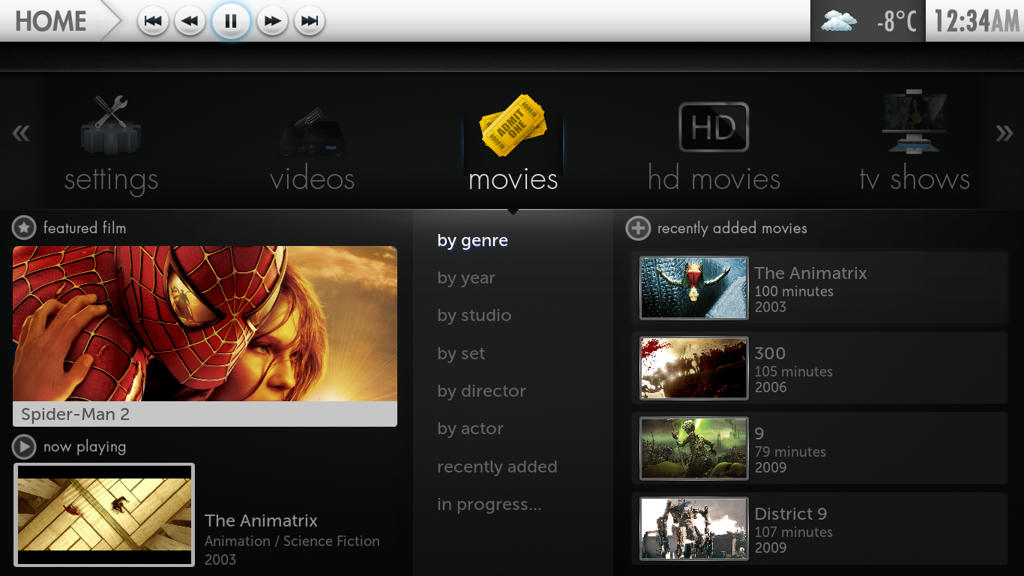
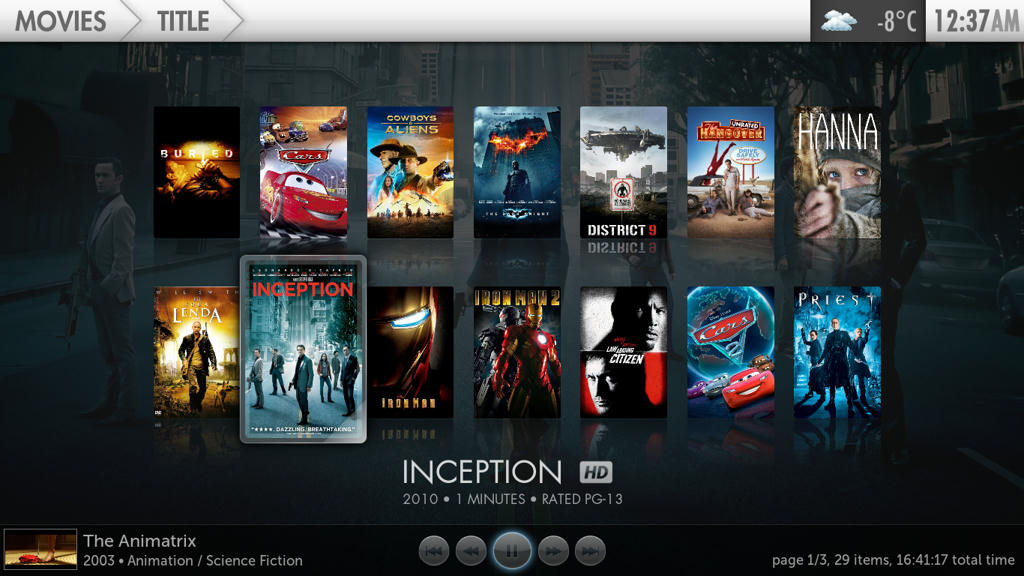
REV.427 Commited to SVN - butchabay - 2012-02-03
- Player Controls
- Scrolling Animation Home (Experimental)
- JohnVee - 2012-02-03
Very nice! Thank you...Seems as though the home screen navigates A LOT smoother.
When activating player controls on home, it highlights the first word in the sub menu. Possible bug?
Also, in the screenshot you posted above, where it says recently added movies, next to the + symbol, doesn't show for me. Nor does it show the text, "recently added episodes" on TV home screen. It used to, but it doesn't anymore. Any Ideas?
- zepfan - 2012-02-03
butchabay Wrote:- Fixes, Missing Includes, Missing Animations
@zepfan
could you try and report back ?
thanx
Appears to be fixed on my desktop, will try on HTPC tonight!
- butchabay - 2012-02-03
JohnVee Wrote:Very nice! Thank you...Seems as though the home screen navigates A LOT smoother.
When activating player controls on home, it highlights the first word in the sub menu. Possible bug?
Also, in the screenshot you posted above, where it says recently added movies, next to the + symbol, doesn't show for me. Nor does it show the text, "recently added episodes" on TV home screen. It used to, but it doesn't anymore. Any Ideas?
Yes noticed the highlight on home while playercontrol is active.
About recently added label, going to check.