
+- Kodi Community Forum (https://forum.kodi.tv)
+-- Forum: Support (https://forum.kodi.tv/forumdisplay.php?fid=33)
+--- Forum: Skins Support (https://forum.kodi.tv/forumdisplay.php?fid=67)
+---- Forum: Aeon Nox: Silvo (https://forum.kodi.tv/forumdisplay.php?fid=142)
+---- Thread: Run script from new Main Menu Item (/showthread.php?tid=128620)
Pages:
1
2
Run script from new Main Menu Item - puulima - 2012-04-12
Posted the thread below in the Windows forum - but thinking it should belong here as the more I read, the more I believe I need to customize the Main Menu in AEON NOX.
I don't use all Menu Items so is it possible to hijack one of the items I don't use - change the label and what it does when selected - or easier to ADD a new item and new actions?
Here's the original thread I posted: Add a menu item to run a script?
Thanks!
RE: Run script from new Main Menu Item - phil65 - 2012-04-12
in aeon nox 3.0:
main menu customizer in options --> choose custom menu item --> set custom as type there --> click on set item --> type RunScript(whateveryouwant) --> done
not tried it yet, but should work.
possible way for 2.0. add the script as an advancedlauncher item, add that to favourites (don´t know if you can add adv launcher items to favs) and then add that to home menu.
RE: Run script from new Main Menu Item - puulima - 2012-04-12
(2012-04-12, 07:12)phil65 Wrote: in aeon nox 3.0:
main menu customizer in options --> choose custom menu item --> set custom as type there --> click on set item --> type RunScript(whateveryouwant) --> done
not tried it yet, but should work.
possible way for 2.0. add the script as an advancedlauncher item, add that to favourites (don´t know if you can add adv launcher items to favs) and then add that to home menu.
I have 2.0.
I already tried using Advanced Launcher & Launcher - but it looks like it only wants to grab .exe files - not .py scripts? I was able to use Advance Launcher to run an AutoHoteKey script I compiled - and then set it as a Fave and then add that to the Main menu - that aspect works fine - except the .py script handles what I want to do much cleaner.
Any other ideas - I know this can likely be done by modifying the home menu xml files - just not sure of all the details...
RE: Run script from new Main Menu Item - phil65 - 2012-04-12
3.0 is wip, you could test it, but it isn´t finished. you´ll have to wait a bit. advancedlauncher can launch anything you want. you´d have to use python [PathToPythonScript] then.
RE: Run script from new Main Menu Item - puulima - 2012-04-12
Already downloaded and installed and testing. Tried your 3.0 suggestion above - but maybe I'm missing something? Nothing happens when I select it form the menu. See the scerencap..
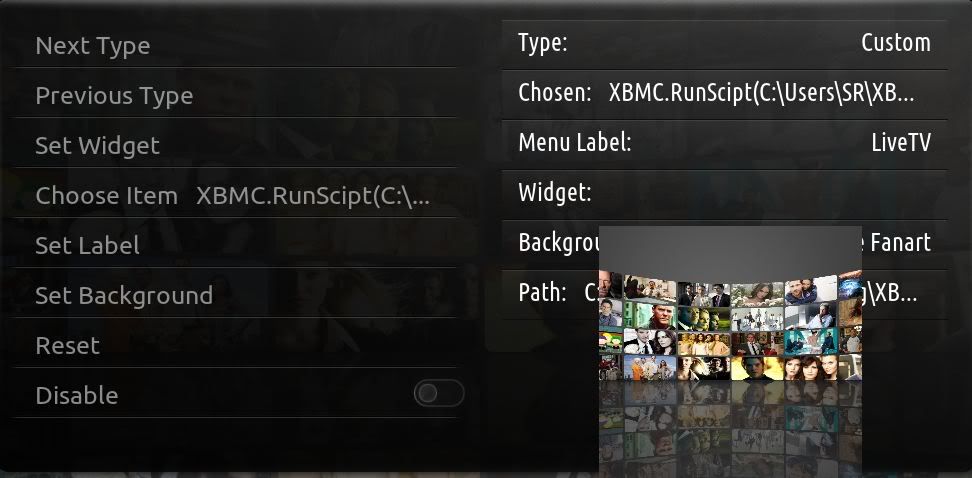
Can you explain "pathtopythonscript"
RE: Run script from new Main Menu Item - puulima - 2012-04-12
Also - seem to be missing a bunch of SKIN settings options? Where did the options to customize backgrounds go...and my backgrounds are animated now...can't find where to shut that off...I only have 3 options on the Skin menu (General, Home Window and View Types) - used to have a lot more with 2.0?
RE: Run script from new Main Menu Item - phil65 - 2012-04-12
option for animate is missing yet, all other options are in one big customizer.
about the Runscript(): perhaps path in ""? didn´t try that yet, could take a a look if i find some time.
and yes, it seems as if aeon 2.0 did have much more options. that´s wrong. they´re only better placed now.
EDIT:
XBMC.RunScript(special://skin/scripts/yourscript.py) should work, place the script in SKINFOLDER/scripts/ for that.
RE: Run script from new Main Menu Item - puulima - 2012-04-12
Tried putting the quotes on the path - no luck... - ok - just saw you edited your posting so will go try that.
Also: So the background is animated by default? Can I edit that setting manually...I like the changes (so far) and will continue to test - but would like to be able to customize the backgrounds and stop them from moving around
 Q: "better placed" - I can't find the options for the background customization? Where are the other previous options placed now? I thought I poked everywhere...
Not sure if a bug? But noticed when I turn (back) on my animated Weather icons...the icons go away.
Thx
RE: Run script from new Main Menu Item - phil65 - 2012-04-12
as is said, option is not integrated yet. we shifted all options and things are still wip. you could edit the setting in guisettings.xml manually if you want or rollback to an older version change it there, and return to 3.0
RE: Run script from new Main Menu Item - puulima - 2012-04-12
(2012-04-12, 19:02)phil65 Wrote: XBMC.RunScript(special://skin/scripts/yourscript.py) should work, place the script in SKINFOLDER/scripts/ for that.
ok, I'm confused... does SKINFOLDER refer to the "BigNoid-Aeon-Nox-859d869" folder in the addons folder? - and if so, I would need to create the "scripts" folder there?
RE: Run script from new Main Menu Item - phil65 - 2012-04-12
(2012-04-12, 19:17)puulima Wrote:(2012-04-12, 19:02)phil65 Wrote: XBMC.RunScript(special://skin/scripts/yourscript.py) should work, place the script in SKINFOLDER/scripts/ for that.
ok, I'm confused... does SKINFOLDER refer to the "BigNoid-Aeon-Nox-859d869" folder in the addons folder? - and if so, I would need to create the "scripts" folder there? And am I really using forward slashes?
I'm getting this in the log:
13:16:30 T:7664 ERROR: Keymapping error: no such action 'xbmc.runscipt(special://bignoid-aeon-nox-859d869/scripts/wmc.py)' defined
ok, correct the spelling error (duh) but get this in the log:
13:22:30 T:6152 NOTICE: -->Python Interpreter Initialized<--
13:22:31 T:7664 ERROR: Python script "" does not exist
no, only exchange yourscript.py with the name of your script. /skin/ stays /skin/
"scripts" folder has to be included inside aeon nox folder. (don´t know how yours is called)
RE: Run script from new Main Menu Item - puulima - 2012-04-12
Gotcha. Works like a charm! But now I have to continue to use 3.0 then to have this functionality huh?
So how do I get the customized backgrounds working again? I looked at guisettings.xml and see the customized entries/paths and filenames for ones I manually select a specific single image for.
Not sure how I rollback to 2.0 - although 3.0 created it's own folder when I installed from the ZIP, I don't see an option to select 2.0 from the Appearance menu?
Thanks a heap for your assistance...this is great that I can get this to work...really do love this skin.
RE: Run script from new Main Menu Item - phil65 - 2012-04-12
rollback is only possible when using the passion svn probably.
toggle the nox skin setting animatedbghome off in guisettings, that should do it for now.
rest of background settings can be done in the same customizer you used for the new menu item.
RE: Run script from new Main Menu Item - puulima - 2012-04-12
(2012-04-12, 19:52)phil65 Wrote: rest of background settings can be done in the same customizer you used for the new menu item.
Yeah, I just figured that out...I see what you mean about better placed...it's one stop shopping to customize the menu now. Just needed to figure out where to look.
I changed the animated options to false - all good there. Anyway to shut off the Window/Mouse/Focussed sysinfo that's floating around the screen? Assuming that's part of the test package...but it will bug the wife
Thanks again for the assistance...hope this thread helps others. What's the ETA for 3.0 going live anyways?
RE: Run script from new Main Menu Item - BigNoid - 2012-04-12
(2012-04-12, 20:08)puulima Wrote: What's the ETA for 3.0 going live anyways?When it's done
