
+- Kodi Community Forum (https://forum.kodi.tv)
+-- Forum: Support (https://forum.kodi.tv/forumdisplay.php?fid=33)
+--- Forum: Skins Support (https://forum.kodi.tv/forumdisplay.php?fid=67)
+---- Forum: Skin Archive (https://forum.kodi.tv/forumdisplay.php?fid=179)
+----- Forum: Back Row (https://forum.kodi.tv/forumdisplay.php?fid=127)
+----- Thread: Back Row General Discussion (/showthread.php?tid=63773)
RE: Back Row General Discussion - BeesKnees - 2015-04-11
I promise I did a search... Is there a way to turn off the 3..2...1.. countdown?
If not, it does not matter. I am not a guy that cares that much about skins. I have a new Fire TV that I have installed Kodi on and I was just poking around the add-ons. I thought, what the heck, the worst that happens is I immediately uninstall it. So I have a man cave with a movie theme... makes sense to get the back row skin, right?
SHAME ON YOU! YOU HAVE MADE ME A GUY THAT CARES ABOUT SKINS!
Not only is it killer... you even solved one of my irritations because now I can see movie and tv episode synopsis before playing.
How do donations work for skins? If I am still using this in a couple of weeks I would feel obliged.
RE: Back Row General Discussion - Sharpe - 2015-04-11
LOL - I'm really sorry BeesKnees no one should have to care about skins!
But yes you can disable the countdown either by changing the skin to use custom wallpaper on the home screen (in skin settings) or by activating the toggle in skin settings shown below:
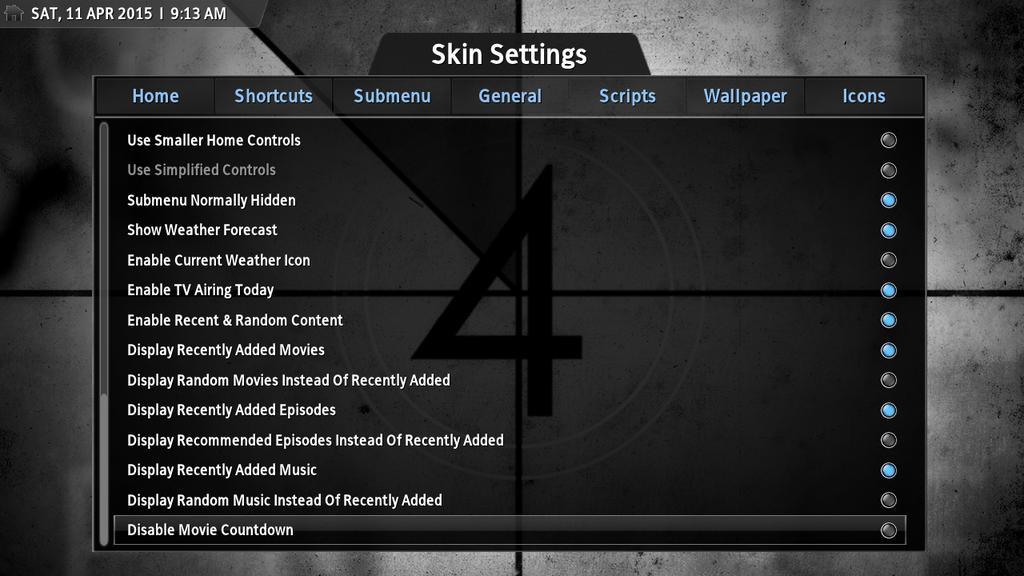
Speaking of donations I've recently added a paypal button to the download link post accessible via my signature.
Cheers
RE: Back Row General Discussion - BeesKnees - 2015-04-12
I poked around but I missed the "Settings" options. Thanks. I think I like the rest of it default but I might play around with it some more.
I really envy you graphically inclined developers. I probably write the most boring code you can imagine. It has done and does some impressive things but it will never be interesting at a dinner party. I have always kind of wanted to do an entire project but "making it pretty" is just not my strength.
Anyway, I will kick the tires and if I am still hating you for making me like skins in a few weeks I will check out your links and do the right thing.
Oh and I hope anyone else reading this will take what I have said lightly. I know jokes on a support board sometimes go over like a lead balloon. We all come in different flavors. I like things pretty simple. The first thing I do when I get a new cellphone is find a ringtone that sounds like a cellphone so I am only razzing you because you have converted me... at least for this skin on this software.
RE: Back Row General Discussion - Sharpe - 2015-04-12
Thanks bud glad to hear you're liking things.
Hey I envy anyone who can code at all I wish I knew a lot more proper coding.
All the best.
RE: Back Row General Discussion - BeesKnees - 2015-04-15
Well I donated. I hope that is enough for a couple of drinks and an appetizer. I have more questions but I think I need to poke around some more because at least one of them is definitely a Kodi question before bothering you.
Well... one quick one... I also have a Fire Stick but I was kind of reluctant to load back row on it because it does not seem to have a lot of horsepower and I was afraid of adding much overhead or using up more space. I am actually getting another Fire TV and move the stick somewhere less important. Anyway, is that a valid concern?
RE: Back Row General Discussion - Sharpe - 2015-04-15
Oh that's very kind of you - thank you very much.
I'm not sure how the Fire Stick performs as I've not used one but I think it should be ok- it's a dual core device isn't it? The Fire TV will work great though! I use one of them and am really impressed with how snappy it is and ever so quiet. Plus the ability to add android apps as favourites then add those favourites to the home menu is really useful - I use it that way load up Netflix seamlessly from within Kodi,
RE: Back Row General Discussion - BeesKnees - 2015-04-16
I am not sure. I did not buy it with Kodi in mind so I didn't check the specs. I will look into it. If I had realized that Kodi was an option I would have just purchased the boxes and skipped the stick because sometimes it crashes during playback.
Anyway I am not sure what is being suggested here can you check this thread?
http://forum.kodi.tv/showthread.php?tid=224520
RE: Back Row General Discussion - Sharpe - 2015-04-16
I've not heard of this before - seems a reasonable idea though. I'll check out what skins have something like this and see if I can do something similar,
RE: Back Row General Discussion - BeesKnees - 2015-04-16
It is not crucial but if it is not too much trouble I would appreciate it. I doubt I would switch from Back Row regardless of the outcome.
You will be happy to know I searched and answered most of my own questions. The last thing on my list is to customize two of the default pictures which I think I can do with a usb thumb drive or ADB.
Can you tell me the name of the up arrow picture file for that indicates the root directory? It is one that I wish to change. You have such a beautiful skin but when I hit Movies or TV I am greeted by an arrow that takes me out of the experience.
RE: Back Row General Discussion - Sharpe - 2015-04-16
It's contained in the textures file and hard to alter - however you can just disable it (which is what I do) by following the instructions here
RE: Back Row General Discussion - BeesKnees - 2015-04-18
Thanks again!! That is so much nicer.
RE: Back Row General Discussion - BeesKnees - 2015-04-19
So today I spent a fair amount of time playing around with settings removing things like weather, pictures, music, and programs, stuff I knew I would not be using anytime soon and adding the submenus I wanted to see, etc.
I was really impressed with the way your skin looks but I have to say bravo on customization options too.
I look forward to learning what some of the other options do. I have spent so much time re-ripping my collection that by the time I get it scanned into Kodi I haven't been inspired to look under the hood as much as I probably should have by now.
I still haven't tried it on the Fire Stick but something sure went wrong on the Boxee Box. I have no idea if it had anything to do with BR but after loading it errors kept popping up. If it wasn't for the fact the BB was already failing to boot up about half the time before I stopped using it I would probably try and figure it out. It seemed to make more sense to put it back in the closet and not deal with the headache of dealing with multiple player platforms right now.
RE: Back Row General Discussion - Mortekai - 2015-07-11
Hello, first time poster here, and I'd like to thank you for all your hard work on this outstanding skin for Kodi!! It really is superb, and I intend to use it permanently with Kodi for as long as it's compatible.
My question has to do with the newest version of your skin, skin.back-row-Isengard-7.0.4b .
I have read the majority of this thread, within most of the 70 pages of great information. My question, at this point in time, is this... How would I go about lowering the position of the Home Screen submenu background image?
To assure you that I have done all the searching I can think of, here's where I'm at with modding the skin in order to lower the film strip. In posts from about 2 years ago, I found out that I need to alter the includes.xml file. The line numbers are different now, because you've obviously had to adapt the includes.xml to keep up with the evolving Kodi. I have managed to lower the Normal Small Menu, and the Normal Small Submenu by 100 pixels by adding 100 to the values in lines 2053 and 3407. So far, so good, except for one item that I cannot figure out.
With the normal small menu and the normal small submenu dropped, I am still left with the dark background for the submenu up at it's original position. So, it's right in the middle of the film strip now. I'm thinking that image is in the textures.xbt file, but I'm not really sure.
All that to say this: Would you please instruct me how to lower that dark submenu background down 100 pixels? I would be extremely grateful for your help!!
RE: Back Row General Discussion - Sharpe - 2015-07-12
Hi Mortekai
Sorry bud I'm not going to be home for a couple of weeks whilst I'm on holiday. I won't be able to help until I'm back at the end of the month.
RE: Back Row General Discussion - Mortekai - 2015-07-12
Thanks for getting back to me, Sharpe.
The end of the month will be just fine. I learned patience long ago. :-)
I hope you have a great holiday, and that you make some fine memories. I look forward to talking with you more about the mod issue when you return home.
Take care.