
+- Kodi Community Forum (https://forum.kodi.tv)
+-- Forum: Support (https://forum.kodi.tv/forumdisplay.php?fid=33)
+--- Forum: Skins Support (https://forum.kodi.tv/forumdisplay.php?fid=67)
+---- Forum: Skin Archive (https://forum.kodi.tv/forumdisplay.php?fid=179)
+----- Forum: Alaska (https://forum.kodi.tv/forumdisplay.php?fid=126)
+----- Thread: [RELEASE] Alaska Revisited (/showthread.php?tid=70302)
Pages:
1
2
3
4
5
6
7
8
9
10
11
12
13
14
15
16
17
18
19
20
21
22
23
24
25
26
27
28
29
30
31
32
33
34
35
36
37
38
39
40
41
42
43
44
45
46
47
48
49
50
51
52
53
54
55
56
57
58
59
60
61
62
63
64
65
66
67
68
69
70
71
72
73
74
75
76
77
78
79
80
81
82
83
84
85
86
87
88
89
90
91
92
93
94
95
96
97
98
99
100
101
102
103
104
105
106
107
108
109
110
111
112
113
114
115
116
117
118
119
120
121
122
123
124
125
126
127
128
129
130
131
132
133
134
135
136
137
138
139
140
141
142
143
144
145
146
147
148
149
150
151
152
153
- Hitcher - 2010-12-03
FilterDiffuse is used for the Context Menu - to change the filter colour you'll need to edit the actual texture.
PanelDiffuse2 has been removed.
The repo is being updated tonight.
- Juanflaco - 2010-12-03
Great - thanks for the info. So filter color can be changed by editing the filter.png but is there a way to control it's opacity as it relates to fanart without editing includes.xml? I was able to achieve the very dark fanart effect shown below only by editing includes.xml (the global_filter fade in amount, IIRC)
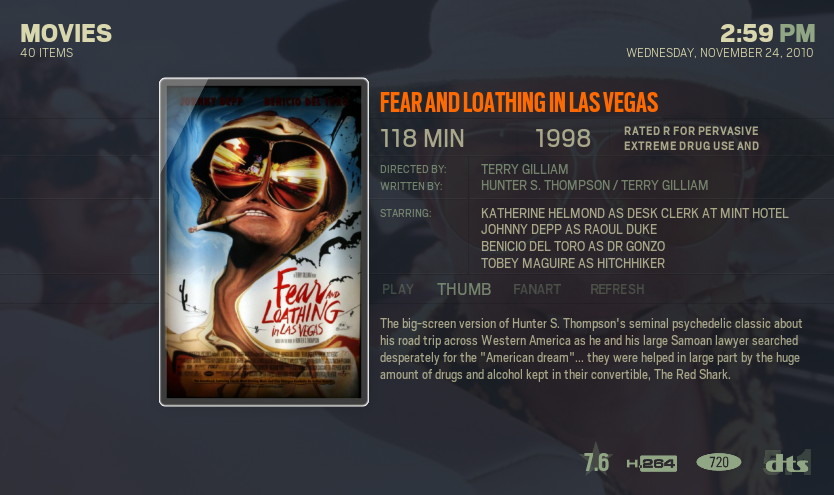
I think this is a tad too dark but still, it would be cool to control this as part of the theme without modding include.xml. I just find for the darker mods that the fanart needs to be obscured a bit more in order for text to be readable.
@Waldo - sounds great. I hope to write something up once I get everything straight in my head so others won't have to harass Hitcher with questions as much as I am!
- Sebo - 2010-12-03
Hello,
I am having problems downloading the skin from Hitcher's repository via add-on manager. I used to have the Alaska Revisited skin, but I removed it as I'm trying to hunt a crash problem. But now, with Dharma RC2 I'm unable to download the skin. It just states 0% and doesn't download it. I reinstalled the repository zip but still nothing. Log states the following:
19:30:39 T:3356 M:1127653376 WARNING: XFILE::CFileCurl::CReadState::FillBuffer: curl failed with code 22
19:30:39 T:3356 M:1127653376 ERROR: CFileCurl::CReadState::Open, didn't get any data from stream.
I looked up the URL of your repo from the repo.zip. I can visit the site manually: http://xbmc-repo-hitchers.googlecode.com/svn/trunk/
Any idea what's the problem? Me and my friend's been having problems updating the skin for weeks now.
Thanks for the great skin, Hitcher!

- Hitcher - 2010-12-03
Juanflaco Wrote:Great - thanks for the info. So filter color can be changed by editing the filter.png but is there a way to control it's opacity as it relates to fanart without editing includes.xml? I was able to achieve the very dark fanart effect shown below only by editing includes.xml (the global_filter fade in amount, IIRC)Just make the filter more transparent?
I think this is a tad too dark but still, it would be cool to control this as part of the theme without modding include.xml. I just find for the darker mods that the fanart needs to be obscured a bit more in order for text to be readable.
@Waldo - sounds great. I hope to write something up once I get everything straight in my head so others won't have to harass Hitcher with questions as much as I am!
- Juanflaco - 2010-12-03
Hitcher Wrote:Just make the filter more transparent?Here's what I'm seeing when I use a filter.png that is completely transparent or completely opaque.
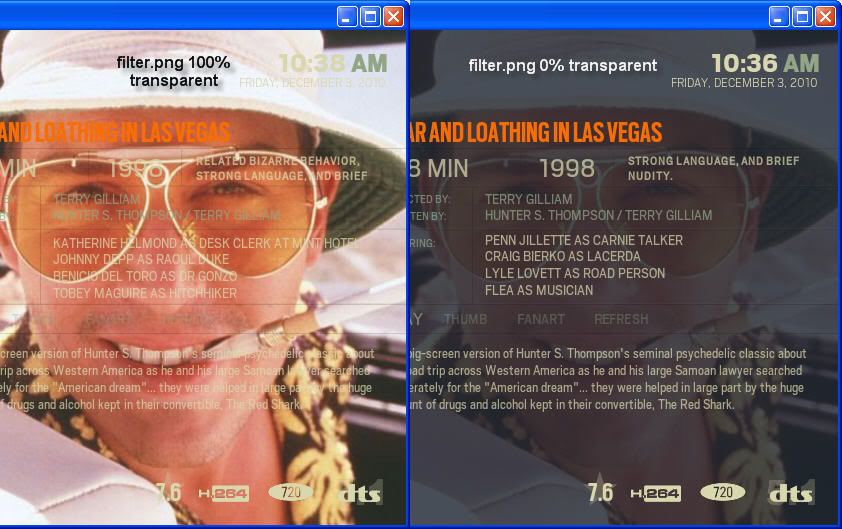
The issue I'm having is that even with a solid blue filter.png (no transparency at all) too much of the fanart is showing. When attempting to create a dark theme with light text, the fanart has to be *really* obscured by the filter for the text to show, for example considering fanart which has a lot of white in it.
The example above probably isn't the best one, as it's still pretty easily readable but in some cases the text just isn't showing up, so I'd love to be able to really darken the fanart if possible. No biggie if not currently possible, I can work up some different colors which will work better.
- pardu - 2010-12-04
Hi Hitcher,
First of all, Love your skin and work.
Now for my question: I used to have the Alaska Original Skin, not the revisited one, and there is something that looks a bit odd now with revisited. When you are using the files or list views while looking at a series (season listing) if no poster is found (e.g. That season's poster is not yet scrapped cause season is new) in Alaska there just to be the banner replacing that poster image. Now with Alaska Revisited the banner is still used on those cases BUT size of the banner is changed to meet the poster size requirements. And it's no pretty at all when a banner gets resized to a poster size.
Thanks,
Pardu
- Oral-B - 2010-12-05
Sebo Wrote:I am having problems downloading the skin from Hitcher's repository via add-on manager. I used to have the Alaska Revisited skin, but I removed it as I'm trying to hunt a crash problem. But now, with Dharma RC2 I'm unable to download the skin. It just states 0% and doesn't download it. [...]
Same here, I'm unable to update the skin to 1.9.2 after having upgraded to Dharma RC2. Browsing Hitcher's repo works, and XBMC notifies me that an update is available, but download stays stuck at 0%.
Never had a problem upgrading the skin in Dharma RC1. I understand that there's been a final update in add-ons management in RC2, could this be the cause?
- Angelscry - 2010-12-05
Oral-B Wrote:Same here, I'm unable to update the skin to 1.9.2 after having upgraded to Dharma RC2. Browsing Hitcher's repo works, and XBMC notifies me that an update is available, but download stays stuck at 0%.I think it is because the skin is compressed under RAR format instead of ZIP.
Never had a problem upgrading the skin in Dharma RC1. I understand that there's been a final update in add-ons management in RC2, could this be the cause?

- Hitcher - 2010-12-05
Opps, don't know how that got changed but it's fixed now.
- Hitcher - 2010-12-05
pardu Wrote:Hi Hitcher,Sounds like you need to change the scraper to use Posters instead of Banners.
First of all, Love your skin and work.
Now for my question: I used to have the Alaska Original Skin, not the revisited one, and there is something that looks a bit odd now with revisited. When you are using the files or list views while looking at a series (season listing) if no poster is found (e.g. That season's poster is not yet scrapped cause season is new) in Alaska there just to be the banner replacing that poster image. Now with Alaska Revisited the banner is still used on those cases BUT size of the banner is changed to meet the poster size requirements. And it's no pretty at all when a banner gets resized to a poster size.
Thanks,
Pardu
- Hitcher - 2010-12-05
Juanflaco Wrote:Here's what I'm seeing when I use a filter.png that is completely transparent or completely opaque.I'm am trying different things to help with this but don't have a lot of spare time right now.
The issue I'm having is that even with a solid blue filter.png (no transparency at all) too much of the fanart is showing. When attempting to create a dark theme with light text, the fanart has to be *really* obscured by the filter for the text to show, for example considering fanart which has a lot of white in it.
The example above probably isn't the best one, as it's still pretty easily readable but in some cases the text just isn't showing up, so I'd love to be able to really darken the fanart if possible. No biggie if not currently possible, I can work up some different colors which will work better.
- Hitcher - 2010-12-05
OK, worked it all out.
There are now 3 filters, the first is used whenever the other two aren't.
Filter_2 is the equivalent of the 80% faded one and Filter_3 is the 72% faded one, so now you can change their opacity yourself.
- Hitcher - 2010-12-05
daninino Wrote:First off thank you for a great skinUnfortunately not.
The trouble described above with the switching images I see the same error is it possible to solved it even though I have hidden some menu points?
tonybeccar Wrote:Sorry to bother again,Look in the Includes.xml for the totals entries and add whatever you want from here -
Is there any way to show the amount of watched movies in the movie library title? Maybe someone could give me a tip with the code or something? Thanks in advance to all.
Great skin, great work, keep it up and thanks again!
http://wiki.xbmc.org/index.php?title=InfoLabels
WheresWaldo Wrote:After more testing, I added a new movie. It too did not show up in the recently added, but does show in New Movies. Switch to Confluence and it appears, switch back to AR and it's there. So the recently added script is simply not running.The RandomItems script has been updated, just waiting for the RecentlyAdded one to get the same fix and hopefully this will solve the problem.
BTW, I am running 3 XBMC on Ubuntu using Dharma RC1 and the latest AR. All three behave the same way. These are clean installs of Dharma using a single MySQL DB located on a remote server (same Ubuntu server all the media is on) and a common .xbmc/userdata/Thumbnails using a symlink to a directory on the same server. This is the only way to keep all three XBMC installations in sync and to share bookmarks.
- 420p - 2010-12-06
hitcher any chance of you doing a "Random episode" or "random Movie" at any level of the scrip
All viewtypes for Add-Ons - daninino - 2010-12-06
Is there any possibility to open for all viewtypes for Add-ons or should this be defined in the Add-on itself?
For Instance the Apple trailer Add-on can use the Landscape viewtype, but this is not present in other Add-ons
Why is that?
