
+- Kodi Community Forum (https://forum.kodi.tv)
+-- Forum: Support (https://forum.kodi.tv/forumdisplay.php?fid=33)
+--- Forum: Supplementary Tools for Kodi (https://forum.kodi.tv/forumdisplay.php?fid=116)
+--- Thread: Win XBMC on iMON Display (LCD / VFD) for Windows (/showthread.php?tid=84166)
- NorDemoniac - 2010-11-05
So, I've tested it out. And I have good feedback!
Finally I can actually use the monitor for something else than news and static "|XBMC|". This is great!
Just some wishes:
- Option to not display the balloon when exiting XBMC
- Option to lit up "HDTV" (see picture), maybe only on HD-material?
- I'm not sure if DTS will lit up as of now? Could it?
- Could the big round thing to the left do anything fancy? F.ex spin while playing?
Problems:
- When I use the remote, VFD doesn't work anymore. It stucks on "XBMC STOP" f.ex.
Don't get me wrong - I'm just happy I actually can use it. But this would, for me atleast, make it tons better!
Btw, here's some photos, so that you'll get an idea on how it looks on a VFD screen, in addition to some photos of what you actually can lit up on the screen.
Hope this is of any help:
(Btw. the ' is supposed to be there
 )
)
Some icons on the left:

And on the right (could you make an option to lit up "HDTV" here?)

Closeup on the playing file:

And the whole thing (sorry for the bad lights on this one):

- Montellese - 2010-11-05
NorDemoniac Wrote:- Option to not display the balloon when exiting XBMCYesterday I added an option to disable the balloon tips. Therefore it will be in the next release for sure.
NorDemoniac Wrote:- Option to lit up "HDTV" (see picture), maybe only on HD-material?This is a feature I have planned as well.
NorDemoniac Wrote:- I'm not sure if DTS will lit up as of now? Could it?You should be able to get this working already depending on the codec of your videos and your Audio Codec Mappings in my program's XBMC settings.
NorDemoniac Wrote:- Could the big round thing to the left do anything fancy? F.ex spin while playing?Another feature I have already planned.
NorDemoniac Wrote:- When I use the remote, VFD doesn't work anymore. It stucks on "XBMC STOP" f.ex.You will find this already mentioned under "Known problems" in the first post of this thread and the README file. It seems to be a bug in the iMon Manager software.
NorDemoniac Wrote:Don't get me wrong - I'm just happy I actually can use it. But this would, for me atleast, make it tons better!Don't worry I won't
 I'm always open to feature requests and even more to bug/problem reports.
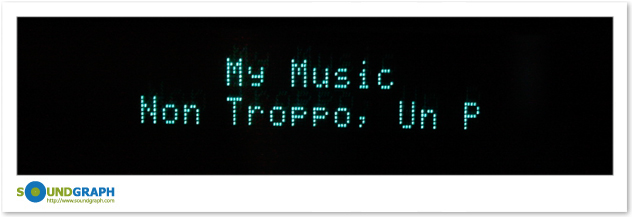
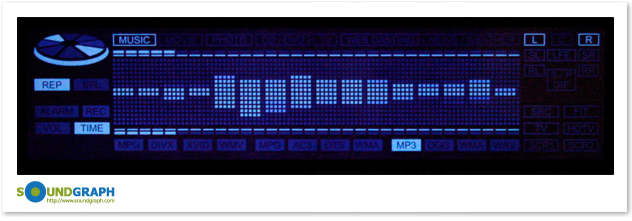
NorDemoniac Wrote:Btw, here's some photos, so that you'll get an idea on how it looks on a VFD screen, in addition to some photos of what you actually can lit up on the screen.Ah so you have the iMON LCD and not the VFD. To clarify:
iMON VFD:
iMON LCD:
- marv_el - 2010-11-05
it there an option to disable the display while watching a movie? the light of the display is rather annoying while watching a movie. for me it's very useful when i am listening to music, so i don't need to turn on the tv to see what's playing right now.
sorry for asking before i even tested it, but haven't got time yet.
i am looking forward to the first stable release...
- Montellese - 2010-11-05
marv_el Wrote:it there an option to disable the display while watching a movie? the light of the display is rather annoying while watching a movie. for me it's very useful when i am listening to music, so i don't need to turn on the tv to see what's playing right now.
Unfortunately not but I have already posted a request at Soundgraph's for the possibility to turn the display on/off exactly for such reasons.
- NorDemoniac - 2010-11-05
I have LCD?... Well OK then =)
Keep up the good work!
Btw:
My system is Windows 7 x64 Pro.
Let me know if you would like some help testing!
- bobbydavro - 2010-11-05
Do you know if this will work with the original Antec Fusion case?
Fusion Case VFD with Floppy power connector and no IR receiver
Its the very bottom one here.
http://www.antec.com/Believe_it/index.php?page=support_faqDownload
I'll gladly test the VFD but I think mine might be even older than what you need?
- Montellese - 2010-11-05
Soundgraph has not released any minimum requirements regarding display hardware BUT there is an error which is fired when the hardware is not supported. So go ahead download my program, try it and report back whether it works or not.
If your hardware is not supported you should get a balloon tip telling you so.
- Codemaster32 - 2010-11-06
Sorry but have I missed something very obvious here? I recently built an HTPC with an Antec case that has this exact iMon LCD and iMon software.
When I installed the latest iMon manager from Soundgraph's forums it seamlessly integrated itself with XBMC, with no changes needed from me at all. It displays RSS news when it should, title information for movies and music when it should, and spins the disc icon etc when media is playing. I get a proper top/bottom countdown bar as my media plays too.
Admittedly it doesn't light up the 5.1 sound icons or the HD icon, but almost everything else works as it should.
So maybe I've done something different to everyone else, but I'm not clear what this plugin is doing that is more than you get with the built in (and pretty good) functionality.
- Montellese - 2010-11-06
My goal for this program is to give the user the possibility to actually decide what they want to see on their display and what they don't want to see. When using the iMon Manager functionality you simply get what is implemented and if there is something you don't like you have two possibilities:
1. Go to the soundgraph forum, post your request and wait a month or two until you get a response that they consider implementing it (or not). If they actually do it takes another 2 - 3 months until it is in a release.
2. You just forget about it and live with it the way it is.
I want to provide the user with as many options as possible. Up until now there are not many options yet but in this very moment I'm working on an option which will allow you to define a pattern for the text which will display when a movie is being played. This pattern might look like this: "%title% (%year%)" or something simpler or more complex. Currently there are 12 possible values which can be combined in any way you can think of. The same functionality will be available for tv episodes and music songs.
I even want to go as far as letting the user define a list of texts containing these patterns which will then be displayed on the screen in the order they were configured, e.g.
Code:
%title% (%year%)

%genre%

%duration% mins

%outline%)My point is that I personally prefer to be able to control what I payed for and iMon Manager simply doesn't provide me with that possibility. Anyone being happy with what iMON Manager provides does not have to use my program in any way. It's free to use and free to ignore
- paco - 2010-11-06
Montellese Wrote:Unfortunately not but I have already posted a request at Soundgraph's for the possibility to turn the display on/off exactly for such reasons.
All the recent versions of Imon allow users to Turn On or Off the LCD. I have an unused remote button mapped to do just that. It can be found in settings, windows command, Turn On/Off Frontview.
- Montellese - 2010-11-06
paco Wrote:All the recent versions of Imon allow users to Turn On or Off the LCD. I have an unused remote button mapped to do just that. It can be found in settings, windows command, Turn On/Off Frontview.Yeah I know that but the API Soundgraph provides does not allow you to control the On/Off state of the display or use the functionality available for the remote.
paco Wrote:I tried your plugin but I had trouble with it crashing whenever I played non-library video files (shows I watch but don't want to keep).
Could you try to reproduce the crashes with debug logging enabled and provide me with the debug log? That would help me a lot to improve the stability of the program.
- paco - 2010-11-06
Montellese Wrote:Could you try to reproduce the crashes with debug logging enabled and provide me with the debug log? That would help me a lot to improve the stability of the program.
I typed too soon! Your latest release fixed that issue.
Overall the plugin looks very promising. I've only noticed a few tiny glitches. MP3's are defined as MPG and MP3. I deleted the MP3 reference under the MPG type but I only once had the MP3 logo turn on when playing back audio (I had just started a playlist). All my music is in a library.
The other thing I noticed is when a song is FF or Rew, the time elapsed indicator doesn't take into account the jump and continues from the same place. I tested a 7 minute song. I FF'ed 2 minutes in and played to the end. The time elapsed indicator only reached 3/4 of the way before the next song started.
I also don't know how it determines file type in regards to video files. Playing back non-library files triggered the Video logo but not the file format (I tried a few different formats).
Very nice progress and a nice improvement over the built-in iMon XBMC support. Keep up the great work (I am looking forward to the next release that will get rid of the tray pop-ups)!
- Montellese - 2010-11-06
paco Wrote:I typed too soon! Your latest release fixed that issue.That's what I hoped for

paco Wrote:Overall the plugin looks very promising. I've only noticed a few tiny glitches. MP3's are defined as MPG and MP3. I deleted the MP3 reference under the MPG type but I only once had the MP3 logo turn on when playing back audio (I had just started a playlist). All my music is in a library.Thanks for reminding me. I wanted to remove the "MP3" from "MPG" in the last release but seems that I forgot it. This will be fixed in the next release.
paco Wrote:The other thing I noticed is when a song is FF or Rew, the time elapsed indicator doesn't take into account the jump and continues from the same place. I tested a 7 minute song. I FF'ed 2 minutes in and played to the end. The time elapsed indicator only reached 3/4 of the way before the next song started.Yeah that's one of the things listed in the "Known Problems" section of the README. I'll have to find the best way to solve this issue.
paco Wrote:I also don't know how it determines file type in regards to video files. Playing back non-library files triggered the Video logo but not the file format (I tried a few different formats).I just noticed that yesterday. As all my videos are in library I can't really test it so I didn't notice but I saw it in the code yesterday and fixed it.
Thanks for all your feedback.
- Mardagg - 2010-11-06
This is AWESOME! Thanks for all the hard work and really looking forward to future versions and features.
- NorDemoniac - 2010-11-07
Hi again!
The known issue with the screen locking up for a while when using the remote;
For me it actually won't show anything else. I have to exit XBMC, open XBMC, not use the remote, and it will work.
I would be very greatful if this issue was fixed

Again - if you'd like me to test anything at all, just tell me!