
+- Kodi Community Forum (https://forum.kodi.tv)
+-- Forum: Support (https://forum.kodi.tv/forumdisplay.php?fid=33)
+--- Forum: Skins Support (https://forum.kodi.tv/forumdisplay.php?fid=67)
+---- Forum: Aeon MQ (https://forum.kodi.tv/forumdisplay.php?fid=68)
+---- Thread: [RELEASE] AEON Showmix- Support/Bugs/Feature Request (/showthread.php?tid=96014)
- ZombieRobot - 2011-03-07
Hunter-Killer Wrote:ZombieRobot,
Thank you so much for this! My favourite skin I own an Acer Revo but I haven't had a go on it yet, using it on my big PC very nice.
Does the feature include the Aeon info window like the ones seen in Aeon65 and Alaska instead of the info spinning around on the plot and the poster on the paused screen is there an option to turn this on or is this for a future release or have I complete mistaken these bits with Aeon Lite?
Cheers and keep up the awesome work!
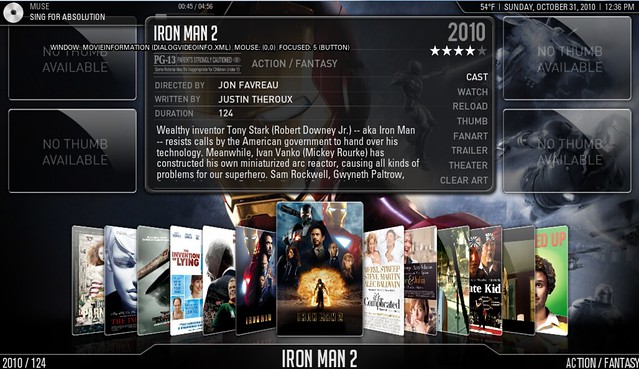

Ha thats funny just coded 90% of it back in you can toggle between classic and new video info screen will be in next update
- Hunter-Killer - 2011-03-07
ZombieRobot Wrote:Ha thats funny just coded 90% of it back in you can toggle between classic and new video info screen will be in next update
Hahaha, sorry dude!! I certainly wasn't nitpicking your masterpiece and I'm already looking forward to the next one, glad to see Showmix is once again alive and well, I'm going to have a mess around with it on my Revo soon to see what its like.
- dashyw0n - 2011-03-07
I'm not sure if I'm doing something wrong or if its a bug with the skin but when I use the skin you provided and I watch a movie for whatever reason everything is working good and when I try to stop the video the "stop symbol" disappears, therefore I cannot stop the video. In fact all the symbols for all the buttons disappear so I cant do anything with the video the only thing I can do is press the escape button to stop the video. When I uninstall the skin and use the default skin the player works fine. Any thoughts

- ZombieRobot - 2011-03-07
DazNoonan Wrote:Looks really good... Do you know how this performs on the ATV2?
i think this will cripple atv2 but i could take a look i have one i use for testing
- ZombieRobot - 2011-03-07
dashyw0n Wrote:I'm not sure if I'm doing something wrong or if its a bug with the skin but when I use the skin you provided and I watch a movie for whatever reason everything is working good and when I try to stop the video the "stop symbol" disappears, therefore I cannot stop the video. In fact all the symbols for all the buttons disappear so I cant do anything with the video the only thing I can do is press the escape button to stop the video. When I uninstall the skin and use the default skin the player works fine. Any thoughts
I'm guessing you are using a mouse to control? currently mouse is not fully supported i think it is on my to do list but not for some time.
i will add it to my list but first i need to squash out all other bugs i want showmix to be completely and utterly bug free
- DazNoonan - 2011-03-07
ZombieRobot Wrote:i think this will cripple atv2 but i could take a look i have one i use for testingIf you could that would be apprecited... It does look awesome!!
- Hunter-Killer - 2011-03-07
Just to follow up, it works very nicely on an Acer Revo!

- Simzer0 - 2011-03-07
OMG!!!!
I love you man

- AJ1000 - 2011-03-07
Seriously awesome, good work. I know how much effort it has taken you zombie. It is appreciated.
- dashyw0n - 2011-03-08
ZombieRobot Wrote:I'm guessing you are using a mouse to control? currently mouse is not fully supported i think it is on my to do list but not for some time.
i will add it to my list but first i need to squash out all other bugs i want showmix to be completely and utterly bug free
Sort of I'm using a Logitech diNovo mini so the mouse is a touch pad. So I'm guessing as of right now that is still not supported.
- iiixtream - 2011-03-09
love this skin all the views and options will keep me busy for awhile. Good work. I was wondering though if there was a way to change the images for the music genre.
- lazyman - 2011-03-09
HI zombie!
Nice, it's showmix time again. Won't have time to install and test until this weekend. Anyway, I'm really excited to test-drive the new showmix.
Just one short question before I start. Does it make sense to clean-up the now obsolete showmix evolution stuff from guisettings.xml? If not, is it safe to keep these and will this version utilize my settings made?
- MarcosQui - 2011-03-09
I want to congratulate the ZombieRobot by work.
Able to build the Aeon Lite and release a new version of ShowMix is really something extraordinaire.

Best regards.
- ZombieRobot - 2011-03-09
MarcosQui Wrote:I want to congratulate the ZombieRobot by work.
Able to build the Aeon Lite and release a new version of ShowMix is really something extraordinaire.
Best regards.
Thanks MarcosQui just thought i owe it to showmix fans to put out a new release of showmix Aeoun lite is still coming very soon but working on showmix has put back my release a little bit work on Aeon lite will continue after i squash some necessary bugs and have a bit of a cleanup of showmix
- kim1406 - 2011-03-09
Any one manage to have this works on ION based builds? I tried here but it was very slow/sluggish.
Edit:
I just tried it again and, it works perfectly ok. I'm not sure why it was not working first time. great skin.
thanks.