why hasn't anyone mentioned flirc?

  Thread Rating:
  • 1 Votes - 5 Average
  • 1
  • 2
  • 3
  • 4
  • 5
Post Reply
realityisterror Offline
Junior Member
Posts: 8
Joined: Jun 2010
Reputation: 0
Post: #1
I heard about flirc from the wiki, but I couldn't find any mention in the forums. The product has just started shipping very recently, and I had a little trouble verifying exactly what it does from the website. After emailing back and forth with the developer (and getting super quick and helpful replies) I went ahead and ordered it.

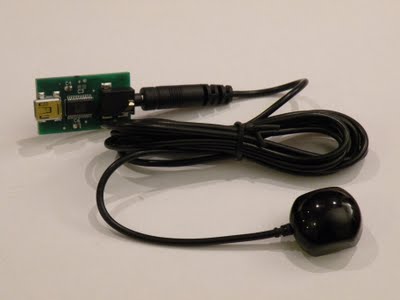
First of all, it works exactly like you would expect. You get a little USB flash drive style dongle rather than a big receiver like the MCE remotes. For my HTPC this was a huge advantage; I just plugged in to the mobo USB header and leave it inside of my polycarbonate case. The developer has software out for OS X, Windows, and Ubuntu. There are GUIs for each, but also a command line configuration utility in Ubuntu.

So essentially you can use whatever remote you want and seamlessly integrate with the rest of your home theater setup. I've been using the universal remote from my satellite provider under one of the AV settings. If you're using the CLI it's as simple as running flirc record left and then pressing the button you want to tie to left. Flirc then sends key presses to XBMC (or whatever else you want to run) so you can use the same keymap that you use with a keyboard.

At practically the same price as most MCE remotes I feel like this is a no brainer and more people need to hear about it. Infinitely configurable and it should work with close to any IR remote. I love being able to use one remote for everything.

edit: I just saw that the developer has updated the site with a lot more information on how it works. flirc.tv
find quote
jasonkotzin Offline
Member
Posts: 54
Joined: Jun 2011
Reputation: 0
Post: #2
realityisterror Wrote:I heard about flirc from the wiki, but I couldn't find any mention in the forums. The product has just started shipping very recently, and I had a little trouble verifying exactly what it does from the website. After emailing back and forth with the developer (and getting super quick and helpful replies) I went ahead and ordered it.

First of all, it works exactly like you would expect. You get a little USB flash drive style dongle rather than a big receiver like the MCE remotes. For my HTPC this was a huge advantage; I just plugged in to the mobo USB header and leave it inside of my polycarbonate case. The developer has software out for OS X, Windows, and Ubuntu. There are GUIs for each, but also a command line configuration utility in Ubuntu.

So essentially you can use whatever remote you want and seamlessly integrate with the rest of your home theater setup. I've been using the universal remote from my satellite provider under one of the AV settings. If you're using the CLI it's as simple as running flirc record left and then pressing the button you want to tie to left. Flirc then sends key presses to XBMC (or whatever else you want to run) so you can use the same keymap that you use with a keyboard.

At practically the same price as most MCE remotes I feel like this is a no brainer and more people need to hear about it. Infinitely configurable and it should work with close to any IR remote. I love being able to use one remote for everything.

edit: I just saw that the developer has updated the site with a lot more information on how it works. flirc.tv

Thanks so much for starting the thread.
find quote
eskro Offline
Posting Freak
Posts: 8,333
Joined: Nov 2010
Reputation: 162
Post: #3
not bad but, doesnt seem to let you map alot of buttons :/

oops, looks like i've read too fast..

i guess it can map any keyboard keys after all and for ~$30 CAD...
(This post was last modified: 2011-06-13 07:34 by eskro.)
find quote
darkscout Offline
Posting Freak
Posts: 2,146
Joined: Jul 2008
Reputation: 12
Post: #4
I wish that he'd offer the option of pulling the IR receivers and replacing them with a 1/8" headphone jack and then a 1', 6', 10' cord so your HTPC can be about anywhere and just run the cord out. Only option I see now is running a USB cable out.

[Image: aeKO.jpeg]
Code:
GRANT ALL PRIVILEGES ON `xbmc_%`.* TO 'xbmc'@'%';
IF you have a mysql problem, find one of the 4 dozen threads already open.
find quote
Inglorious Offline
Junior Member
Posts: 5
Joined: Jan 2010
Reputation: 0
Post: #5
Nice! I've been looking for this kind of product for a while now. I'll definitely be ordering one!

I'm currently using a Universal Remote (One For All) with the HP receiver but I never liked it. For some reason, I would rather use the remote that came with my cable box (Scientific Atlanta 8300HD PVR) as it feels more comfortable.

I'll be using a short USB extension though, I hope that won't cause an issue.
find quote
eskro Offline
Posting Freak
Posts: 8,333
Joined: Nov 2010
Reputation: 162
Post: #6
Scientific Atlanta 8300HD PVR, whats you cable company? videotron?
find quote
Inglorious Offline
Junior Member
Posts: 5
Joined: Jan 2010
Reputation: 0
Post: #7
eskro Wrote:Scientific Atlanta 8300HD PVR, whats you cable company? videotron?

Yes. Always liked their remote control, but was bummed out by the fact it couldn't be used to control my HTPC (Revo 3610). Looks like this will solve the issue Smile
find quote
jasonkotzin Offline
Member
Posts: 54
Joined: Jun 2011
Reputation: 0
Post: #8
Just wanted to again thank you for starting the thread.

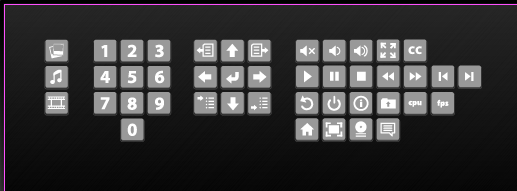
Also, I've been trying to incorporate as much feedback as I can. Something not shown on the video located on the homepage is the keyboard controller view. You can link any buttons on the keyboard with remote keys.

A lot of people have been saying it has been a bit painful to lookup XBMC keys, Boxee Keys, and WMCE keys. So something we're trying to push in the next week or two is more controllers. There will be a XBMC, Boxee, and WMCE controller view with all the shortcuts.

For example, no need to look up which keyboard keys do a 'toggle closed captions' for either of the three media center apps.

[Image: Screen_shot_2011-06-13_at_12.04.29_PM.png]

We will break up the icons and put them in separate controller windows, as those are the total combined for the three apps.

We'll update the video to demonstrate this as well. Thanks again.
find quote
eskro Offline
Posting Freak
Posts: 8,333
Joined: Nov 2010
Reputation: 162
Post: #9
Inglorious, where your from, i have videotron too Tongue

jasonkotzin, your the flirc author?
find quote
burritoboy9984 Offline
Senior Member
Posts: 209
Joined: Apr 2009
Reputation: 0
Post: #10
Looks awesome, wish I would have seen this before buying the mce remotes for my htpc's...

-Erik

Don't be scared to ask questions. Odds are someone else is wondering the same thing.
Closet - Norco 4020 - Supermicro X8SAX - Intel i7-920 - Corsair HX1000 - Corsair XMS3 12GB - 10x1.5tb Raid 5 - 10x2tb Raid 5 - Openfiler VM inside Workstation Win7 x64
Living room - Silverstone ML02B-MXR - Gigabyte GA-E7AUM-DS2H - E8400 - OCZ Platinum Edition 4GB - Denon 3310CI
Bedroom - Antec Mini Skeleton - Zotac IONITX-B-E @ 1.92ghz - AVS Gear HA-IR01SV - A-DATA G series 4GB - Denon 2808CI
find quote
Post Reply