
2011-06-27, 16:14
Hi guys,
i would like to introduce you my homeserver/htpc system.
All i did was buying the imho extremly nice HP Microserver N36L which came with 1GB ECC RAM and 1x250GB HDD. So i added 1x4GB ECC RAM, a Club 3D Radeon HD6450 passive graphicscard, 2x2TB HDDs, a bluray burner and an Antec Veris Multimediastation EZ IrDa Receiver.
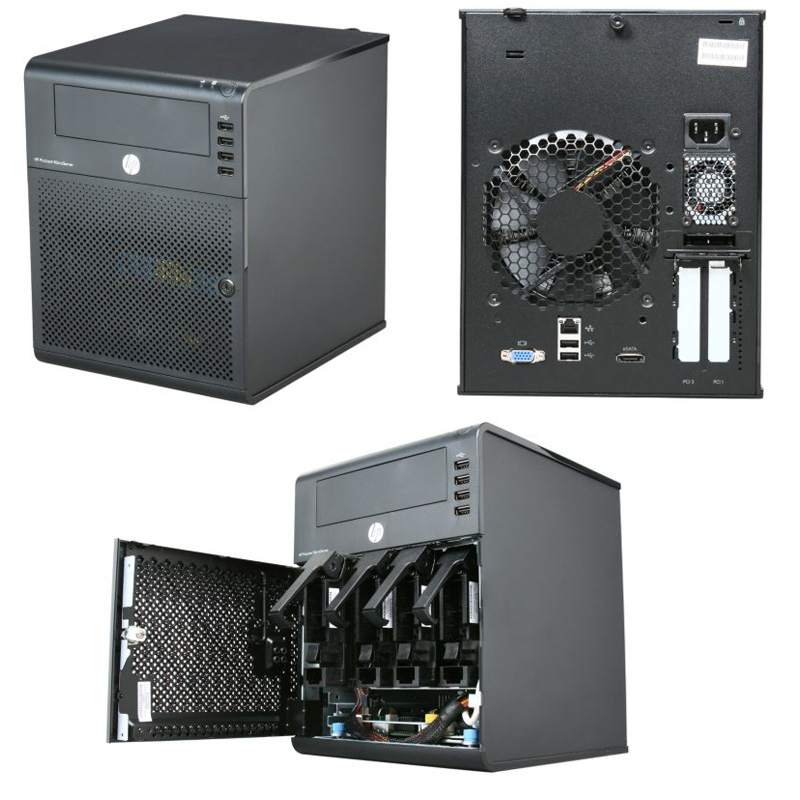
Overview:
OS: WindowsHomeServer 2011
RAM: 5GB ECC
HDD: 2x2TB WD RE4-GP
Grafik&Sound: Club3D Radeon HD6450 1GB DDR3 Noisless Edition low profile [maximum powerconsumption: 18W (load), 7.5W (idle)]
Bluray burner: LG Electronics BH10LS30
IrDa receiver: Antec Veris Multimediastation EZ
HTPC software: Xbmc Dharma 10.1
Usage: file/backupserver + HTPC
The file/backupserver part is totally easy und comfortable realized with WHS2011. I can totally recommend this os to anyone, who wants to have an easy to manage homeserver.
In mid of july there should also be coming the final version of the WHS2011 AddIn "DriveBender", which brings the well known and beloved driveextender technology back to WHS2011.
The HTPC part is where xbmc turns in. Altough the AMD Athlon II Neo N36L 2x 1.30GHz cpu is much faster than intels Atom cpus, its power is enough for smooth 1080p full hd/bluray playback. Next thing is that the HP N36L is designed for server usage only so it is "just" equipped with a poor onboard graphicscard with vga port and doesn't have a soundcard at all. To get rid of these problems i inserted the ATI HD6450 low profile graphicscard with built in 7.1 HD soundcard.
WHS2011 is based on windows server 2008, so dxva respectively dxva2 is working perfect under xbmc.
Even the 1080p samsung demo "Oceanic Life" which reaches up to 44MBit/s bitrate is running totally smooth @20-22% cpu utilization.
I'm also using powerdvd 11+reclock+displaychanger as an external player for bluray playback using this guide and it's also running perfectly smooth after solving some driver issues.
My IrDa receiver is the so called Antec Veris Multimediastaion EZ.
It fits perfectly into the lowest front usb port of the N36L. I'm still able to open the bluray drive without any problems.
It also works 100% fine with my logitech harmony one configured as a mce remote keyboard(using this german guide)
power consumption:
under idle my N36L with above mentioned config is using ~36W and under heavy load a maximum of 45-50W.
idle results should als lower down with the whs2011 AddIn "Lights Out" but i haven't measured this yet.
update: idle with spun down drives: 24,3W
temperatures:
environment: 25-26°C
cpu: idle 35°C/ max load 47°C
ram: idle 31°C/ max load 36°C
hdd: idle 32°C/ max load 36°C
graphic: idle 48°C/ max load 69°C
(max load = values after 1h fullHD playback (samsung oceanic life demo))
noise:
according to HPs N36L Datasheet: 21dBa
personally i would say it is quiet, but not silent.
i've also found a nice review of the N36L @silentpcreview.com
there it's described how you can swap the 120mm fan with an even quieter scythe fan. (last page of review after conclusion)
they achieved 17dBa with the mod.
imho it's not necessary to mod the fan, cause it is quiet enough for me... maybe i'll try it just for fun, if i should start getting bored
costs:
HP N36L: 200€
4GB ECC RAM: 45€
HD6450 1GB DDR3: 40€
Antec Veris Elite: 12€
2x2TB WD RE4-GP: 290€ (24/7 server HDDs with 5y warranty)
LG BH10LS30: 70€
Windows Home Server 2011: 40€
total: 697€ (~1000$) (using normal HDDs will reduce the costs extremly)
i'm totally happy with it and can recommend this setup to everyone
if you are planning to use the system at its minimum configuration, just to use xbmc(linux) you only need to buy following things:
HP N36L: 200€
HD6450 1GB DDR3: 40€
Antec Veris Elite: 12€
(notice i haven't tested the above mentioned minimal setup)
total: 252€ (but i have read linux+ati is not recommendable cause their might happen stuttering playback...problem there is no nvidia card below 25W which is able to handle hd audio)
picture of my system:

P.S. it should also be able to play 3D blurays ... will try this in the next few weeks, if i really can get this working
edit: WHS2011 now only costs 40€ due to a massive price drop. updated price list...
edit2: g725s pmed me a link from tekforums.net where the user "Leon" has written a nice heavily pictured guide about his microserver+Zotec 512MB nVidia 210 GFX card setting up XBMC - 10.1 & Aeon MQ2, SABnzbd+, Sick Beard and Couch Potato on Win7SP1
(Automated Media Server & XBMC Setup (Long & Image Heavy))
edit3: here are some driver links for the N36L (thx Digital Vortex)
AMD chipset driver
Gigabit NIC
edit4: always newest modified bios version for full ahci support on the 5th sata port and more features
modified bios from "The Bay"
edit5: 18TB microserver edition
i would like to introduce you my homeserver/htpc system.
All i did was buying the imho extremly nice HP Microserver N36L which came with 1GB ECC RAM and 1x250GB HDD. So i added 1x4GB ECC RAM, a Club 3D Radeon HD6450 passive graphicscard, 2x2TB HDDs, a bluray burner and an Antec Veris Multimediastation EZ IrDa Receiver.
Overview:
OS: WindowsHomeServer 2011
RAM: 5GB ECC
HDD: 2x2TB WD RE4-GP
Grafik&Sound: Club3D Radeon HD6450 1GB DDR3 Noisless Edition low profile [maximum powerconsumption: 18W (load), 7.5W (idle)]
Bluray burner: LG Electronics BH10LS30
IrDa receiver: Antec Veris Multimediastation EZ
HTPC software: Xbmc Dharma 10.1
Usage: file/backupserver + HTPC
The file/backupserver part is totally easy und comfortable realized with WHS2011. I can totally recommend this os to anyone, who wants to have an easy to manage homeserver.
In mid of july there should also be coming the final version of the WHS2011 AddIn "DriveBender", which brings the well known and beloved driveextender technology back to WHS2011.
The HTPC part is where xbmc turns in. Altough the AMD Athlon II Neo N36L 2x 1.30GHz cpu is much faster than intels Atom cpus, its power is enough for smooth 1080p full hd/bluray playback. Next thing is that the HP N36L is designed for server usage only so it is "just" equipped with a poor onboard graphicscard with vga port and doesn't have a soundcard at all. To get rid of these problems i inserted the ATI HD6450 low profile graphicscard with built in 7.1 HD soundcard.
WHS2011 is based on windows server 2008, so dxva respectively dxva2 is working perfect under xbmc.
Even the 1080p samsung demo "Oceanic Life" which reaches up to 44MBit/s bitrate is running totally smooth @20-22% cpu utilization.
I'm also using powerdvd 11+reclock+displaychanger as an external player for bluray playback using this guide and it's also running perfectly smooth after solving some driver issues.
My IrDa receiver is the so called Antec Veris Multimediastaion EZ.
It fits perfectly into the lowest front usb port of the N36L. I'm still able to open the bluray drive without any problems.
It also works 100% fine with my logitech harmony one configured as a mce remote keyboard(using this german guide)
power consumption:
under idle my N36L with above mentioned config is using ~36W and under heavy load a maximum of 45-50W.
idle results should als lower down with the whs2011 AddIn "Lights Out" but i haven't measured this yet.
update: idle with spun down drives: 24,3W
temperatures:
environment: 25-26°C
cpu: idle 35°C/ max load 47°C
ram: idle 31°C/ max load 36°C
hdd: idle 32°C/ max load 36°C
graphic: idle 48°C/ max load 69°C
(max load = values after 1h fullHD playback (samsung oceanic life demo))
noise:
according to HPs N36L Datasheet: 21dBa
personally i would say it is quiet, but not silent.
i've also found a nice review of the N36L @silentpcreview.com
there it's described how you can swap the 120mm fan with an even quieter scythe fan. (last page of review after conclusion)
they achieved 17dBa with the mod.
imho it's not necessary to mod the fan, cause it is quiet enough for me... maybe i'll try it just for fun, if i should start getting bored
costs:
HP N36L: 200€
4GB ECC RAM: 45€
HD6450 1GB DDR3: 40€
Antec Veris Elite: 12€
2x2TB WD RE4-GP: 290€ (24/7 server HDDs with 5y warranty)
LG BH10LS30: 70€
Windows Home Server 2011: 40€
total: 697€ (~1000$) (using normal HDDs will reduce the costs extremly)
i'm totally happy with it and can recommend this setup to everyone
if you are planning to use the system at its minimum configuration, just to use xbmc(linux) you only need to buy following things:
HP N36L: 200€
HD6450 1GB DDR3: 40€
Antec Veris Elite: 12€
(notice i haven't tested the above mentioned minimal setup)
total: 252€ (but i have read linux+ati is not recommendable cause their might happen stuttering playback...problem there is no nvidia card below 25W which is able to handle hd audio)
picture of my system:
P.S. it should also be able to play 3D blurays ... will try this in the next few weeks, if i really can get this working
edit: WHS2011 now only costs 40€ due to a massive price drop. updated price list...
edit2: g725s pmed me a link from tekforums.net where the user "Leon" has written a nice heavily pictured guide about his microserver+Zotec 512MB nVidia 210 GFX card setting up XBMC - 10.1 & Aeon MQ2, SABnzbd+, Sick Beard and Couch Potato on Win7SP1
(Automated Media Server & XBMC Setup (Long & Image Heavy))
edit3: here are some driver links for the N36L (thx Digital Vortex)
AMD chipset driver
Gigabit NIC
edit4: always newest modified bios version for full ahci support on the 5th sata port and more features
modified bios from "The Bay"
edit5: 18TB microserver edition


