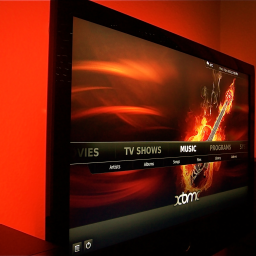
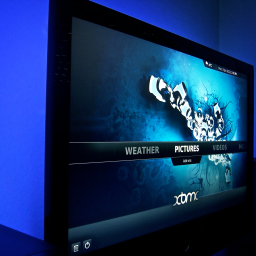
2011-12-06, 23:11
XBMC boblight Addon pre-Eden/Eden:
This is the official XBMC boblight addon for using the open source ambilight clone ( http://code.google.com/p/boblight/ ) from within XBMC.
(It does NOT work with the old boblight from http://blogger.xs4all.nl/loosen)
Its available in the official XBMC Repo (services). Development can be followed here GitHub
Supported plattforms
For now the XBMC boblight addon supports the following plattforms:
Windows, Linux and OSX. Since June 2nd 2012 its also available on iOS (thx to davilla for fixing the ctypes module). Since 2.0.11 it works on android (arm only for now).
Though the required boblightd daemon (the server part of boblight) is only available on linux at the moment. It is not needed to run the server on the same mashine as the client (XBMC with addon in that case). I for example have the server running on my openwrt router and connect to the daemon via lan (boblight is connected to it via usb2rs232 adapter). So i can use boblight from within linux,osx and windows on my HTPC (for deving purposes mostly
 ).
).Accessing settings
You can access the addons settings as usual like with any other addon aswell. It is located in the services subcategory.
Beside that you can access the settings during video playback. For this just put the file script.xbmc.boblight.keymap.xml found HERE into your "userdata/keymaps" folder.
You can access the settings during playback by hitting the key "b" or "B". (Note: a former keymapping to that key will be overwritten by this keymap file. If there is a
conflict you just can change the mapped key to something else).
Meaning of the settings
* Saturation and value are multipliers for HSV color space: http://en.wikipedia.org/wiki/HSL_and_HSV
* Speed is a factor for a first order lowpass filter, it goes from 0 to 100, the higher you set it the faster the lights react.
Autospeed adjusts the speed on top of that based on how fast the colors are changing, it kind of sucks to be honest.
* Interpolation is a setting for a boblightd output device, when it's on it will interpolate between the last two writes of a client, I suggest turning it off in the xbmc addon.
* Pixels below the threshold value will be considered as black pixels, it goes from 0 to 255, I suggest setting it to something like 10.
Dependencies
First of all the following clarification: This addon only provides the client. You still need to run the boblightd - daemon somewhere in your network (either on the same mashine as XBMC or on any other mashine in your network, where your boblight hardware is connected to).
For this addon to be working you need a library for communicating with the boblightd - daemon. It should get automagically downloaded for you on the first run of the addon for Windows and OSX. If it doesn't ask you for the automatic download - disable and reenable the addon - this should get you going. Linux users should have installed the library libboblight.so.
Linux:
goto the projects site http://code.google.com/p/boblight/ and download the source code. Then compile and install the library by issueing the following commands (without the $'s):
Code:
$ cd <source of boblight>

$ ./configure --without-portaudio --without-opengl --without-x11 --prefix=/usr

$ make && sudo make install
This will install the libboblight.so library into /usr/lib - where the boblight addon will find it.
Features
1. Currently boblight is only driven when the videoplayer is running. We hope to be able to extend it to the menu and even music playback in the future- though this will need major changes in the XBMC core so it wouldn't be the near future
.2. You can define a static light which is used whenever the videoplayer is not running.
3. You can choose between 2 presets (fast and slow) which only differ in the reaction speed and smoothness of the light changes. Maybe in the future there will be some more presets - according to the feedback users.
4. You can use custom defined boblight settings (saturation, value, speed, interpolation, threshold, autospeed).
5. It has 2 seperated sets of settings. Movie and MusicVideo. It is able to use the appropriate setting when it detects a Movie or a MusicVideo. The detection is based on the video library (content option).
6. Both sets can be used to switch between 2 different settings by using the "Override used category" feature. This allows for switching between these settings when no library is used or Movie and MusicVideo aren't the wanted decision rules.
Possible hardware solutions
1. Using an arduino and a TLC5940 pwm controller - http://code.google.com/p/tlc5940arduino/
2. Use my custom hardware which is based on the first one without arduino. It needs slightly adapted arduino firmware. Find everything here: Custom Boblight - The Memphiz Way. For powering the Atmel (not the lights - only the board logic) i use this usb2TTL5V converter Lipoly (any other TTL converter will work as long as it has a 5V levels including 5V VCC output).
3. Use an amblone hardware like described here
4. HowTo build multichannel adalight here
5. There are many more possibilitys - use google...
Calculator for boblight.conf and others
With this tool you are able to generate boblight and adalight (and maybe others) config files based on your led setup. Thx to Hansaplast.
Boblight Config Maker
Changelog
2.0.11- [feature] - enable android support
2.0.10
- [feature] - add setting for disableing boblight for 3d content
2.0.9
- [fix] custom category detection
- [fix] custom category settings
2.0.8
- [fix] work around UTF8 encoding problems for dialogs
2.0.7
- [updated] language files from Transifex
- [fix] for the newly added categories livetv, tvshow and files the category override didn't work
- [fix] xbmc always returns the video player content "files" even if no video is playing - workaround
this and fix static boblight during audio playback that way
2.0.6
- [changed] use correct string ID range
- [language] added dutch translations - thx to georgehenze
- [feature] added a new preset categories used for tvshows, livetv and files (everything outside of the movie database)
- [feature] for all categories there is a new preset "disabled" which basically disables boblight. This allows to
watch live-tv without boblight and movies with - without needing to change the addon settings - thx to georgehenze for
those 2 features
2.0.5
- [fix] recover if boblightd is disconnected while movie is playing - by amet
2.0.4
- [fix] - race condition which could lead to boblight turn on after movie stop if static light is not enabled
2.0.3
- [add] - option for disabling/enabling the initial color blink
- [add] - option for disabling/enabling any user notifications (connection lost and so on)
2.0.2
- [fix] activate static light when playing audio
2.0.1
- [fix] close download dialog once we finished/failed
- [fix] - catch exceptions during libboblight download and add a toast for suggesting a check of the fs permissions
2.0.0
- compleate rewrite of the addon, it uses xbmc.Monitor class to monitor for changes in addon settings, player start/stop and others
1.0.3
- fixed the lib downloading code on win32
1.0.2
- changed icon to something we own the copyright for
1.0.1
- ping boblightd and reconnect if connection is lost
1.0.0
- initial version
Images