
Keyboard Shortcut Map (Image)

  Thread Rating:
  • 0 Votes - 0 Average
  • 1
  • 2
  • 3
  • 4
  • 5
Post Reply
sickpuppies Offline
Junior Member
Posts: 38
Joined: Oct 2011
Reputation: 0
Location: Sunshine Coast, Queensland, Australia
Post: #1
Hi guys,

I don't know if anyone has done this before, but I could not locate one on the forums, or in a google images search, but I find it handy. Might be more useful for n00bs, like me Rolleyes

Basically I took the keyboard shortcut keys that are listed in the wiki, brought the more pertinent ones to the fore (with "Play", "Stop", "Pause", "Rewind" and "Fast forward" icons) for ease of use.

I have it sitting as a background on my HTPC now, but will print one when I get some more ink.

Here is the one I use;
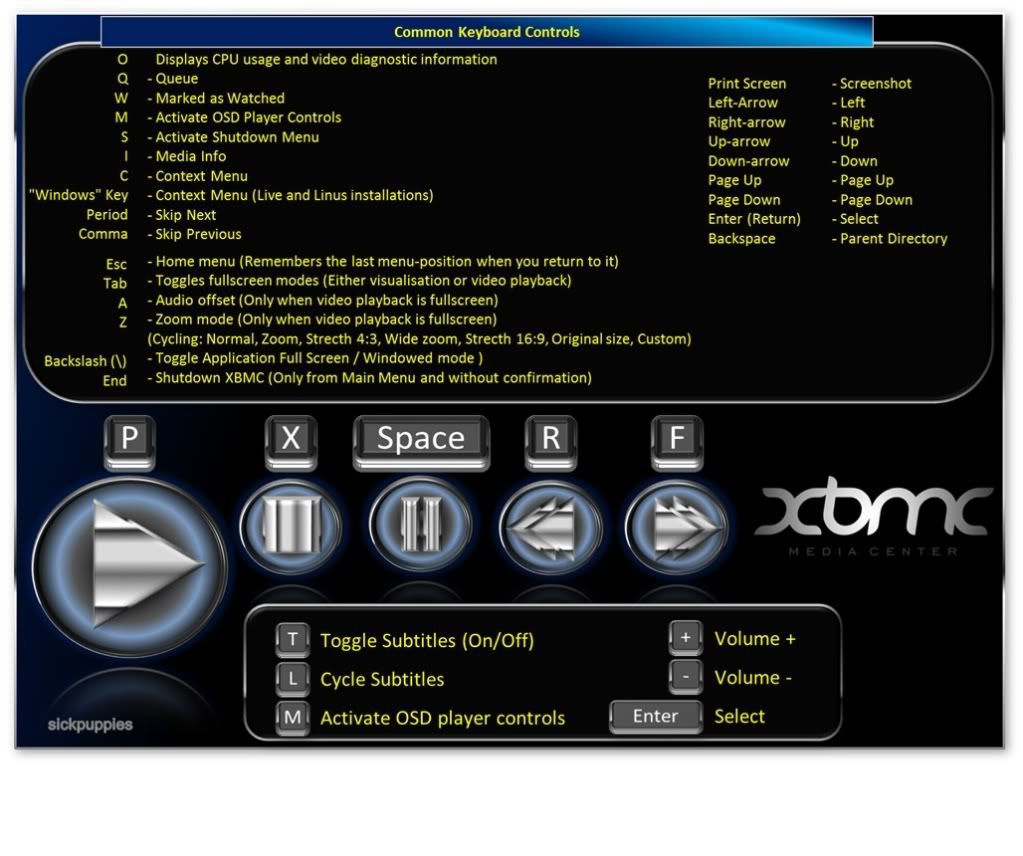
[Image: XBMCKeyboardGuide.jpg]
(227Kb)

Here is one that includes common Mac commands and mouse commands;
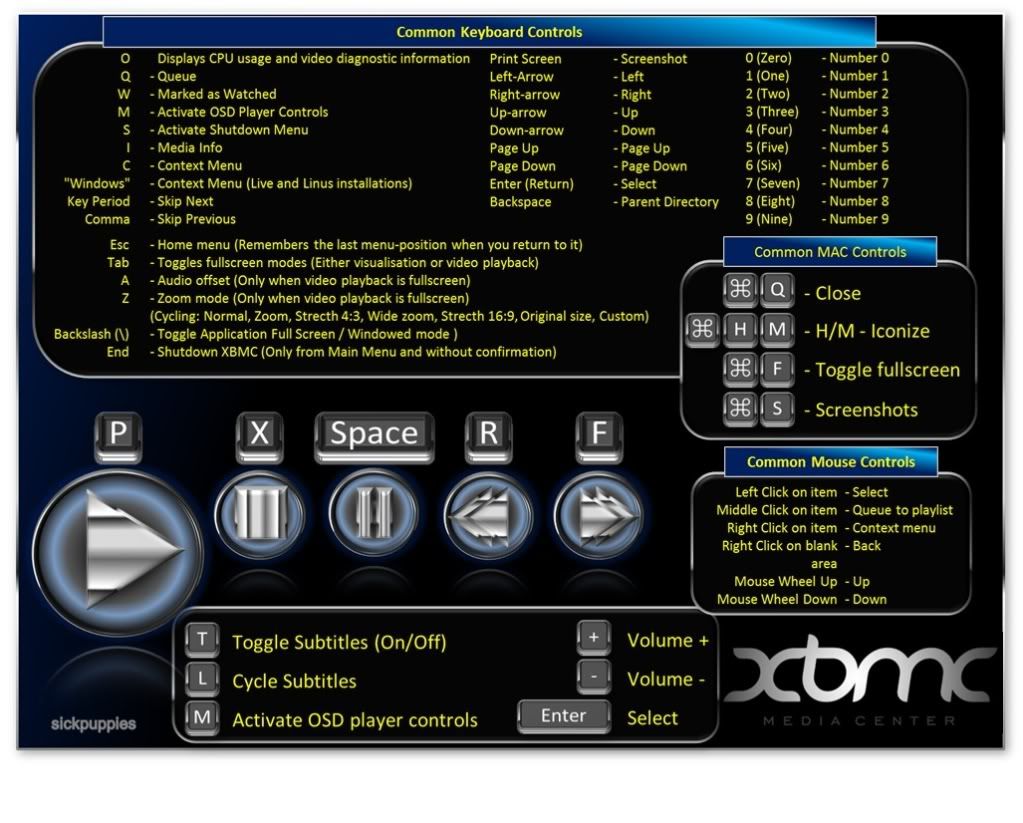
[Image: XBMCKeyboardGuide-1.jpg]
(276Kb)

Let me know if there are any suggestions/changes/additions, but I should say that I am not a designer by any means - I put these together in Excel..

Cheers,

francis
find quote
quark4 Offline
Junior Member
Posts: 2
Joined: May 2012
Reputation: 0
Post: #2
Thank you for this nicely laid-out image. I am a complete newbie, and a handy reference guide is exactly what I was looking for. You say you are not a designer, but I have my doubts about that statement Smile
find quote
Ned Scott Offline
Team-XBMC Wiki Guy
Posts: 11,984
Joined: Jan 2011
Reputation: 132
Location: Arizona, USA
Post: #3
We also have the somewhat-recently revised Keyboard controls page.

You can make easy links to the XBMC wiki using double brackets around words: [[debug log]] = debug log, [[Add-on:YouTube]] = Add-on:YouTube, [[Adding videos to the library]] = Adding videos to the library, [[userdata]] = userdata, etc
find quote
teaguecl Offline
Fan
Posts: 402
Joined: Apr 2010
Reputation: 22
Post: #4
(2012-05-09 18:34)Ned Scott Wrote:  We also have the somewhat-recently revised Keyboard controls page.

The new page looks great - but it's missing functionality from the old page. Specifically, it shows "Common keyboard controls" - but not all of them. Any chance of having another page that includes the complete list? Or at least a reference to /usr/share/xbmc/system/keymaps/keyboard.xml so that people know where to look for more advanced keyboard shortcuts?

Habey BIS-6561 silent fanless HTPC + 2GB DDR2 RAM + Intel X25-V 40GB SSD + XBMCbuntu Eden + Tivo Slide qwerty remote | My latest XBMC patch
(This post was last modified: 2012-05-22 22:11 by teaguecl.)
find quote
Ned Scott Offline
Team-XBMC Wiki Guy
Posts: 11,984
Joined: Jan 2011
Reputation: 132
Location: Arizona, USA
Post: #5
(2012-05-22 22:08)teaguecl Wrote:  The new page looks great - but it's missing functionality from the old page. Specifically, it shows "Common keyboard controls" - but not all of them. Any chance of having another page that includes the complete list? Or at least a reference to /usr/share/xbmc/system/keymaps/keyboard.xml so that people know where to look for more advanced keyboard shortcuts?

Aye, I plan to make a full extensive page with every possible option, as well as explaining the various other options of keyboard.xml files. I just gotta get the led out and have at it :)

You can make easy links to the XBMC wiki using double brackets around words: [[debug log]] = debug log, [[Add-on:YouTube]] = Add-on:YouTube, [[Adding videos to the library]] = Adding videos to the library, [[userdata]] = userdata, etc
find quote