2012-02-28, 14:23
I actually found that enabled AC3 and DTS on the audio screen AND THEN disabling them again worked for me.
HDMI sound thru my TV now working.
HDMI sound thru my TV now working.

 .
.
23:10:32 T:2766629696   ERROR: Initialize - failed to open custom device plug:'hdmi:0,3' (error:Device or resource busy), retry with default hdmi:0,3

23:10:32 T:2766629696   ERROR: Initialize - pcm_open_lconf, alsa error: -16 - Device or resource busy

23:10:32 T:2766629696   ERROR: Unable to open audio mixer
hdmi:CARD=NVidia,DEV=0

    HDA NVidia, HDMI 0

HDMI Audio Output**** List of PLAYBACK Hardware Devices ****
card 0: Intel [HDA Intel], device 0: ALC887 Analog [ALC887 Analog]
Subdevices: 1/1
Subdevice #0: subdevice #0
card 0: Intel [HDA Intel], device 1: ALC887 Digital [ALC887 Digital]
Subdevices: 1/1
Subdevice #0: subdevice #0
card 1: NVidia [HDA NVidia], device 3: HDMI 0 [HDMI 0]
Subdevices: 0/1
Subdevice #0: subdevice #0
Quote:So it looks like, in 295.20 sound device is not freed while switching from menus to video player
FernetMenta Wrote:That's actually a problem of XBMC. It does not disable menu sound in time. Until this is fixed you can disable navigation sounds.Thanks, that fixed my no sound issue while playing movies in Eden RC2.
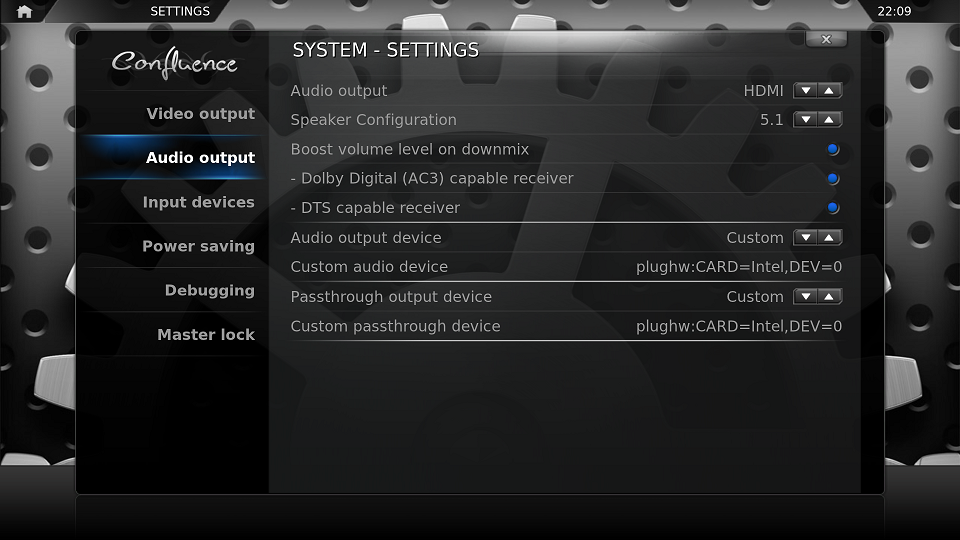
Knabbel Wrote:Just solved my audio problems with my Zotac ID41
I'm running xbmcbuntu Eden beta3 and have a HT receiver connected via the optical output.
This did the trick for me:
FernetMenta Wrote:The setting for passthrough is wrong. plughw is not an iec device and won't accept AES parameters. Try hdmi:Intel
21:35:11 T:2829056880  NOTICE: Creating audio device with codec id: 86019, channels: 2, sample rate: 48000, pass-through

21:35:11 T:2829056880   ERROR: Initialize - failed to open custom device iec958:CARD=PCH,DEV=0,AES0=0x6,AES1=0x82,AES2=0x0,AES3=0x2 (error:No such file or directory), retry with default iec958:CARD=PCH,DEV=0

21:35:11 T:2829056880 ERROR: Initialize - pcm_open_lconf, alsa error: -2 - No such file or directory[SeatDefaults]
autologin-user=xbmc
autologin-user-timeout=0
user-session=XBMC
greeter-session=lightdm-gtk-greeter
Quote:**** List of PLAYBACK Hardware Devices ****
card 0: Intel [HDA Intel], device 0: ALC892 Analog [ALC892 Analog]
Subdevices: 1/1
Subdevice #0: subdevice #0
card 0: Intel [HDA Intel], device 1: ALC892 Digital [ALC892 Digital]
Subdevices: 1/1
Subdevice #0: subdevice #0
card 1: NVidia [HDA NVidia], device 3: HDMI 0 [HDMI 0]
Subdevices: 1/1
Subdevice #0: subdevice #0
Quote:xbmc@xbmc-living:~$ aplay -L
null
Discard all samples (playback) or generate zero samples (capture)
default
both
multi
hdmi_formatted
hdmi_complete
front:CARD=Intel,DEV=0
HDA Intel, ALC892 Analog
Front speakers
surround40:CARD=Intel,DEV=0
HDA Intel, ALC892 Analog
4.0 Surround output to Front and Rear speakers
surround41:CARD=Intel,DEV=0
HDA Intel, ALC892 Analog
4.1 Surround output to Front, Rear and Subwoofer speakers
surround50:CARD=Intel,DEV=0
HDA Intel, ALC892 Analog
5.0 Surround output to Front, Center and Rear speakers
surround51:CARD=Intel,DEV=0
HDA Intel, ALC892 Analog
5.1 Surround output to Front, Center, Rear and Subwoofer speakers
surround71:CARD=Intel,DEV=0
HDA Intel, ALC892 Analog
7.1 Surround output to Front, Center, Side, Rear and Woofer speakers
iec958:CARD=Intel,DEV=0
HDA Intel, ALC892 Digital
IEC958 (S/PDIF) Digital Audio Output
dmix:CARD=Intel,DEV=0
HDA Intel, ALC892 Analog
Direct sample mixing device
dmix:CARD=Intel,DEV=1
HDA Intel, ALC892 Digital
Direct sample mixing device
dsnoop:CARD=Intel,DEV=0
HDA Intel, ALC892 Analog
Direct sample snooping device
dsnoop:CARD=Intel,DEV=1
HDA Intel, ALC892 Digital
Direct sample snooping device
hw:CARD=Intel,DEV=0
HDA Intel, ALC892 Analog
Direct hardware device without any conversions
hw:CARD=Intel,DEV=1
HDA Intel, ALC892 Digital
Direct hardware device without any conversions
plughw:CARD=Intel,DEV=0
HDA Intel, ALC892 Analog
Hardware device with all software conversions
plughw:CARD=Intel,DEV=1
HDA Intel, ALC892 Digital
Hardware device with all software conversions
hdmi:CARD=NVidia,DEV=0
HDA NVidia, HDMI 0
HDMI Audio Output
dmix:CARD=NVidia,DEV=3
HDA NVidia, HDMI 0
Direct sample mixing device
dsnoop:CARD=NVidia,DEV=3
HDA NVidia, HDMI 0
Direct sample snooping device
hw:CARD=NVidia,DEV=3
HDA NVidia, HDMI 0
Direct hardware device without any conversions
plughw:CARD=NVidia,DEV=3
HDA NVidia, HDMI 0
Hardware device with all software conversions
**** List of PLAYBACK Hardware Devices ****

card 0: NVidia [HDA NVidia], device 0: ALC662 rev1 Analog [ALC662 rev1 Analog]

  Subdevices: 0/1

  Subdevice #0: subdevice #0

card 0: NVidia [HDA NVidia], device 1: ALC662 rev1 Digital [ALC662 rev1 Digital]

  Subdevices: 0/1

  Subdevice #0: subdevice #0

card 0: NVidia [HDA NVidia], device 3: HDMI 0 [HDMI 0]

  Subdevices: 0/1

  Subdevice #0: subdevice #0