Posts: 464
Joined: Dec 2011
Reputation:
0
Hi,
I installed Rapier from XBMC repository yesterday .. congrats, your PVR support is very good, especially I like the OSD with detailed program information !
It would be nice, if the OSD information about what's running now and coming next could be a little more in contrast to the rest (bigger font, other color or something like that) ..
Greetz
LastCoder
Posts: 464
Joined: Dec 2011
Reputation:
0
Hi,
I'm using Rapier now for a while and discovered, that something goes wrong with EPG timeline and OSD information about starting and ending times and the right information about the actual played program.
[BUG]
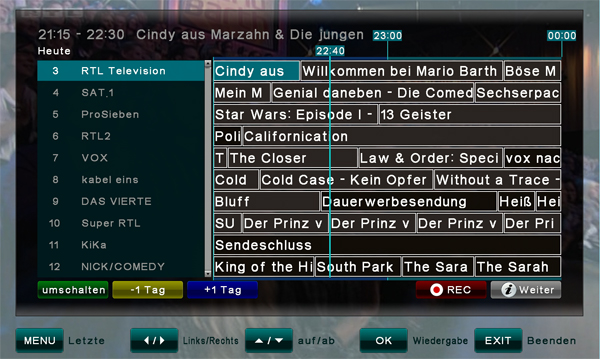
- Timeline bars are longer or shorter than the running time of the program even if the information itself about start and ending time - for example when setting a timer - is correct (so for example starting time is 20:15 and ending time is 21:15 the bar shows an ending time between 21:00 and 22:30) ..
- When switching through the EPG timeline I sometimes don't get an information overview about the choosen program but for the upcoming program
[REQUEST]
It would be nice to have a scrollbar for the OSD-channel-switching dialog ..
(Picture)Preview for recorded programs
Greetz
LastCoder
Posts: 464
Joined: Dec 2011
Reputation:
0
[BUG]
'since confluence shows the same behaviour this might be a generic pvr error, but after stoping a recording the home screen still shows the stopped recording task as running
[REQUEST]
there is no information in the liveTV section about running recordings. For example Confluence theme shows a red circle next to the channel that is recorded.
Posts: 413
Joined: Jul 2008
Reputation:
25
scarfa
Skilled Skinner
Posts: 413
You can thank Lambda who maintains the pvr code. He will look into this.
Posts: 49
Joined: Sep 2011
(2012-03-13, 11:59)LastCoder Wrote: It would be nice, if the OSD information about what's running now and coming next could be a little more in contrast to the rest (bigger font, other color or something like that) ..
I've changed the location of it in osd.
(2012-03-15, 13:13)LastCoder Wrote: It would be nice to have a scrollbar for the OSD-channel-switching dialog ..
I added this.
(2012-03-15, 20:38)LastCoder Wrote: there is no information in the liveTV section about running recordings. For example Confluence theme shows a red circle next to the channel that is recorded.
I've made progress icon to turn blue if channel is recording.
(2012-03-15, 13:13)LastCoder Wrote: (Picture)Preview for recorded programs
This is not available in pvr builds yet,
I will add this when it becomes available for sure.
(2012-03-15, 13:13)LastCoder Wrote: I'm using Rapier now for a while and discovered, that something goes wrong with EPG timeline and OSD information about starting and ending times and the right information about the actual played program.
- Timeline bars are longer or shorter than the running time of the program even if the information itself about start and ending time - for example when setting a timer - is correct (so for example starting time is 20:15 and ending time is 21:15 the bar shows an ending time between 21:00 and 22:30) ..
- When switching through the EPG timeline I sometimes don't get an information overview about the choosen program but for the upcoming program
All these are controlled by pvr builds, I have no power on them

Posts: 49
Joined: Sep 2011
(2012-04-10, 11:35)LastCoder Wrote: Hi Lambda,
thx .. will test it soon. Your work offers atm the best PVR experience !
Btw. is it possible to add a  .. don't know how to describe .. that "green line" that shows the progress
  ?
?
Greetz
LastCoder
it is called TimeBar
I haven't added this because it is not supported by pvr builds yet.
If you look Rapier's pseudotv timeline view which uses an identical layout with pvr timeline view,
you will see that I have added it there and you will also see how it will look when it is supported by pvr builds.
(2012-04-04, 03:24)lambda Wrote: (2012-03-15, 13:13)LastCoder Wrote: (Picture)Preview for recorded programs
This is not available in pvr builds yet,
I will add this when it becomes available for sure.
This is now supported in latest pvr builds and it has been added in Rapier.