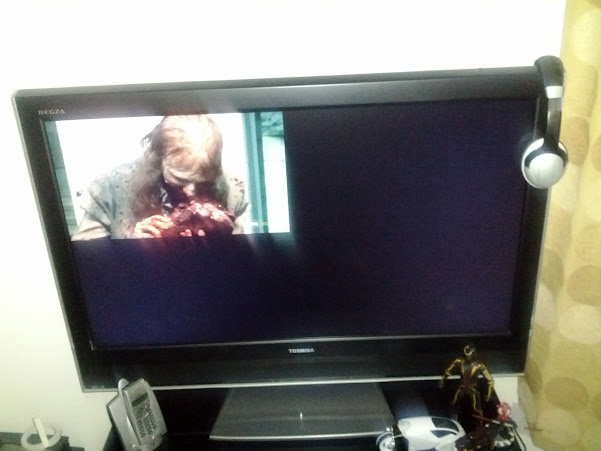
@bluray - that's what he said caused the problem...
@gui - not sure why you'd want windowed fullscreen? true fullscreen is preferred for performance
System: XBMC HTPC with HDMI WASAPI & AudioEngine - Denon AVR-3808CI - Denon DVD-5900 Universal Player - Denon DCM-27 CD-Changer
- Sony BDP-S580 Blu-Ray - X-Box 360 - Android tablet wireless remote - 7.1 Streem/Axiom/Velodyne Surround System If I have been able to help feel free to add to my reputation +/- below - thanks!
@DDDamian i know the true fullscreen is preferred .
the problem is only with HD video files,and the only way to play them in full screen is having to select the "use a fullscreen window" option.
@bluray ,windows is using the preferred resolution and problem still there.
"Problems with ghosting or videos which are only played back in the left upper quarter? The following ATI hack may solve it."
<glrectanglehack>yes</glrectanglehack>
how this line should be written in the advancedsettings.xml
(2012-05-09, 04:32)gui Wrote: can anyone help with this problem ?
thanx
Have you tried this:
Video plays in half/a quarter of the screen:
This happens for certain settings with nVidia graphics cards/integrated chipsets and hardware decoding. To fix this, go in the 3D settings of the nVidia Control panel and stop forcing antialiasing to be used (set "Antialiasing - Mode" to Application-controlled or Off). To avoid changing the setting globally and to preserve it for other applications, you can alternatively create a program profile for XBMC and only disable antialiasing in that profile.