Change dark background on Music Media Info view

  Thread Rating:
  • 1 Votes - 2 Average
  • 1
  • 2
  • 3
  • 4
  • 5
Post Reply
MediaPlayerFan Offline
Junior Member
Posts: 14
Joined: Mar 2012
Reputation: 0
Post: #11
<visible>Container.Content(seasons)</visible> and
<visible>!Container.Content(seasons)</visible>
did the trick. Now TV Seasons and TV Episodes can be changed independently. Thank you very much. That concludes Q1 and Q2.

This is pretty nit-picky and probably not worth your time, but... The "go up one level" (..) at the top of each list (seasons and episodes) uses the default background rather than fanart. If you know (without too much work) where to look, I will change that as well. I looked in vain.
find quote
Mudislander Offline
Skilled Skinner
Posts: 1,155
Joined: Jun 2009
Reputation: 20
Post: #12
You could try adding the following image just before the end of CommonVideoBackground

Code:
<control type="image">
     <posx>0</posx>
     <posy>0</posy>
     <width>1280</width>
     <height>720</height>
     <texture background="true">$INFO[Fanart.Image]</texture>
     <include>backgroundfade</include>
     <fadetime>FanartCrossfadeTime</fadetime>
     <include>Window_OpenClose_Animation</include>
     <visible>Container.Content(Seasons) | Container.Content(Episodes)</visible>
</control>

Noli illegitimi carborundum
(This post was last modified: 2012-04-04 21:12 by Mudislander.)
find quote
Mudislander Offline
Skilled Skinner
Posts: 1,155
Joined: Jun 2009
Reputation: 20
Post: #13
Actually you may want to tighten up the visibility as the example is pretty loose, you could try adding another visible statement under the suggested one
Code:
<visible>StringCompare(ListItem.label,..) + !IsEmpty(Fanart.Image)</visible>

Noli illegitimi carborundum
find quote
MediaPlayerFan Offline
Junior Member
Posts: 14
Joined: Mar 2012
Reputation: 0
Post: #14
Thanks again. It works after removing the extra f in </ffadetime>. Apparently, the transient display of the the default background is not easily avoidable. No problem.

Other loose ends:
- I use thumbnail view for the music library and did not change view number 509 as suggested.
- I do like to keep the fanart aspect ratio, hence do not stretch to fit the width of the screen. That would look pretty bad on 4:3 fanart.
find quote
mad-max Online
Posting Freak
Posts: 1,476
Joined: Jul 2010
Reputation: 52
Location: Germany
Post: #15
(2012-04-03 21:33)MediaPlayerFan Wrote:  New:
[Image: AliceinWonderlandnew.jpg]

Looks a bit like my MOD:
[Image: photo-208-a72749f2.jpg]

BTW: Good work! Looks pretty cool...Focused on the main things Cool

[Image: obi3o55x.jpg]
[Image: 7c8w3bu8.png]

- - - Tribute to Metallica - - -

If I managed to help you, please click my reputation
find quote
MediaPlayerFan Offline
Junior Member
Posts: 14
Joined: Mar 2012
Reputation: 0
Post: #16
Quick update:

Added the mirrored image of the thumbnails back at the bottom (ViewsVideoLibrary.xml lines 348-358, modified)
Removed the darkening behind the titles (ViewsVideoLibrary.xml lines 282-288).
Added a png of an entirely black background in the media folder.
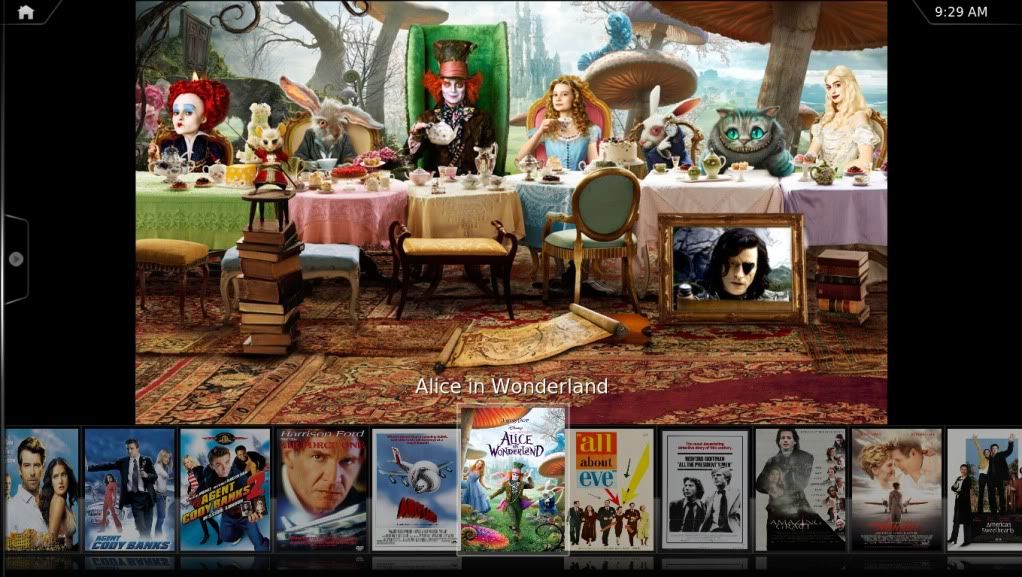
[Image: AliceinWonderland9.jpg]
find quote
Mudislander Offline
Skilled Skinner
Posts: 1,155
Joined: Jun 2009
Reputation: 20
Post: #17
Looking good !!

Noli illegitimi carborundum
find quote
Post Reply