If you are having problems about standard XBMCFlicks functionality or general Netflix functionality in XBMC, please post your questions in the appropriate theads and leave this thread simply for XBMCFlix-o-mate. Thank You!
XBMCFlix-o-mate is a helper to the popular XBMCFlicks Video Add-on.
XBMCFlix-o-mate picks up where XBMCFlicks leaves off in that it provides you a way to access all of the common Netflix commands using hotkeys. This will allow you to use your keyboard or remote (with a 3rd party program like EventGhost) to control most of the major aspects of watching Netflix on your XBMC installation.
Technically XBMCFlix-o-mate is not an add-on for XBMC as it does not plug directly into XBMC or use the standard XBMC add-on format. It is a set of stand-alone files that will help you to automate your Netflix viewing after launching a video with XBMCFlicks.
XBMCFlix-o-mate is coded using AutoIt and Sikuli and should work across all screen resolutions.
XBMCFlix-o-mate has been tested with the latest available version of XBMCFlicks for EDEN available here and XBMC EDEN using Confluence (default skin) and IE.
Watch the video below!:
(NOTE: Video was done for first release, program is since updated to work with new Netflix GUI!)
Download HERE (version 2.1b - 5/27/12)
v.2.0b+ UPDATED FOR NEW NETFLIX GUI!
Instructions are provided in RTF document inside download.
P.S. - Also check out my minor mod to XBMCFlicks which fixes/tweaks some minor annoyances. Not directly related to XBMCFlix-o-mate.
bengalih
Senior Member Posts: 117 Joined: Oct 2004 Reputation: 1 |
2012-04-16 19:20
Post: #1
.peace out.
(This post was last modified: 2012-05-28 00:49 by bengalih.)
|
| find quote |
bengalih
Senior Member Posts: 117 Joined: Oct 2004 Reputation: 1 |
2012-04-16 20:39
Post: #2
Changelog
Version 2.1b – 5/27/2012
Version 2.0b – 5/18/2012
Version 1.5b – 5/13/2012
Version 1.4b - 5/4/2012
Version 1.3b - 4/23/2012
Version 1.2b - 4/20/2012
Version 1.0b - 4/16/2012 Initial Release .peace out.
(This post was last modified: 2012-05-28 00:52 by bengalih.)
|
| find quote |
bengalih
Senior Member Posts: 117 Joined: Oct 2004 Reputation: 1 |
2012-04-16 20:51
Post: #3
F.A.Q.
How do I setup the program, why isn't it working, how do I do X,Y, or Z? Chances are 90% of everything you need is in the documentation provided with the download. Please read it thoroughly before asking any questions. Will this allow me to use a remote control with Netflix? This app allows you to use hotkeys (like CTRL+SHIFT+ALT+N) to control Netflix GUI operations, like moving between episodes or toggling full screen, subtitles, etc. You will need to use a 3rd party application that can map your remote control to those hotkeys (e.g. EventGhost, LIRC). Does this work on a Linux or OSX based XBMC install? Yes...or at least it should...or at least most of it should. It has not yet been tested but the Sikuli language that the majority of the tool is developed in is java based and supported on Linux and OSX. If you are interested in getting it to work, download and try it...I'm willing to help troubleshoot errors to get it functional. Remember this is a helper to XBMCFlicks...which requires Silverlight(Moonlight) to function properly. If you can't even get XBMCFlicks to work, you shouldn't bother with this. The included docs have instructions for Linux, but OSX users should be able to figure it out based on those as well. More to come (based on your questions)... .peace out.
(This post was last modified: 2012-05-19 00:07 by bengalih.)
|
| find quote |
XeroKool
Junior Member Joined: Jan 2012 Reputation: 2 |
2012-04-19 15:05
Post: #4
Hey, thanks for taking the time to create this script. I was happy to see that it makes use of Sikuli, which is something I've been playing around with in the past. Quick question though, is it possible for you to change the path of where the 32-bit launcher is looking for the sikuli jar file? It's searching for it under C:\Program Files (x86)\Sikuli X\ whereas it is installed under C:\Program Files\Sikuli X\ on my system (32-bit Windows 7).
|
| find quote |
bengalih
Senior Member Posts: 117 Joined: Oct 2004 Reputation: 1 |
2012-04-19 17:19
Post: #5
Hey...thanks for being the first person to comment on the script!
![]() Yes, you can change this. If you use the XBMCflix-o-mate.au3 script there is a section at top to define some user variables. Just open it with the AutoIt editor (or any text editor) and find: $SikuliDir = "c:\Program Files (x86)\Sikuli X" You can then edit this as necessary. You can then either continue to use the .au3 script to launch the program, or you can re-compile it into an .EXE with the AutoIt editor (Tools > Compile). I will take this into account and do a check for system architecture for the next release...I took for granted that I was on x64 when writing it! .peace out. |
| find quote |
XeroKool
Junior Member Joined: Jan 2012 Reputation: 2 |
2012-04-19 19:49
Post: #6
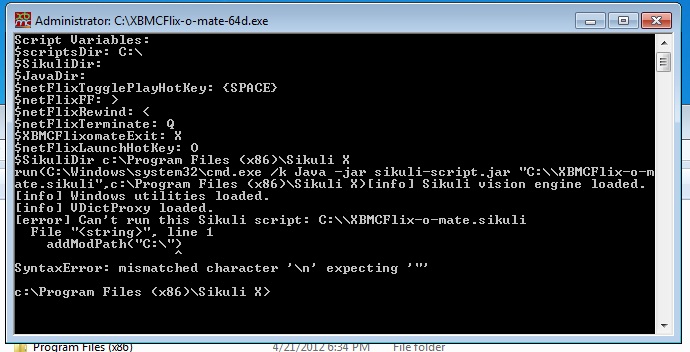
Awesome. I'm glad I saw your post. It gave me a reason to start using XBMCFlix again. I made the change to the .au3 script and recompiled. I then launched the new .EXE and it began running and is visible in the taskbar. However I'm having another issue. It seems that the sikuli script is not being launched. I have both the .exe and the sikuli scipt in the same directory as per instructions. I know that the script works on my machine because I was able run it through the Sikuli IDE and it worked perfectly.
EDIT: I figured out the problem thanks to the debug mode you implemented. Seems that if the path to the script (ie. WorkingDir) has a space in it, it is being truncated for whatever reason. I placed both files in another directory and all is well. Once again thanks.
(This post was last modified: 2012-04-19 20:24 by XeroKool.)
|
| find quote |
bengalih
Senior Member Posts: 117 Joined: Oct 2004 Reputation: 1 |
2012-04-19 21:03
Post: #7
Thanks...I'm going to test now with a space and hopefully implement a fix...I have already incorporated the architecture check.
Please post back once you have used it a bit and let me know how it has been working for you. .peace out. |
| find quote |
XeroKool
Junior Member Joined: Jan 2012 Reputation: 2 |
2012-04-20 00:14
Post: #8
Ok cool. Will do.
|
| find quote |
ultradodger
Junior Member Posts: 15 Joined: Jan 2011 Reputation: 0 |
2012-04-20 03:11
Post: #9
Hello, I seem to have an issue with getting this to work. I followed the instructions very carefully over and over, so thats why I am posting here. I attempt to launch the .EXE and AutoIT successfully launches, but javaw.exe does not. I have ensured I am running 32-bit JRE 6, as well as 32-bit Sikuli. All directories are default, and my XBMC-O-Mate folder and xbmc--mate.exe reside on the root of my C: drive to eliminate any pathing issues. I am running Windows 7 64-bit with IE9, thanks!
|
| find quote |
bengalih
Senior Member Posts: 117 Joined: Oct 2004 Reputation: 1 |
2012-04-20 04:20
Post: #10
Dodger -
Please confirm you have the following: C:\Program Files (x86)\Java\jre6\bin\java.exe C:\Program Files (x86)\Java\jre6\bin\javaw.exe If you do not have the files in those locations, then something is up with your Java install. If you have them in an alternate location let me know. You can also right-click on the .au3 file and choose Edit Script. The Press F5 to run the script from there. If there is a problem with it not being able to find your java, it should list some error. You can provide me what it shows in the output window in the bottom. thanks UPDATE: Be sure to download the latest version posted above and try it out before going any further...I think it should fix your issue. .peace out.
(This post was last modified: 2012-04-20 18:37 by bengalih.)
|
| find quote |


Search
Help