
[RELEASE] XBMCFlix-o-mate

  Thread Rating:
  • 5 Votes - 4.2 Average
  • 1
  • 2
  • 3
  • 4
  • 5
Post Reply
XeroKool Offline
Junior Member
Posts: 37
Joined: Jan 2012
Reputation: 2
Post: #11
So far everything seems to be working well. I'm finally able to use my remote with XBMCFlicks. If I run across any issues I'll definitely let you know about it.
find quote
bengalih Offline
Senior Member
Posts: 117
Joined: Oct 2004
Reputation: 1
Post: #12
New version 1.2 released.

See Changelog on first page.

If you were having any issues with the app, please download the latest version and test it out before reporting back.

Thanks!

.peace out.
(This post was last modified: 2012-04-20 06:38 by bengalih.)
find quote
ultradodger Offline
Junior Member
Posts: 17
Joined: Jan 2011
Reputation: 0
Post: #13
Hello,

Thank you very much for your assistance. I hate to be a bother, but it still doesn't work. I have attached a screenshot to hopefully any issues. Maybe my Java is bust? All java files exist in the appropriate folders (C:\Program Files (x86)

LINK: https://lh4.googleusercontent.com/-EvaYj.../Error.jpg

[Image: Error.jpg]
(This post was last modified: 2012-04-21 20:40 by ultradodger.)
find quote
bengalih Offline
Senior Member
Posts: 117
Joined: Oct 2004
Reputation: 1
Post: #14
(2012-04-21 20:35)ultradodger Wrote:  Hello,

Thank you very much for your assistance. I hate to be a bother, but it still doesn't work. I have attached a screenshot to hopefully any issues. Maybe my Java is bust? All java files exist in the appropriate folders (C:\Program Files (x86)

LINK: https://lh4.googleusercontent.com/-EvaYj.../Error.jpg

Well you don't have debug turned on, so there is really not much output, but the fact that there is no error shown on that screen should indicate that it is having no problem loading Java. How are you confirming that Java is not open? Are you looking in task manager to see this? Are you sure you are sorting correctly when looking for the process?

You can run the debug versions of the .exe located in the /debug folder - make sure you move it into the same location as the sikuli script. You should get a command window with debug output that looks similar to this:

Code:
Script Variables:
$scriptsDir:c:\XBMCFlix\XBMCFlix-o-mate\v.1.2b
$SikuliDir:
$JavaDir:
$netFlixTogglePlayHotKey: {SPACE}
$netFlixFF: >
$netFlixRewind: <
$netFlixTerminate: Q
$XBMCFlixomateExit: X
$netFlixLaunchHotKey: O
$SikuliDir c:\Program Files (x86)\Sikuli X
run(C:\Windows\system32\cmd.exe /k Java -jar sikuli-script.jar "c:\XBMCFlix-o-mate\v.1.2b\XBMCFlix-o-mate.sikuli",c:\Program Files
(x86)\Sikuli X)[info] Sikuli vision engine loaded.
[info] Windows utilities loaded.
[info] VDictProxy loaded.
[info] add hotkey: CTRL+ALT+SHIFT O
[info] add hotkey: CTRL+ALT+SHIFT F
[info] add hotkey: CTRL+ALT+SHIFT N
[info] add hotkey: CTRL+ALT+SHIFT B
[info] add hotkey: CTRL+ALT+SHIFT T
[info] add hotkey: CTRL+ALT+SHIFT Q
[info] add hotkey: CTRL+ALT+SHIFT X

Show me the output of that window (again make sure you copy/move the debug to the same folder as the XBMCFlix-o-mate.sikuli folder)


thx

.peace out.
find quote
ultradodger Offline
Junior Member
Posts: 17
Joined: Jan 2011
Reputation: 0
Post: #15
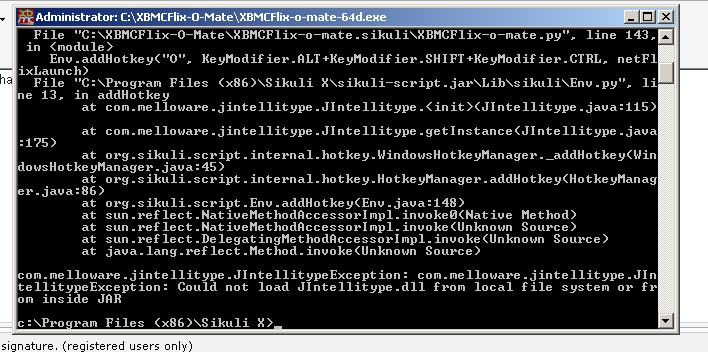
Yes, that is correct I am looking in Task Manager and sorting by name. I am indeed sorting correctly, and here is a screenshot of when I ran debug...

https://lh5.googleusercontent.com/-_pn10.../error.jpg

[Image: error.jpg]

I am no programmer, unfortunately. Seems to be an issue with the script, although I dont know why it's only effecting me. Everything is currently installed to default directories, including AutoIT - C:\Program Files (x86)\AutoIt3

Thanks so much for the help!
find quote
bengalih Offline
Senior Member
Posts: 117
Joined: Oct 2004
Reputation: 1
Post: #16
(2012-04-22 00:47)ultradodger Wrote:  I am no programmer, unfortunately. Seems to be an issue with the script, although I dont know why it's only effecting me. Everything is currently installed to default directories, including AutoIT - C:\Program Files (x86)\AutoIt3

Thanks so much for the help!

It's because you have put the scripts directly in the root of your C: drive like this:

c:\XBMCFlix-o-mate.sikuli
c:\XBMCFlix-o-mate
c:\XBMCFlix-o-mate-32d

I will have to look at the code to see why it is adding an extra slash in this case (and not finding the script).
However, I would highly recommend NOT putting files in the root of your C: drive....that is what directories are for!
Why would you want it on the very root of your drive? At the very least, put it in c:\XBMCFlix-o-mate\!

Nonetheless, I should support it this way...at the very least to prevent errors on silly file placement like this...in the meantime, move it to a subdirectory!

UPDATE: I have already fixed the code on my end...but it appears that even with my fixes, Sikuli may have an issue with running something from the root folder. I am awaiting a response from their Dev team to see if I can work around it. In the meantime - don't try to run from the ROOT of your drive!

.peace out.
(This post was last modified: 2012-04-22 01:42 by bengalih.)
find quote
ultradodger Offline
Junior Member
Posts: 17
Joined: Jan 2011
Reputation: 0
Post: #17
Got it, moved everything to C:\XBMCFlix-O-Mate\

Now with a new error...

https://lh4.googleusercontent.com/-cyE4W.../error.jpg

[Image: error.jpg]

So sorry! I feel like such a pain for these issues. Thanks again for your help, i'd really love to use this!
find quote
bengalih Offline
Senior Member
Posts: 117
Joined: Oct 2004
Reputation: 1
Post: #18
(2012-04-22 05:40)ultradodger Wrote:  Got it, moved everything to C:\XBMCFlix-O-Mate\

Now with a new error...

https://lh4.googleusercontent.com/-cyE4W.../error.jpg

[Image: error.jpg]

So sorry! I feel like such a pain for these issues. Thanks again for your help, i'd really love to use this!

Ok...well that's an easy one...it just isn't finding Java.... Since you confirmed the location of the Java binaries, Java simply isn't in your path.
I tested this with a fresh machine with a new Java install, and Java is normally automatically placed in your path. You can check this by going to a command prompt and typing "echo %path%" you should get somethings like this:

Quote:C:\Users\username>echo %path%
C:\Program Files (x86)\NVIDIA Corporation\PhysX\Common;C:\Windows\system32;C:\Wi
ndows;C:\Windows\System32\Wbem;C:\Windows\System32\WindowsPowerShell\v1.0\;c:\Pr​
ogram Files\WIDCOMM\Bluetooth Software\;c:\Program Files\WIDCOMM\Bluetooth Softw
are\syswow64;;C:\Program Files\Broadcom\Broadcom 802.11\Driver;C:\Program Files
(x86)\Sikuli X\libs;C:\Program Files (x86)\Java\jre6\bin

You can see in my path that Sikuli is there (manually added by me I believe), but Java is also added at the end. Since you don't have that it can't find Java.

I could have hardcoded the path...but the problem is it may be different on every installation. I did however provide a method for you to set this automatically. So you have two choices:

1) Add have directory to your path (System > Advanced > Environmental Variables ...or just google it)
2) Add the path into the AutoIt script in the $JavaDir variable up top.

A full reinstall of Java may also fix the issue for you as the default behavior is to add it to the path.

There is probably a way for me to query the registry to determine the proper location on a system...so I will look into this. In the meantime, just do one of the above for now.

And don't worry about asking these questions, I'm happy to get feedback and fix issues that may plague others as well. I'd like for the end user to do as little setup as possible.

UPDATE: Oh, I might add that you might not have this problem if you use the actual (non-debug version). The debug version runs java via a different method which will be path dependent as I stated....the normal version runs javaw (no console) using a shell execute method that may enable it to find java on your system. So you can also just try to run the original copy again and if it works, then you don't need to do any of the above.

.peace out.
(This post was last modified: 2012-04-22 18:29 by bengalih.)
find quote
ultradodger Offline
Junior Member
Posts: 17
Joined: Jan 2011
Reputation: 0
Post: #19
Thanks! That got rid of the that issue, seems it is now able to intilize Java. Now I have a new error...

[Image: error.jpg]

EDIT: A quick reinstall of Java got everything working! Who knows what happened, but its beautiful! Thanks SO MUCH!
(This post was last modified: 2012-04-23 03:22 by ultradodger.)
find quote
bengalih Offline
Senior Member
Posts: 117
Joined: Oct 2004
Reputation: 1
Post: #20
(2012-04-23 02:45)ultradodger Wrote:  Thanks! That got rid of the that issue, seems it is now able to intilize Java. Now I have a new error...

[Image: error.jpg]

EDIT: A quick reinstall of Java got everything working! Who knows what happened, but its beautiful! Thanks SO MUCH!


Ha yeah...before I got to your last comment I was about to say your Java looks all fouled up! Glad the reinstall got it going. Please post back after some play time with it and let me know how its working for you.

.peace out.
find quote
Post Reply