Hi,
Quick question,
I have a folder full of mp3 albums etc... The naming convention on all of them is a mess, the structure is a mess, it's basically a folder full of albums that aren't named very well, some contain the music in the folder, some are split into album/cd1 and cd2 etc...
Is there a tool (like therenamer) that I can drop my music into, it will be tagged and renamed and spat out in a new location? TheRenamer is a godsend for xbmc and does an incredible job, but I havnt been able to find anything like it for music?
So far I've tried:
Picard (this doesn't work like therenamer)
Mp3tag (which also doesn't work like therenamer)
Rather than continuing down this path, can anyone recommend a tool that is similar to "therenamer" which will just hunt through a predetermined directory, match up everything it can, rename it accordingly, and spit it out the other end in a new location with the correct tags, naming convention and information etc.
Thanks in advance.

PatrickBateman
Posting Freak Posts: 1,643 Joined: Mar 2011 Reputation: 15 Location: Another Earth |
2012-05-14 01:16
Post: #1
(This post was last modified: 2012-05-14 01:26 by PatrickBateman.)
|
| find quote |
hernandito
Senior Member Posts: 282 Joined: Feb 2011 Reputation: 0 |
2012-05-14 01:37
Post: #2
A couple things that I like are The Godfather and MP3Tag... they make some of these task simple, but they are not a one click solution... You may need to go folder by folder and fixing stuff that way. Once you have it sorted out, Headphones will collect new music for you and handle the naming and tagging...
Starting your collection from scratch using Headphones might also be a solution, but thi sis a big commitment.
(This post was last modified: 2012-05-14 01:38 by hernandito.)
|
| find quote |
giftie
Skilled Python Coder Posts: 2,037 Joined: Mar 2010 Reputation: 35 |
2012-05-14 02:10
Post: #3
MusicBrainz Picard actually does a very good job of renaming and moving into a proper folder layout. Though it does take a bit of configuring.
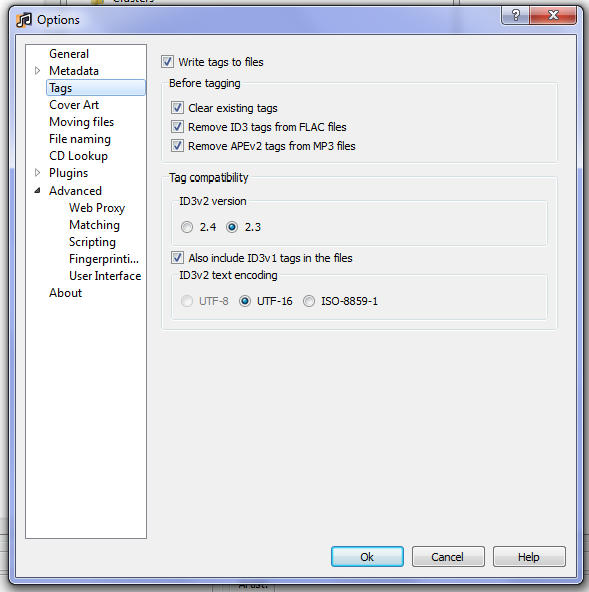
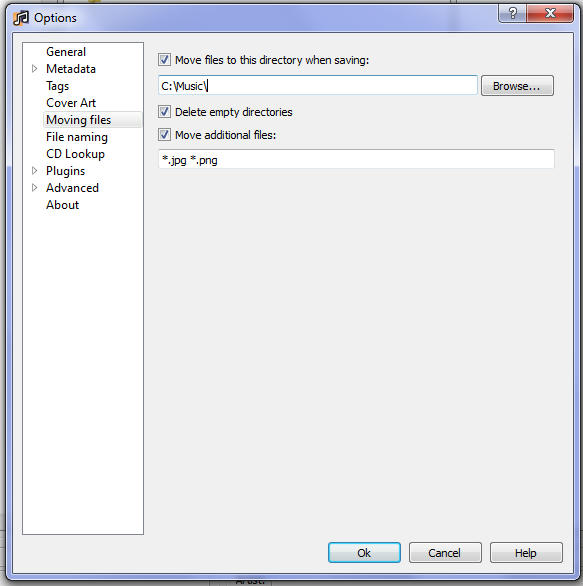
First off you need to install a plugin called Disc Numbers - > http://users.musicbrainz.org/~luks/picar...cnumber.py (place it in -> C:\Program Files (x86)\MusicBrainz Picard\plugins) Probably need to restart Picard. Then adjust your tag setting to the following. ![]() This clears the tags, as some have useless information that XBMC uses improperly Then under the File Naming option, set 'Name Files Like This' to: Picard version < 1.0 Code: $if2(%albumartist%,%artist%)/%album%$if($eq(%releasetype%,single), \(single\),$if($eq(%releasetype%,ep), \(EP\)))/$if($gt(%totaldiscs%,1),/Disc %discnumber%$if(%discsubtitle%, - %discsubtitle%))/$num(%tracknumber%,2) - %title%Code: $if($eq(%compilation%,1),For example if the album is a multidisc, it will separate the tracks into the proper Disc folders. It will also add '(single)' to the Album folder name if the album is a single <- this separates the single releases that share with an actually Album name. It's best to move the files so your music library is nice and clean. If you set the move options to the following, Picard will also move the artwork(ie folder.jpg, cdart.png, logo.png, fanart.jpg)
![]() For troubleshooting and bug reporting please make sure you read this first you can also use XBMC Log Uploader Script. Cinema Experience Cinema Experience Wiki cdART Manager fanart.tv
(This post was last modified: 2012-08-06 20:38 by giftie.)
|
| find quote |
PatrickBateman
Posting Freak Posts: 1,643 Joined: Mar 2011 Reputation: 15 Location: Another Earth |
2012-05-14 02:11
Post: #4
Hi,
Thanks for the suggestion... I'll check godfather out and headphones as I know nothing of them. A one click solution like "therenamer" would be fantastic, but I suppose it's asking a lot. Cheers, |
| find quote |
PatrickBateman
Posting Freak Posts: 1,643 Joined: Mar 2011 Reputation: 15 Location: Another Earth |
2012-05-14 14:15
Post: #5
(2012-05-14 02:10)giftie Wrote: MusicBrainz Picard actually does a very good job of renaming and moving into a proper folder layout. Though it does take a bit of configuring. Hey, Fantastic. I'll try that right away. Thanks for that
|
| find quote |
zag
Team-XBMC Member Joined: Oct 2007 Reputation: 7 Location: UK |
2012-05-15 10:47
Post: #6
MP3Tag can do this with a few clicks. Its renaming functions are awesome and simple to use.
Just rename using the tag information. HTPC - XBMC Frodo, MCE remote, 40gb intel ssd, core i5, 4gb ram | Storage - 2 x qnap 8tb 419p+ NAS | Display Samsung 46" LCD + Acer HD projector Kitchen - Wall Mounted Motorola Xoom tablet | Mobile - Ipad 2 | My setup pics
(This post was last modified: 2012-05-15 10:49 by zag.)
|
| find quote |
PatrickBateman
Posting Freak Posts: 1,643 Joined: Mar 2011 Reputation: 15 Location: Another Earth |
2012-05-15 11:15
Post: #7
(2012-05-15 10:47)zag Wrote: MP3Tag can do this with a few clicks. Its renaming functions are awesome and simple to use. I tried mp3 tag and it seemed more manual? Can I just set it off, go to bed and wake up with an o regained, tagged, renamed, labeled library
|
| find quote |
adrock0211
Junior Member Posts: 33 Joined: Sep 2012 Reputation: 0 |
2012-11-13 23:55
Post: #8
(2012-05-14 02:10)giftie Wrote: MusicBrainz Picard actually does a very good job of renaming and moving into a proper folder layout. Though it does take a bit of configuring. This actually worked great on my test with just a few folders, fantastic! Thanks for this Giftie. One quick question for you...if I have all my music organized at the top level by genre is there any addition to the code I could use to still keep the top level? For instance my music is currently organized: <genre><artist><album><track> I would like to maintain this organizational structure but can it be done with Picard and if so will XBMC be able to read it for scraping purposes or should I just shut up and stick with <artist><album><track> and be happy with my life? Thanks. |
| find quote |
AlbieTheCat
Junior Member Posts: 2 Joined: Jan 2013 Reputation: 0 |
2013-02-13 09:48
Post: #9
thanks all for the advice and help setting up Picard.. I keep getting WIN8 Blue screens when running the scan.. its killing me.. i too use 'The Renamer' maybe if more people donated to him he would include music..
|
| find quote |
cpmiller22
Senior Member Joined: Jan 2011 Reputation: 0 |
2013-02-13 14:39
Post: #10
I've been a long time user of Tag & Rename which has served me well.
|
| find quote |

![[Image: 88413c5334db906053d5b5323435e8154d375dba...3a5d6g.jpg]](http://www.mediafire.com/imgbnc.php/88413c5334db906053d5b5323435e8154d375dbac93343fda441cdafb4603a5d6g.jpg)
![[Image: 9b2084342596b8d895fba59ed6eae53c625e7a22...43286g.jpg]](http://www.mediafire.com/conv/9b2084342596b8d895fba59ed6eae53c625e7a222470bd8e79e5c7fea57f43286g.jpg)
![[Image: e4f63e45ba34fe4695b3bb08eb2499d8e4ee484e...4c076g.jpg]](http://www.mediafire.com/conv/e4f63e45ba34fe4695b3bb08eb2499d8e4ee484e4d2fe70f903275f93e5e4c076g.jpg)
Search
Help