
2012-05-24, 07:38
[RELEASE] Aeon Nox 3.0.1
You´ve waited long enough...
Aeon 3.0 is finally ready. Enjoy
Only support for Eden!
Before posting bugs/feature requests, please check if your issue is not already listed here
3.0.1
- Fixed issue which could cause loss of remote functioning during video playback.
- Updated Russian language - thx Roman_V_M
- Fixed popup of keyboard after changing color.
- Fixed overlapping now playing label on small video widget.
- Fixed customization of 'Play Disc' menu item.
- Fixed cut off posters in 'Episode' viewtype.
3.0.0
By applying this update all settings from previous version are lost! This includes custom backgrounds, paths to subtitle/lyrics add-on and assigned favorites to the main menu.
- Changed skin codebase to 1080
- Reworked custom items on Home screen:
- reworked media menu including QuickNav and new tooltip
- It's now possible to have 9 custom items with 5 custom submenu items, all which can be fully customizable.
- Over 25 different widgets, most with 2 modes, which can be attached to every menu item.
- Background customizer has been moved to 'Main menu item customizer'. Every menu item can have all available background types.
- Reworked Music visualisation screen.
- Artistslideshow support
- song to musicvideo script support
- metadata actors script support
- Added options to show logos instead of labels, whenever available, in Showcase view and Shift view.
- Wall view now only has clear case thumbs.
- Stripshow view is only available in pictures section.
- Removed Carousel and Panel view.
- Merged Thumbnail and BannerWall with normal Wall view.
- Added 'YouTube' mode to Wall view.
- Added PVR support - thx tocinillo
- Added support for Moviesets add-on (enable add-on or 'Group movies by sets' to activate).
- Added support for XBMC Intro Movie script (disable add-on to return to normal startup).
- Added Tripanel View (Poster + Square)
- Added color selection for all areas (supports Color Picker script)
- Added 'Glow mode', toggle Normal, Light and Extended mode.
- Added option for colored labels and panels.
- Removed/Moved Options for better usability.
- Lot of texture/color work
- Redesigned album, artist, song and picture information screen.
- Improved navigation (no invisible buttons anymore)
- Moved fullscreen fanart to video info dialog (press select on highlighted fanart/extrafanart)
- more LiveTV Viewtypes
- Auto-Detect TVTunes Add-on
- New 'Busy' dialog
- Added Rom Collection Browser support
- Removed White and Neon65 theme.
- Updated Spanish language - thx PatOso
- Updated French language - thx Rififi77
- Updated Greek language - thx CutSickAss
- Updated Dutch language
- Updated German language
- Updated Icelandic language - thx Passer
- Updated Russian language - thx Roman_V_M
- Updated Hungarian language - thx Frodo19
- Removed languages that were not updated for 3.0.0
+ an endless amount of tweaks/bugfixes we forgot to mention in that list
And all this comes along with the old feaures which are available since 2.0:
- Custom Main Menu items + Submenu items (Smart Playlists/Favourites).
- TV Next Aired integrated in Library view.
- TV Tunes support.
- Banner.jpg / Landscape.jpg / Poster.jpg support.
- Default focus of Main Menu adjustable in skin settings.
- Recently added/Random items/ Watchlist support.
- "Featured" window with output of random items, recently added and watchlist script all in one window.
- Cinema Experience support. Either through VideoInfo or through submenu.
- Random movie script support.
- Artwork downloader script integrated in skin in VideoInfo.
- Weather + Support
- Advanced Launcher support.
- Pseudo TV support.
- "New" flag for items that have been recently added.
- Live home window customization: see what you change on the fly.
- Music and Video genre icons and fanart support.
- Extrafanart/extrathumbs support.
- TV Show logo/Movie logo/clearart support.
- cdART/clearLOGO support.
For all 3.0 BETA/RC users:
please follow this advice to keep your skin settings when switching to official repo version:
http://forum.xbmc.org/showthread.php?tid...pid1109222
Install skin through XBMC addon repository:
Addons--> Get Addons --> XBMC.org addons--> Skin--> Aeon Nox
Source:
Code:
git://github.com/BigNoid/Aeon-Nox.git
Supported Add-Ons:
MyPicsDB
http://passion-xbmc.org/addons/?Page=Vie...e.mypicsdb or via passion repo
MovieSets Script
http://passion-xbmc.org/addons/?Page=Vie....moviesets or via passion repo
MusicExtraInfo Script
http://passion-xbmc.org/addons/?Page=Vie...aMusicInfo
ColorPicker Script
http://passion-xbmc.org/addons/?Page=Vie...lor.picker or via passion repo
Randommovie Script
https://github.com/elParaguayo/xbmc-rand...ll/preEden
Cinema Experience Script (available on official repo)
Watchlist Script (gets installed automatically)
RandomandlastItems Script (gets installed automatically)
Google Maps Weather Script (World Map Backgound, available on passion repo)
Bug reports:
Submit issue here:
https://github.com/BigNoid/Aeon-Nox/issues
Some Screenies:
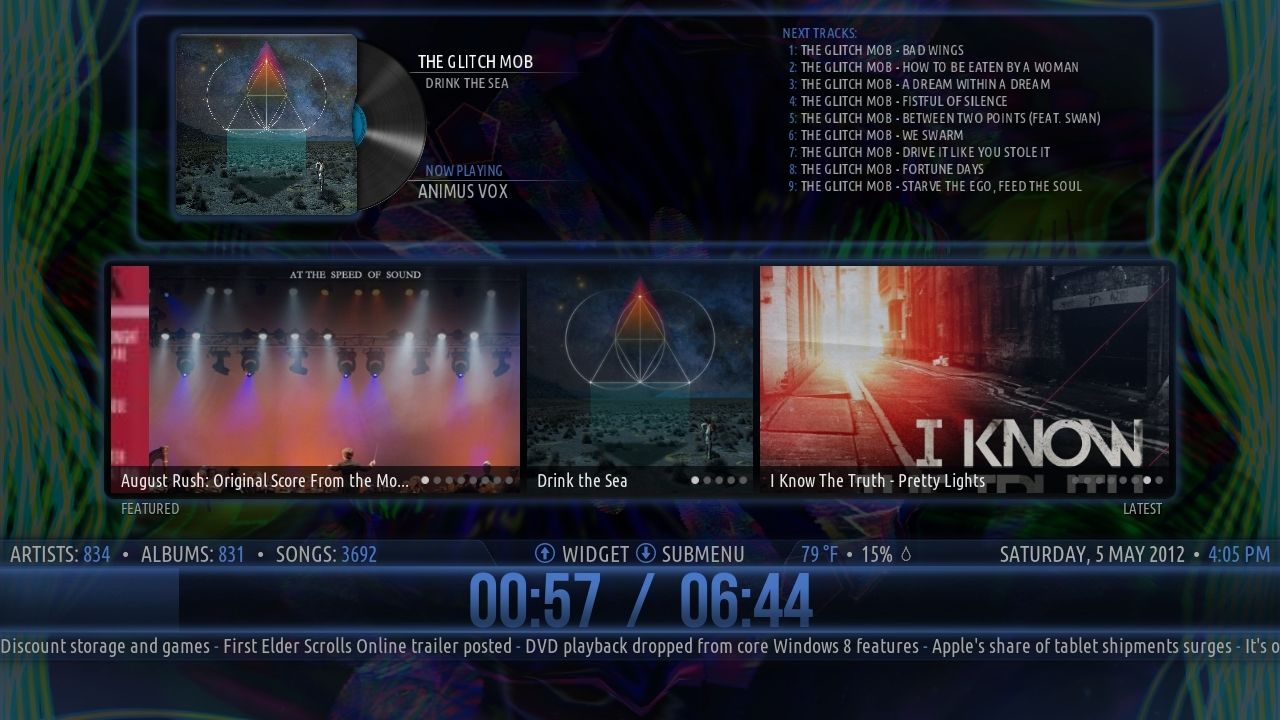
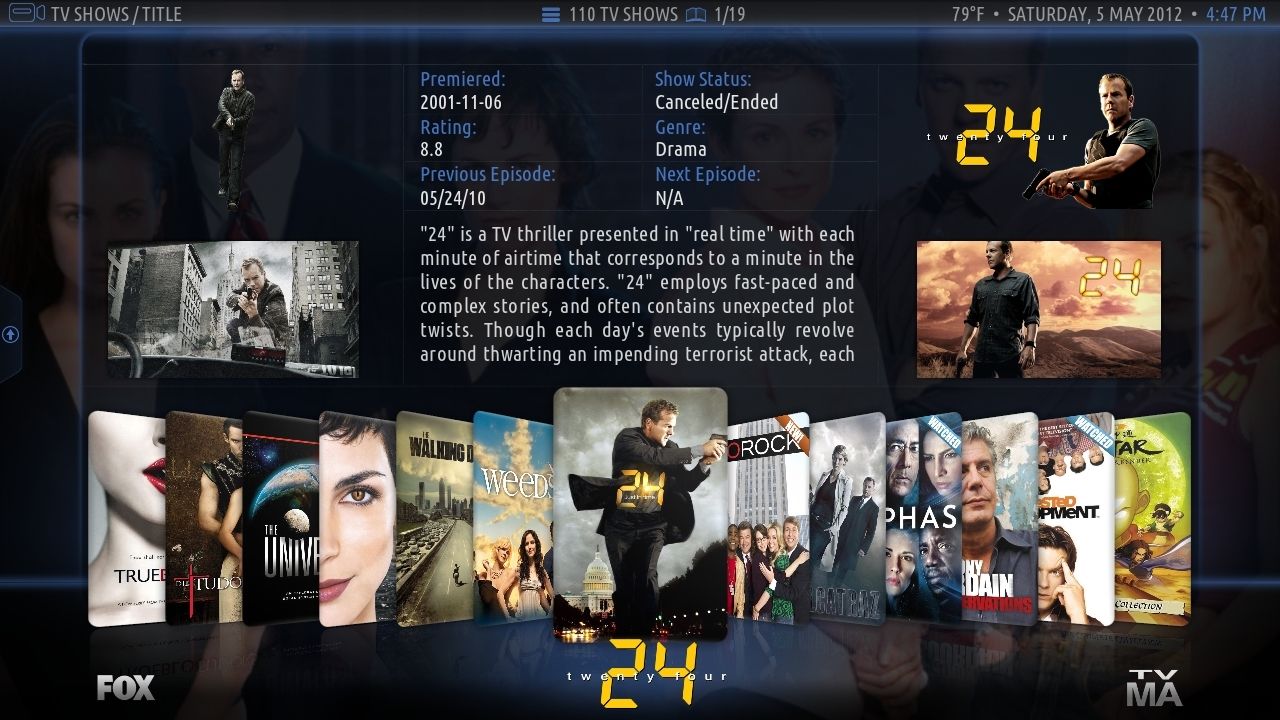
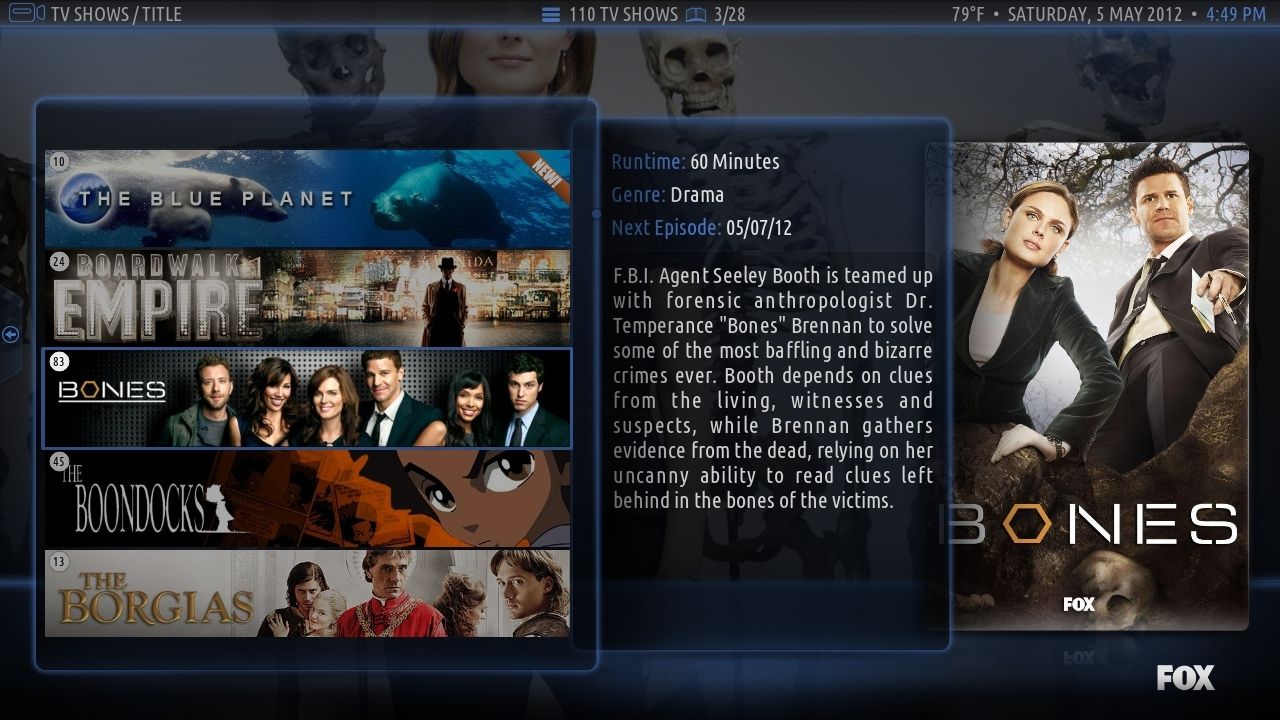
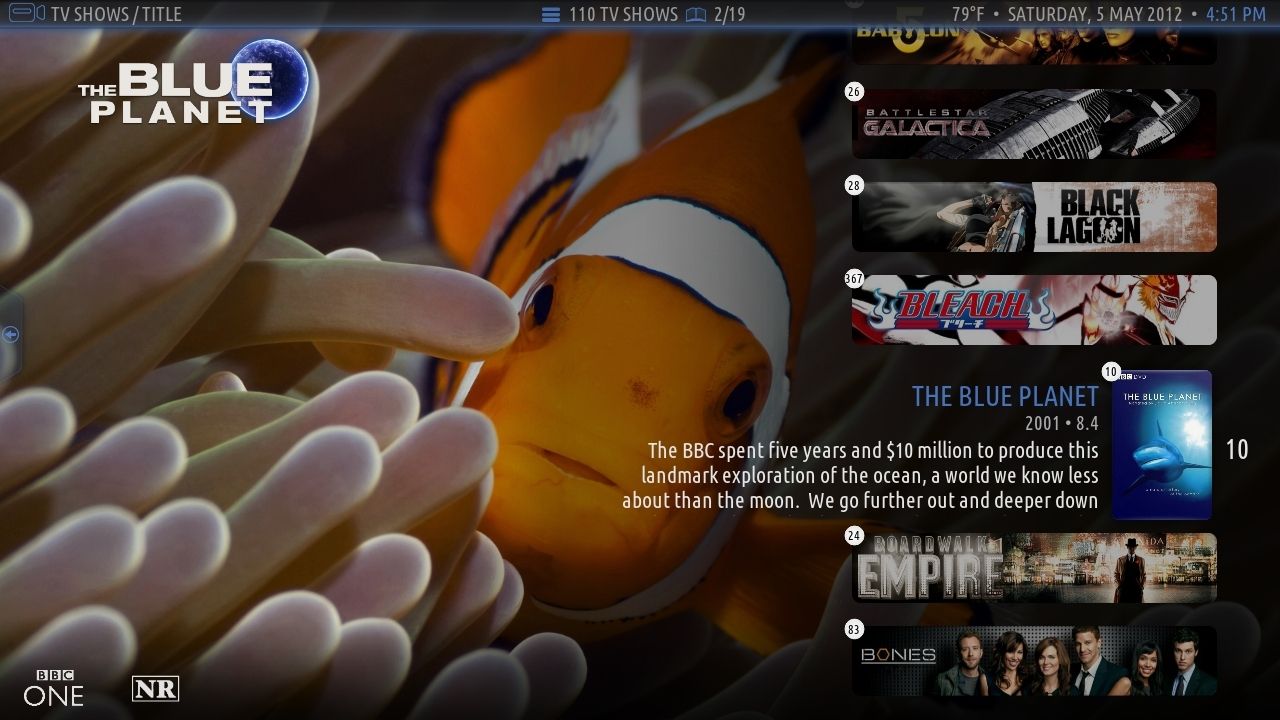

Thanks
- To Team XBMC for making XBMC (http://xbmc.org/contribute/donate/)
- To djh_ for designing Aeon.
- To Jezz_X for making Confluence, it was the basis for this skin.
- To all translators.
- To all other skinners for makings skins from which we used code or inspiration. (esp. team blackbolt/black for xperience)
- To all people who commented in this thread and submitted bug reports.
- ..and especially to big_noid from my side of course for reworking the complete old Aeon base and adjusting this skin "series" to eden back then
as well as for all the work he put in for 3.0 release and the always enjoyable and constructive partnership we had.
i think this is a good example that collaboration for skins can work out quite nicely.
EDIT Big_Noid:
- I would like to say thanks to Phil65 for working together on this skin. He's really one of the most talented skinners out there and has had some of the most innovative ideas I've seen in a long time.
all feedback is very much appreciated.
You´ve waited long enough...
Aeon 3.0 is finally ready. Enjoy
Only support for Eden!
Before posting bugs/feature requests, please check if your issue is not already listed here
3.0.1
- Fixed issue which could cause loss of remote functioning during video playback.
- Updated Russian language - thx Roman_V_M
- Fixed popup of keyboard after changing color.
- Fixed overlapping now playing label on small video widget.
- Fixed customization of 'Play Disc' menu item.
- Fixed cut off posters in 'Episode' viewtype.
3.0.0
By applying this update all settings from previous version are lost! This includes custom backgrounds, paths to subtitle/lyrics add-on and assigned favorites to the main menu.
- Changed skin codebase to 1080
- Reworked custom items on Home screen:
- reworked media menu including QuickNav and new tooltip
- It's now possible to have 9 custom items with 5 custom submenu items, all which can be fully customizable.
- Over 25 different widgets, most with 2 modes, which can be attached to every menu item.
- Background customizer has been moved to 'Main menu item customizer'. Every menu item can have all available background types.
- Reworked Music visualisation screen.
- Artistslideshow support
- song to musicvideo script support
- metadata actors script support
- Added options to show logos instead of labels, whenever available, in Showcase view and Shift view.
- Wall view now only has clear case thumbs.
- Stripshow view is only available in pictures section.
- Removed Carousel and Panel view.
- Merged Thumbnail and BannerWall with normal Wall view.
- Added 'YouTube' mode to Wall view.
- Added PVR support - thx tocinillo
- Added support for Moviesets add-on (enable add-on or 'Group movies by sets' to activate).
- Added support for XBMC Intro Movie script (disable add-on to return to normal startup).
- Added Tripanel View (Poster + Square)
- Added color selection for all areas (supports Color Picker script)
- Added 'Glow mode', toggle Normal, Light and Extended mode.
- Added option for colored labels and panels.
- Removed/Moved Options for better usability.
- Lot of texture/color work
- Redesigned album, artist, song and picture information screen.
- Improved navigation (no invisible buttons anymore)
- Moved fullscreen fanart to video info dialog (press select on highlighted fanart/extrafanart)
- more LiveTV Viewtypes
- Auto-Detect TVTunes Add-on
- New 'Busy' dialog
- Added Rom Collection Browser support
- Removed White and Neon65 theme.
- Updated Spanish language - thx PatOso
- Updated French language - thx Rififi77
- Updated Greek language - thx CutSickAss
- Updated Dutch language
- Updated German language
- Updated Icelandic language - thx Passer
- Updated Russian language - thx Roman_V_M
- Updated Hungarian language - thx Frodo19
- Removed languages that were not updated for 3.0.0
+ an endless amount of tweaks/bugfixes we forgot to mention in that list
And all this comes along with the old feaures which are available since 2.0:
- Custom Main Menu items + Submenu items (Smart Playlists/Favourites).
- TV Next Aired integrated in Library view.
- TV Tunes support.
- Banner.jpg / Landscape.jpg / Poster.jpg support.
- Default focus of Main Menu adjustable in skin settings.
- Recently added/Random items/ Watchlist support.
- "Featured" window with output of random items, recently added and watchlist script all in one window.
- Cinema Experience support. Either through VideoInfo or through submenu.
- Random movie script support.
- Artwork downloader script integrated in skin in VideoInfo.
- Weather + Support
- Advanced Launcher support.
- Pseudo TV support.
- "New" flag for items that have been recently added.
- Live home window customization: see what you change on the fly.
- Music and Video genre icons and fanart support.
- Extrafanart/extrathumbs support.
- TV Show logo/Movie logo/clearart support.
- cdART/clearLOGO support.
For all 3.0 BETA/RC users:
please follow this advice to keep your skin settings when switching to official repo version:
http://forum.xbmc.org/showthread.php?tid...pid1109222
Install skin through XBMC addon repository:
Addons--> Get Addons --> XBMC.org addons--> Skin--> Aeon Nox
Source:
Code:
git://github.com/BigNoid/Aeon-Nox.git
Supported Add-Ons:
MyPicsDB
http://passion-xbmc.org/addons/?Page=Vie...e.mypicsdb or via passion repo
MovieSets Script
http://passion-xbmc.org/addons/?Page=Vie....moviesets or via passion repo
MusicExtraInfo Script
http://passion-xbmc.org/addons/?Page=Vie...aMusicInfo
ColorPicker Script
http://passion-xbmc.org/addons/?Page=Vie...lor.picker or via passion repo
Randommovie Script
https://github.com/elParaguayo/xbmc-rand...ll/preEden
Cinema Experience Script (available on official repo)
Watchlist Script (gets installed automatically)
RandomandlastItems Script (gets installed automatically)
Google Maps Weather Script (World Map Backgound, available on passion repo)
Bug reports:
Submit issue here:
https://github.com/BigNoid/Aeon-Nox/issues
Some Screenies:
Thanks
- To Team XBMC for making XBMC (http://xbmc.org/contribute/donate/)
- To djh_ for designing Aeon.
- To Jezz_X for making Confluence, it was the basis for this skin.
- To all translators.
- To all other skinners for makings skins from which we used code or inspiration. (esp. team blackbolt/black for xperience)
- To all people who commented in this thread and submitted bug reports.
- ..and especially to big_noid from my side of course for reworking the complete old Aeon base and adjusting this skin "series" to eden back then
as well as for all the work he put in for 3.0 release and the always enjoyable and constructive partnership we had.
i think this is a good example that collaboration for skins can work out quite nicely.
EDIT Big_Noid:
- I would like to say thanks to Phil65 for working together on this skin. He's really one of the most talented skinners out there and has had some of the most innovative ideas I've seen in a long time.
all feedback is very much appreciated.



 )
)



