
2013-01-19, 06:33
I had TVH 3.2 working with my Prime and a Comcast Motorola Cable Card. It was running on LinuxMint 13. I had only network stations showing up, but all the functionality was there. I thought I figured out how to get the encrypted channels to show ( had to use 3.3 and a patch dvbhdhomerun) up so I thought I would install Lubuntu 12.10 on a Virtural Box, document everything and post a tutorial since there doesn't seem to be one. I can't get anything to show up and I can't figure out where I'm going wrong. Here is the full tutorial - can you help me point out my mistake?
OS: Lubuntu 12.10
Cable: Comcast w/ Motorola Cable Card
Software: TV Headend 3.3.152
XBMC: Openelec RC1 (XBMC RC3)
I didn't come up w/ all this on my own, it's cobbled together from various forums and IRC chats with the HTS team
GET PPA'S FOR INSTALL
TVHeadend
dvbhdhomerun
Update Sources
if you want to be able to view premium/encrypted channels you will need to build dvbhdhomrun from source with the included descrambler patch
For info on the patch see here
INSTALL HDHOMERUN SOFTWARE
gui install is optional
Make sure your Prime is discoverable
Your output should look like this with a different IP and device number of course: hdhomerun device 1316952D found at 10.0.1.204
Take note of your device ID, you'll need this later on.
INSTALL AND CONFIGURE DVBHDHOMERUN
Service should be started now. If it isn't, start it manually
Set the kernel module to start at boot
Alternatives: If this doesn't work there are two work arounds.
1) Use Nano: - Once in /etc/modules just add a line that says "dvb_hdhomerun" without the quotes
2) Enter into superuser where # is the terminal prompt
- This worked in Mint 13. For Ubuntu Root access is locked by default so this won't work. To enable su see this
Configure dvbhdhomerun to see your tuners. This is used if auto discovery doesn't work (I think )
)
Change your config file so that the adaptors look like this (use your device ID in place of 1316952D):
[1316952D-0]
tuner_type=ATSC
[1316952D-1]
tuner_type=ATSC
[1316952D-2]
tuner_type=ATSC
Reboot
Rebuild kernel modules
RESTART THE HELPERS
HDHomeRun Prime
dvbhdhomerun
VERIFY UNIQUE TSID'S ARE PRESENT
We need to verify that your cable provider is supplying unique TSID's for the Muxes. If not then this won't work for you.
Replace your 1316952D with your device ID
You should see something like this
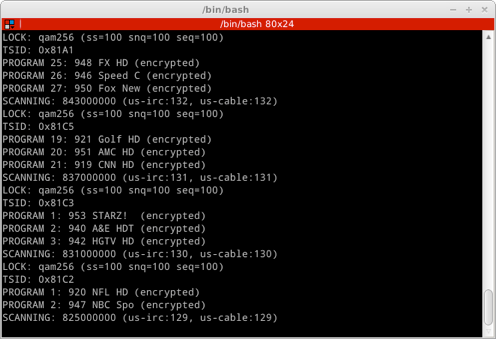
Notice the TSID (0x81A1, 0x81C5, etc...) If you are seeing all zeros, or 0x0000 then you are not getting unique TSID's
When the scan is done we will create a custom DVB location file for TVH to scan. Name your file in the format (country-STATE-Town)
When done your custom DVB file should look something like this:
A 849000000 qam256
A 843000000 qam256
A 837000000 qam256
A 813000000 qam256
A 807000000 qam256
A 771000000 qam256
A 765000000 qam256
A 759000000 qam256
A 753000000 qam256
A 747000000 qam256
Move the file to the proper location
I noticed the other DVB files that come with TVH actually had QAM256, not qam256. You can change it in print section of the command, I'm not sure it makes a difference.
CONFIGURE ADAPTERS
Start/Restart TVHeadend
Open a web browser and go to http://tvheadendIP:9981
Since I'm on the same machine as my server it's just http://localhost:9981
Go to Configuration --> TV Adapters
From the drop down you should have three tuners present. If they are not showing up restart your helpers and then restart TVH.
Select "Add DVB Network by Location"
Pick your custom file you just made
Check autodetect muxes
Turn off full mux reception. Hit save. You should now see muxes showing up, and starting to scan. If it finds services they will show up in the services tab.
So at this point all of my muxes show up, but no services. The only thing left to do is to add the EPG data from schedules direct, and map the services to channels.
If you have services showing up then lets add EPG data for you
Go here and register for an account
You have to run this as user hts, so lets change users
(enter your password)
Run the schedule grab
Enter your schedules direct username and password, and follow the prompts.
Next go into tvheadend via your browser and navigate to the EPG Grabber section. Select schedules direct via the drop down menu and save. Next go back to Configuration --> TV Adapters and click on map DVB services to channels.
I'll clean up this last part later, I know it's kind of rough.
Any ideas why my services aren't showing up?
OS: Lubuntu 12.10
Cable: Comcast w/ Motorola Cable Card
Software: TV Headend 3.3.152
XBMC: Openelec RC1 (XBMC RC3)
I didn't come up w/ all this on my own, it's cobbled together from various forums and IRC chats with the HTS team
GET PPA'S FOR INSTALL
TVHeadend
Code:
sudo add-apt-repository ppa:adamsutton/tvheadend-unstabledvbhdhomerun
Code:
sudo add-apt-repository ppa:tfylliv/dvbhdhomerunUpdate Sources
Code:
sudo apt-get updateif you want to be able to view premium/encrypted channels you will need to build dvbhdhomrun from source with the included descrambler patch
For info on the patch see here
INSTALL HDHOMERUN SOFTWARE
Code:
sudo apt-get install hdhomerun-config hdhomerun-config-guiMake sure your Prime is discoverable
Code:
hdhomerun_config discoverYour output should look like this with a different IP and device number of course: hdhomerun device 1316952D found at 10.0.1.204
Take note of your device ID, you'll need this later on.
INSTALL AND CONFIGURE DVBHDHOMERUN
Code:
sudo apt-get install dvbhdhomerun-dkms dvbhdhomerun-utilsService should be started now. If it isn't, start it manually
Code:
sudo service dvbhdhomerun-utils startSet the kernel module to start at boot
Code:
sudo echo dvb_hdhomerun >> /etc/modulesAlternatives: If this doesn't work there are two work arounds.
1) Use Nano:
Code:
sudo nano /etc/modules2) Enter into superuser
Code:
# su- This worked in Mint 13. For Ubuntu Root access is locked by default so this won't work. To enable su see this
Configure dvbhdhomerun to see your tuners. This is used if auto discovery doesn't work (I think
)Code:
sudo nano /etc/dvbhdhomerunChange your config file so that the adaptors look like this (use your device ID in place of 1316952D):
[1316952D-0]
tuner_type=ATSC
[1316952D-1]
tuner_type=ATSC
[1316952D-2]
tuner_type=ATSC
Reboot
Code:
sudo rebootRebuild kernel modules
Code:
sudo dpkg-reconfigure dvbhdhomerun-dkmsRESTART THE HELPERS
HDHomeRun Prime
Code:
sudo userhdhomerun -fdvbhdhomerun
Code:
sudo service dvbhdhomerun-utils startVERIFY UNIQUE TSID'S ARE PRESENT
We need to verify that your cable provider is supplying unique TSID's for the Muxes. If not then this won't work for you.
Replace your 1316952D with your device ID
Code:
hdhomerun_config 1316952D scan 0 ~/scan0.txtYou should see something like this
Notice the TSID (0x81A1, 0x81C5, etc...) If you are seeing all zeros, or 0x0000 then you are not getting unique TSID's
When the scan is done we will create a custom DVB location file for TVH to scan. Name your file in the format (country-STATE-Town)
Code:
awk '{if ($1 ~ /SCANNING/) print "\n" $2; else print $0}' scan0.txt | awk 'BEGIN { RS = "" ; FS = "\n" } { if (length($4) > 0) print "A " $1 " qam256" }' >us-IL-PeoriaWhen done your custom DVB file should look something like this:
A 849000000 qam256
A 843000000 qam256
A 837000000 qam256
A 813000000 qam256
A 807000000 qam256
A 771000000 qam256
A 765000000 qam256
A 759000000 qam256
A 753000000 qam256
A 747000000 qam256
Move the file to the proper location
Code:
sudo mv us-IL-Peoria /usr/share/tvheadend/data/dvb-scan/atsc/us-IL-PeoriaI noticed the other DVB files that come with TVH actually had QAM256, not qam256. You can change it in print section of the command, I'm not sure it makes a difference.
CONFIGURE ADAPTERS
Start/Restart TVHeadend
Code:
sudo service tvheadend restartOpen a web browser and go to http://tvheadendIP:9981
Since I'm on the same machine as my server it's just http://localhost:9981
Go to Configuration --> TV Adapters
From the drop down you should have three tuners present. If they are not showing up restart your helpers and then restart TVH.
Select "Add DVB Network by Location"
Pick your custom file you just made
Check autodetect muxes
Turn off full mux reception. Hit save. You should now see muxes showing up, and starting to scan. If it finds services they will show up in the services tab.
So at this point all of my muxes show up, but no services. The only thing left to do is to add the EPG data from schedules direct, and map the services to channels.
If you have services showing up then lets add EPG data for you
Go here and register for an account
You have to run this as user hts, so lets change users
Code:
sudo su - htsRun the schedule grab
Code:
sudo /usr/bin/tv_grab_na_dd --configureEnter your schedules direct username and password, and follow the prompts.
Next go into tvheadend via your browser and navigate to the EPG Grabber section. Select schedules direct via the drop down menu and save. Next go back to Configuration --> TV Adapters and click on map DVB services to channels.
I'll clean up this last part later, I know it's kind of rough.
Any ideas why my services aren't showing up?
