

PS3BluMote v2.04
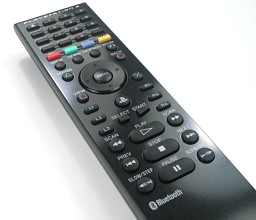
For all that own a playstation3 BD remote or like to use and excellent remote that has a better connectivity that RF or IR, cheetah05 and miljbee, wrote an excellent app for Windows.
Get It -> Github -> Source
update Feb: Added hibernate funcionality by miljbee
It Acts like a normal keyboard / HID-input runs in the system tray and also features sms like text input trough the numeric keys :o , so you can use it on all your favorite applications that use keyboard shortcuts, like media players media centers and so on.

Quote:HOW TO PAIR THE OFFICIAL SONY PS3 BLUETOOTH REMOTE IN WINDOWS:* version 2.04 is not tested by me
=====================
INSTALLATION AND USE:
1. If it is not installed already, download and install .NET 4.0
framework. This can be downloaded for free here:
http://www.microsoft.com/download/en/det...x?id=17851.
2. Download and install the PS3BluMote application from:
http://benbarron.com/applications.
3. Pair the remote (see instructions below).
4. Open the PS3BluMote application. The icon for the application will
appear in the system tray. A grey icon means the remote is not
connected; blue means connected.
5. Right-click on the system tray icon and click "Settings". Here
you can change all the settings needed and the key assignments. You
can close this window by clicking the "X" in the top right-hand
corner. You settings will automatically be saved.
6. To exit the application you will need to right-click on the system
tray icon and click "Exit".
=====================
HOW TO PAIR THE OFFICIAL SONY PS3 BLUETOOTH REMOTE IN WINDOWS:
1. Bring up the Bluetooth pairing screen on your computer. How you do
this depends entirely on your operating system and what Bluetooth
adapter you are using.
2. Put the PS3 Bluetooth Remote into pairing mode. To do this you hold
"Start + Enter" buttons together for 5 seconds and then release.
3. Search for discoverable devices on your computer.
4. When the remote (it is named "BD Remote Control") is found, pair the
device. If prompted for a key, opt for the NO KEY (or similar) option.
5. Allow for the device to pair. Do NOT close the "finished paring screen"
for 2 minutes. Hopefully it should install some drivers in the
background (see your system tray).
6. Open the PS3BluMote application and see if the remote works, pressing
any button should pair the remote automatically. If it works you will
have a blue icon in your system tray and when you hover over the icon
for the application it will pop-up with "Connected".
If it does not work, continue with these steps:
7. Put the remote back into pairing mode (follow instruction 2).
8. Open up the services screen for the already paired remote.
9. **HOPEFULLY** you should see a checkbox for HID device (or something
similar). Check it and click Apply/Ok and it should install the driver.
If you are still having issues continue with these steps:
10. Unplug your PS3 (if you own one).
11. Un-pair/Remove any PS3 related Bluetooth devices that are paired with
your computer.
12. Remove the drivers for your PC Bluetooth device/dongle and remove the
actual device itself.
13. Look through Device Manager to ensure that all drivers/devices related
to Bluetooth have been removed.
14. Restart your computer.
15. Plug the Bluetooth device/dongle back into your PC and install the
drivers.
16. Restart your computer.
17. Return to Step 1.
=====================
FREQUENTLY ASKED QUESTIONS (FAQ):
---> Can I get my PS3 Bluetooth Remote to launch programs with PS3BluMote?
Yes, you can! You first need to assign a keyboard shortcut to that program in
Windows; you can find instructions here:
http://windows.microsoft.com/en-GB/windo...n-programs
You then assign the same keyboard shortcut to a remote button in PS3BluMote
and everytime you press the button it will open the application.
---> How hibernation works ?
PS3BluMote will try to hibernate the remote as soon as it hasn't receive any events from the remote since some time.
The amount of time to wait before hibernating the remote can be changed in the settings screen.
To hibernate the remote, PS3BluMote uses the same method as the one implemented in PS3RemoteSleep. It disables the
HID Service attached to the remote then reenables it.
Note that this method takes some time (up to 20s). During this time PS3BluMote won't receive any event from
the remote. So don't set a too short value in the settings screen.
When the remote is hibernated, pressing any key will wake it up. PS3BluMote will get this key with a 500-1000ms delay.
You can also manually hibernate the remote by holding it's PS button for more than 6s.
When the remote is hibernated, the PS3BluMoteIcon in the task bar will become light blue.
Ps3RemoteSleep is available here: http://ps3remotesleep.codeplex.com/
---> Do other remotes work?
The following remotes are known to work:
- Official Sony PS3 Bluetooth remote (old version).
- Official Sony PS3 Bluetooth remote (new version).
- SMK 3700
- Logitech Harmony (with PS3 Adapter).
To get these addition remotes (and any other PS3 Bluetooth remote) to work, you
need to open the PS3BluMote settings and click on the "Settings" tab. Here you
change the remote VID (Vendor ID) and PID (Product ID) to match your remote. You
can find these in the Device Manager (via Control Panel), however, there is also
a list of VIDs/PIDs for the above remotes on the "Settings" tab page. If you find
another remote that works with PS3BluMote, please let me know via the contact form
here: Http://www.benbarron.com/contact
=====================
 good to hear.


