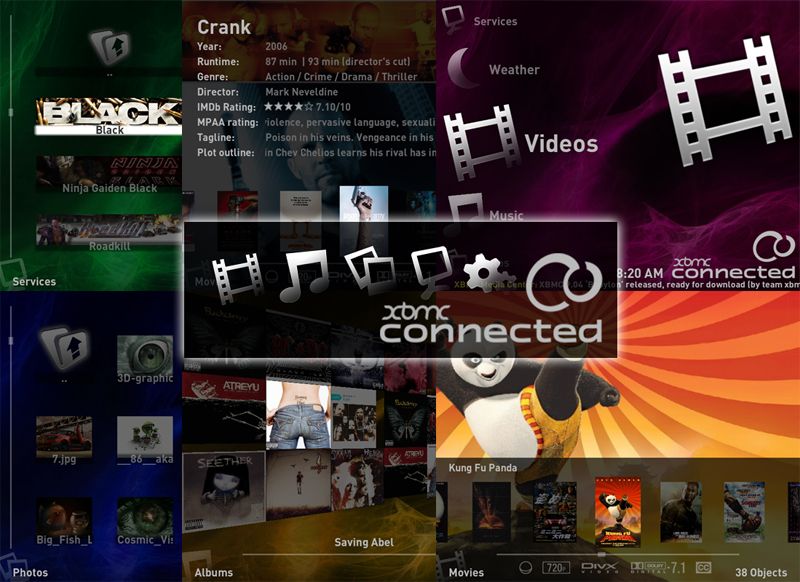
XBMC Connected - Skin Release Thread

  Thread Rating:
  • 2 Votes - 5 Average
  • 1
  • 2
  • 3
  • 4
  • 5
Post Reply
BaerMan Offline
Senior Member
Posts: 147
Joined: Dec 2008
Reputation: 0
Location: Berlin, Germany
Post: #161
Wir3d Wrote:Fix is in SVN. Fat finger problem Eek
I will post a built version later this week after more testing.
I'll give it a try and tell what happens.

Another one: I guess I just figured out where the problem with the disappearing seek/pause window could be located. As I stated some weeks ago this little infoscreen doesn't show up sometimes when pressing pause or seeking in a movie. Now I guess it is related to using the database or not.

The last two weeks I only watched movies and series that where succesfully loaded to the database and I only started them from within the database mode. The infoscreen was always there. Yesterday, I watched some epsiodes from a series not in the database and .... the infoscreen is gone.

Probably this might be related to the latest SVN version, but I don't think so. IMHO this could be an issue when starting a movie / episode not in the db where the system somehow hangs up.

Could this in any way be related to the skin?
find quote
logan_x50 Offline
Senior Member
Posts: 116
Joined: Oct 2008
Reputation: 0
Post: #162
Hello,

I would like to thank you for such a great job. By far the best skin out there. I just wondered whether you could make the Downloading Movie information bar a little smaller. Some menus get hidden behind this dialog box when its on screen.
find quote
Wir3d Offline
Team Razorfish
Posts: 615
Joined: Aug 2007
Post: #163
BaerMan Wrote:Could this in any way be related to the skin?

It could be. I will look into this some more.
find quote
Wir3d Offline
Team Razorfish
Posts: 615
Joined: Aug 2007
Post: #164
logan_x50 Wrote:Hello,

I would like to thank you for such a great job. By far the best skin out there. I just wondered whether you could make the Downloading Movie information bar a little smaller. Some menus get hidden behind this dialog box when its on screen.

What are you downloading from?
find quote
Wir3d Offline
Team Razorfish
Posts: 615
Joined: Aug 2007
Post: #165
BaerMan,
I tried to recreate your issue in library and non-library mode but didn't see the same issue.
Can you recreate this problem with PMIII?
find quote
BaerMan Offline
Senior Member
Posts: 147
Joined: Dec 2008
Reputation: 0
Location: Berlin, Germany
Post: #166
Wir3d Wrote:BaerMan,
I tried to recreate your issue in library and non-library mode but didn't see the same issue.
Can you recreate this problem with PMIII?

PMIII is what ... ? Rolleyes
Ah, I remember, it's the original skin. Might be a little dusty, didn't touch it since decades Laugh

I'll try it with PMIII tonight, but as I frequently update to latest ppa version, the xbmc-version might have impact on this issue. Today I updated to 19325 and Connected is 2112.

By the way: the main menu is back again. Thanks for the fix! Nod
find quote
BaerMan Offline
Senior Member
Posts: 147
Joined: Dec 2008
Reputation: 0
Location: Berlin, Germany
Post: #167
Hi, sorry but I didn't get this faulty behaviour to work again. Will say, the seek-window always showed up. I tried with PMIII and played a little ping-pong with database-integrated files and disk-only files and went to db-mode and back but everything worked as it should. With Connected the same game and the same results.

If it should disappear again one day, I'll call the Ghostbusters Frown
find quote
Wir3d Offline
Team Razorfish
Posts: 615
Joined: Aug 2007
Post: #168
BaerMan Wrote:Hi, sorry but I didn't get this faulty behaviour to work again. Will say, the seek-window always showed up. I tried with PMIII and played a little ping-pong with database-integrated files and disk-only files and went to db-mode and back but everything worked as it should. With Connected the same game and the same results.

If it should disappear again one day, I'll call the Ghostbusters Frown

I hate to ask you to do this but can you walk me through exactly how to recreate this problem?
find quote
Forrester Offline
Junior Member
Posts: 1
Joined: Apr 2009
Reputation: 0
Post: #169
Wir3d Wrote:You must be using a custom theme. It can be done but I can't help with it.


Hello, I'm having the exact same issue with fanart. I'm pretty sure I'm not using a custom theme - mostly because I don't know what those are! Just today, I downloaded the new XBMC and a new copy of the skin and the issue remains.

The fanart totally overwhelms the detail view so as to make it unreadable. I have XBMC on an XBOX with a plain standard def TV. If it's unfixable, it's no biggie. However it would be really nice to be able to use fanart again.

Also, thanks for all the hard work on the skin!!!! I've tried many skins over the years but always went back to the default PMIII skin. Connected is the first one that I ever liked enough to stick with! It is by far the best skin for standard def TV out there.
find quote
BaerMan Offline
Senior Member
Posts: 147
Joined: Dec 2008
Reputation: 0
Location: Berlin, Germany
Post: #170
Wir3d Wrote:I hate to ask you to do this but can you walk me through exactly how to recreate this problem?
Soory, I guess I explained it mistakable. At the moment there is no problem with the seekbar. It is always there when it should. But I try to explain what I did the last time the seekbar was gone:

As far as I remember, I first watched a movie or an episode which was held in the database and afterwards switched to folder view and scanned manually some episodes not already in the database (e.g. marked a series/episode and tried to download details for it, what didn't work). Then I watched some episodes for which there were no infos in the DB. That was the moment, the seekbar was gone.

(Unfortunately) I am not able to reproduce this error again. I tried with Connected as well as with PMIII but everything was OK. If it should happen again, I'll try to reproduce it and tell you how to make it happen.
find quote
Post Reply