Comic Cbr Thumbs

  Thread Rating:
  • 1 Votes - 5 Average
  • 1
  • 2
  • 3
  • 4
  • 5
Post Reply
Tension113 Offline
Senior Member
Posts: 163
Joined: Jun 2008
Reputation: 0
Location: Jersey
Post: #1
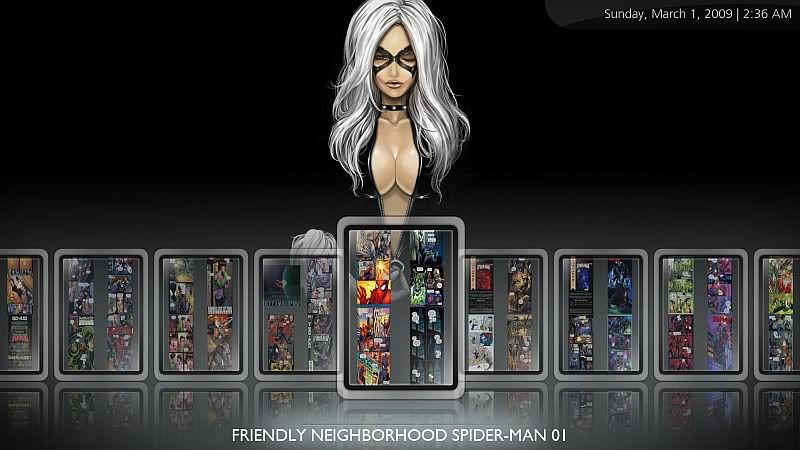
I've been reorganizing my comics lately and editing Horizonz a bit to browse through them nicely, using showcase..

Does anyone happen to know a way to have Xbmc use the first image in the CBR archive? Instead of the 4 random pics that it also uses for picture folder thumbs?

Not sure if something can be added within the skin to make this happen, but personally, I think Cbr and Cbz files would be better displayed this way..

Has anyone else come up with a decent way to browse comics? I know there are only a handful of us out there that read them on xbmc..
find quote
Tension113 Offline
Senior Member
Posts: 163
Joined: Jun 2008
Reputation: 0
Location: Jersey
Post: #2
Maybe this will help show what I'm looking to do a little better.. Since I'm not sure I made any sense in the last post.. or maybe I'm just posting this in the wrong section..

[Image: Comicview.jpg]

Is there something skin side I can do that will only show the first image in the archive as the thumb? or is this part of xbmc's inner workings... The 2x2 thumbs work nice for picture folders, but in the case of cbr/cbz files, the cover to the comic would work better..

or.. I could just create 2000+ filename.tbn's..

Anyone?
find quote
jarod71 Offline
Fan
Posts: 502
Joined: Apr 2006
Reputation: 9
Location: Chitown
Post: #3
Tension113 Wrote:Maybe this will help show what I'm looking to do a little better.. Since I'm not sure I made any sense in the last post.. or maybe I'm just posting this in the wrong section..

[Image: Comicview.jpg]

Is there something skin side I can do that will only show the first image in the archive as the thumb? or is this part of xbmc's inner workings... The 2x2 thumbs work nice for picture folders, but in the case of cbr/cbz files, the cover to the comic would work better..

or.. I could just create 2000+ filename.tbn's..

Anyone?

I had to do this by hand. so that part sucks. but i unzipped the cbr and copied the cover and made a thumbnail for each issue. I don't remember if it wa sjust filename.tbn or not. good luck.
find quote
spiff Offline
Grumpy Bastard Developer
Posts: 12,176
Joined: Nov 2003
Reputation: 82
Post: #4
if in general the first entry in a cbr is the cover i will gladly change it to use that instead

Always read the XBMC online-manual, FAQ and search the forum before posting.
Do not e-mail XBMC-Team members directly asking for support. Read/follow the forum rules.
For troubleshooting and bug reporting please make sure you read this first.
find quote
jarod71 Offline
Fan
Posts: 502
Joined: Apr 2006
Reputation: 9
Location: Chitown
Post: #5
spiff Wrote:if in general the first entry in a cbr is the cover i will gladly change it to use that instead

u are awsome! I am not sure how many people use this feature but I do. I believe in general, the first image is the cover.
find quote
jarod71 Offline
Fan
Posts: 502
Joined: Apr 2006
Reputation: 9
Location: Chitown
Post: #6
we will have to wait for t3ch to release a build incorporating the change, unless it is easy to replace a file in the current build. Does this change require a new build Spiff?
find quote
Tension113 Offline
Senior Member
Posts: 163
Joined: Jun 2008
Reputation: 0
Location: Jersey
Post: #7
spiff Wrote:if in general the first entry in a cbr is the cover i will gladly change it to use that instead

That would be great.. Thanks.. Would save some time and hard drive space.. Smile
and I think it would just be the preferred way to do it..

Once in awhile Cbr's have a 'scanned by' image as the first, but the majority are done correctly.. Some programs, like ComicRack, let you rearrange the order.. So, us nerds, who are into our ecomics, usually do that anyway..

Hopefully you won't need this now Jarod, but I used this ComicRack script to make the filename.tbn's..

http://forum.xbmc.org/showthread.php?p=2...post293208
(This post was last modified: 2009-03-11 00:30 by Tension113.)
find quote
Voinage Offline
Banned
Posts: 856
Joined: Mar 2008
Location: England
Post: #8
If you need to change the order just rename the cbr file as a rar, open it with winrar and delete the scanned by jpg.
find quote
spiff Offline
Grumpy Bastard Developer
Posts: 12,176
Joined: Nov 2003
Reputation: 82
Post: #9
oh man i forgot about this. ticket please or i will surely forget again

Always read the XBMC online-manual, FAQ and search the forum before posting.
Do not e-mail XBMC-Team members directly asking for support. Read/follow the forum rules.
For troubleshooting and bug reporting please make sure you read this first.
find quote
VanZan Offline
Donor
Posts: 335
Joined: Jun 2007
Reputation: 1
Location: Limerick, Ireland.
Post: #10
I'm a bit of a XBMC noob but I would like to add my support for this. I have a load of old Transformers comics with each issue a cbr file. It would be much better if a thumb for just the first (cover) page was shown instead of the 4 random thumbs...since I'm a noob how in the hell do I do this "ticket" thing? Smile
find quote
Post Reply