Video library redesign idea - How can we improve Smart Playlists, aka Filtered Lists?

  Thread Rating:
  • 2 Votes - 4 Average
  • 1
  • 2
  • 3
  • 4
  • 5
Post Reply
jmarshall Offline
Team-XBMC Developer
Posts: 24,523
Joined: Oct 2003
Reputation: 138
Post: #21
Cool. I suspect we'll keep both. i.e. I suspect there are users for whom the browsing of Genres, Years, (or some other category) will still be desirable, even though a filter system will be in place. The tricky bit really is fitting this in with the "customize your library" stuff I've got planned in a coherent way. The same applies to smartplaylists though, as I think about it, so I'll have to deal with it either way. Much thinking still to be done!

Cheers,
Jonathan

Always read the XBMC online-manual, FAQ and search the forum before posting.
Do not e-mail XBMC-Team members directly asking for support. Read/follow the forum rules.
For troubleshooting and bug reporting please make sure you read this first.


[Image: badge.gif]
find quote
tvieson Offline
Member
Posts: 58
Joined: Feb 2009
Reputation: 0
Post: #22
I would like to see ratings added. Unless its there and I'm not seeing it. Something to make it easier to filter what you don't want ur kids to see.
find quote
AhuraMazda Offline
Junior Member
Posts: 27
Joined: May 2009
Reputation: 0
Star    Post: #23
Greetings jmarshall and the XBMC community!

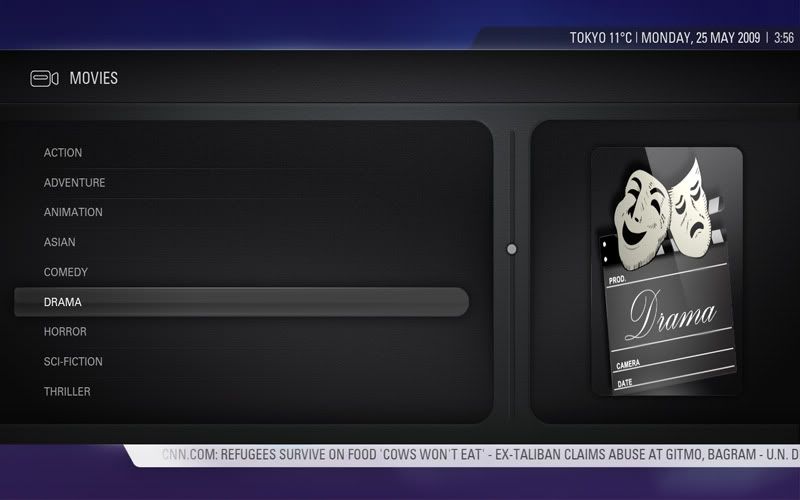
Unfortunately I am currently only limited to use "video file-mode" in XBMC due to many reasons; I have around ~1500 films sorted by limited simple-genre folders (screenshot below). It would be great if XBMC could use user-directory structures for sorting movies in library-database mode and bypassing the IMDb genre tags:

Example: (An option so that the user can highlight a directory "SCI-FICTION" and select "Use this folder name as Genre for all movies in this directory" and that would overwrite all the multiple IMDB genres to the user-set folder name for all the films/.nfo within that directory. )

In the past I used to edit most of my .nfo files by hand and changed the multiple IMDb genres to my own custom simple genres, but that was not a good solution because when I later wanted to update/ scrape the IMDb database/user-ratings etc. then the genre tags would be overwritten again. A directory genre structure would be a much easier and better solution to solve the useless multiple-IMDb genre issues for most users.

ex:
--
SCI-FICTION >>
12 Monkeys (1995)
2001 A Space Odyssey (1968)
-- (instead of SCI-FI/DRAMA/ACTION/ADVENTURE/MYSTERY)

A possibly merge between Videos/Movies(library) section in the future would be much welcomed and less confusing for newcomers to this excellent Media Center software. I always recommend XBMC to my friends, colleagues and family due to the ease of use but improvements on the video area and its library management would indeed be much appreciated and welcomed by all of us. Cheers

img below: Start-page when I enter the "MOVIES" section: (as mentioned by jmarshall, the "search by" function is more useful for actors, year, studio etc. instead of of having them listed on the main movies page)
[Image: XBMLVideo-filemodegenerelist.jpg]
(This post was last modified: 2009-05-25 05:15 by AhuraMazda.)
find quote
proctor Offline
Senior Member
Posts: 113
Joined: Aug 2008
Reputation: 0
Post: #24
Currently my DB has roughly 1500 movies.

90% of the time I use Title to browse to a movie. The other 10% I use the recently added list. Don't really like how existing films end up on this list though if they get rescanned.

I almost never browse by year, but I have used it a couple times in the past to find recent films that are no longer in the recently scanned list.

I find browsing by Actor/Director/Studio a pain, its like scrolling through a phone book and who does that anymore? Maybe I would use this if there was a quick and easy way to type a name and search.

I'm not a fan of how IMDB assigns multiple genres for every movie so I never use that for browsing the library.

If possible, I would love the ability to filter by Language or Resolution/Source
find quote
AaronD Offline
Senior Member
Posts: 252
Joined: Jan 2007
Reputation: 0
Location: Dubai, United Arab Emirates
Post: #25
Apologies in advance if I go OT, but I've found it a little hard to distinguish between what you consider on topic and off topic. However, here goes...

I've got a library of about 300 movies, and my system is used by my wife, young kids and myself. My wife and kids only ever really browse by title. Probably because they don't explore, and just aren't aware of any other way of doing it.

80% of the time, I tend to browse by title as well. The rest of the time, I either browse recently added, or browse by genre. I would say half of this time, I'm not actually browsing by genre, but rather wanting a particular genre and this is the easiest way to get there. But there are times, normally on a friday or saturday night (we have kids, so have no life :rolleyesSmile where I will just browse by genre and we will decide what we feel like as we go.

I also frequently browse by genre when I am picking a movie to put on for the kids. A while ago, I created a smart playlist for this, and using Media Companion I created a custom genre for "kids" with a corresponding link from the main menu (Aeon skin). It worked really well, and the rest of my family used this all the time. But at some stage during a rebuild, I lost the smart playlist and custom skin Xml's, and I just haven't found the time to redo this. I would definately like the ability to do this more easily, particularly linking smart playlists to custom menu items at the top level. One problem I find with the current method of browsing by genre to find kids movies, is that they are distributed across genres. What I really want to do is browse all "family" and "animated" movies, rather than having to look at seperate genres.

I also modify the title of some movies to perform a pseudo "grouping" of movies, so having grouping built in would be useful.

I would also sometimes like to be able to browse by IMDB rating, but haven't tried to set anything up for this.

I hope this is useful.

Cheers
Aaron
find quote
jmarshall Offline
Team-XBMC Developer
Posts: 24,523
Joined: Oct 2003
Reputation: 138
Post: #26
Thanks Aaron. I presume you are meaning filtering by IMDb rating, rather than browsing by it?

Cheers,
Jonathan

Always read the XBMC online-manual, FAQ and search the forum before posting.
Do not e-mail XBMC-Team members directly asking for support. Read/follow the forum rules.
For troubleshooting and bug reporting please make sure you read this first.


[Image: badge.gif]
find quote
pletopia Offline
Fan
Posts: 737
Joined: Jul 2008
Reputation: 1
Post: #27
jmarshall, i think you misunderstood my previous post ..

i too have a ~1500 movie collection
most of the time (75%) of the time i browse by recently added ... 20% by title .. 5% by genre

my suggestion would be to just increase the recent count from the current 25 to a user selectable amount (i believe in plex i was able to set it to anything with a max size of 250)
(This post was last modified: 2009-05-25 12:42 by pletopia.)
find quote
snoxbox Offline
Fan
Posts: 472
Joined: Aug 2005
Reputation: 0
Post: #28
I have >1000 movies, and I find Title (or Flattened) too slow for movies. I primarily use Genre's to browse, with Year used around 30% of the time.

The biggest gripe I have is not being able to have separate 'Flatten' settings for TV Shows and movies. I don't think too many people would use anything other than title view for TV Shows. I have to turn it on or off every time I switch between Movies and TV Shows.
find quote
Jeroen Offline
Skilled Skinner
Posts: 1,882
Joined: Feb 2008
Reputation: 4
Location: The Netherlands
Post: #29
Most of the time I just search by title, but the nodes do come in handy in certain situations. I use genre sometimes, and I use years and actors sporadically. The others I do not use. I use the recently added feature very often though.
I think the way I'd like to see it is similar if not largely the same as your proposition Jonathan.
I think a "related" button in the left hand menu (don't know how to call it actually) could bring up a list from which you could drill down by actor, genre and so fort. The ability to use custom filters would be a great bonus.
(This post was last modified: 2009-05-25 14:09 by Jeroen.)
find quote
queeup Offline
Fan
Posts: 734
Joined: Feb 2009
Reputation: 15
Post: #30
Movies:
Title, yes
Genre, yes
Year, yes
Actor, sometimes
Director, sometimes
Studio, never used

TV shows:
Title, yes always
Year, never used
Genre, never used
Actor, never used
find quote
Post Reply