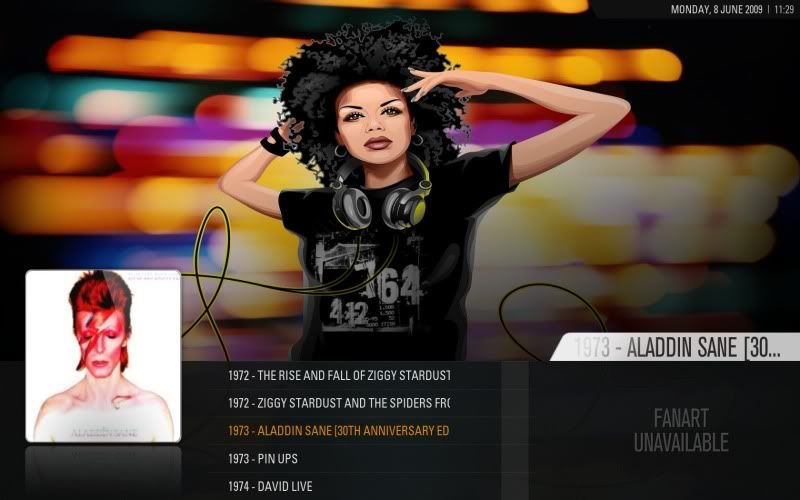
[MOD] List View Rev2

  Thread Rating:
  • 3 Votes - 3.67 Average
  • 1
  • 2
  • 3
  • 4
  • 5
Post Reply
Leeuw Offline
Senior Member
Posts: 274
Joined: Apr 2009
Reputation: 0
Post: #11
buffslayer Wrote:Hey, this looks incredible, but each time I try to add it, I get this message: Incompatible skin. We require skins of version 2.10 or higher. I'm using the latest osx build, 20933. And the latest version of Auriga. I'm sure its a real simple thing, but I've spent some time now on it and have no clue what I'm doing wrong. Thanks for any help guys!

Weird... Are you using a recent svn build of xbmc?
find quote
buffslayer Offline
Junior Member
Posts: 14
Joined: Jun 2009
Reputation: 0
Post: #12
Thanks for the reply. I believe I am, yes. Its the one that was posted yesterday on sshcs. Build 20933. Again, I'm on OSX so maybe that has something to do with it? This is where you get the latest builds, right? I've had no problems using auriga itself, and have been using it since the launch a while back. But I really love this mod you did, and since List View is my main view of choice, would really enjoy having it working, haha. Thanks again.
find quote
Montellese Online
Team-XBMC Developer
Posts: 2,790
Joined: Jan 2009
Reputation: 20
Location: Switzerland
Post: #13
Leeuw Wrote:Not sure what you mean by your second comment about the top entry -- can you elaborate?

Sure I can. I took this screenshot and put some explanation into it (at least I tried).

[Image: listmod.th.jpg]

The yellow lines show the entries having a bottom line. The red one points to the top entry which doesn't have such a bottom line like the rest.

I also put "circles" around the highlighting problem which only works for the year column for me.

Thx for the fix.

Always read the XBMC online-manual, FAQ and search the forum before posting.
Do not e-mail XBMC-Team members directly asking for support. Read/follow the forum rules.
For troubleshooting and bug reporting please make sure you read this first.

[Image: badge.gif]
find quote
Leeuw Offline
Senior Member
Posts: 274
Joined: Apr 2009
Reputation: 0
Post: #14
Moved to post below. [Will use this space later for an update]
(This post was last modified: 2009-06-07 21:38 by Leeuw.)
find quote
Leeuw Offline
Senior Member
Posts: 274
Joined: Apr 2009
Reputation: 0
Post: #15
Montellese Wrote:There seems to be some problem with the highlighting of the actual entry. In your screenshots the entry's text is colored in some kind of orange. This doesn't really work at my end. In Movies it only changes the color of the year column but not of the movie title column. In all the other views it doesn't change the color at all.

Ok, I'm an idiot, I forgot to add Includes.xml to the "easy" install pack. I'm surprised it even works as well as it does without that (about 25% of the code isn't being loaded)! Uploading now so check the first post in 2 mins.

Montellese Wrote:Ah and one question: Will you adjust this for the Pictures section as well? Because this doesn't really work at all atm. The picture shown doesn't change when you change the currently activated entry. But I will use Stripshow anyway so no hurry Wink

Yeah, I use Stripshow too, but I will get to pictures eventually for sure.
(This post was last modified: 2009-06-07 21:39 by Leeuw.)
find quote
Leeuw Offline
Senior Member
Posts: 274
Joined: Apr 2009
Reputation: 0
Post: #16
buffslayer Wrote:Thanks for the reply. I believe I am, yes. Its the one that was posted yesterday on sshcs. Build 20933. Again, I'm on OSX so maybe that has something to do with it? This is where you get the latest builds, right? I've had no problems using auriga itself, and have been using it since the launch a while back. But I really love this mod you did, and since List View is my main view of choice, would really enjoy having it working, haha. Thanks again.

Hmm, I guess it is possible it doesn't work on osx as I am using windows so can't really test it to be sure. Can anyone else out there confirm whether they have the mod working on osx?
find quote
Montellese Online
Team-XBMC Developer
Posts: 2,790
Joined: Jan 2009
Reputation: 20
Location: Switzerland
Post: #17
Great you solved all the issues I mentioned! Thanks a lot Smile

I just noticed pressing "A" doesn't start the trailer for me but I'll test it again later.

Always read the XBMC online-manual, FAQ and search the forum before posting.
Do not e-mail XBMC-Team members directly asking for support. Read/follow the forum rules.
For troubleshooting and bug reporting please make sure you read this first.

[Image: badge.gif]
find quote
Leeuw Offline
Senior Member
Posts: 274
Joined: Apr 2009
Reputation: 0
Post: #18
Montellese Wrote:I just noticed pressing "A" doesn't start the trailer for me but I'll test it again later.

That one is working for me -- let me know if you are still having issues later.
find quote
mkv1080p Offline
Junior Member
Posts: 49
Joined: Nov 2008
Reputation: 0
Post: #19
Hi, I like having the rss feed shown but I think it's too short. Could you move it all the way to left to the right edge of the poster?
find quote
paul Offline
Posting Freak
Posts: 2,772
Joined: Oct 2008
Reputation: 4
Location: Planet Earth
Post: #20
Montellese Wrote:Okay just noticed something else.

There seems to be some problem with the highlighting of the actual entry. In your screenshots the entry's text is colored in some kind of orange. This doesn't really work at my end. In Movies it only changes the color of the year column but not of the movie title column. In all the other views it doesn't change the color at all.

Ah and one question: Will you adjust this for the Pictures section as well? Because this doesn't really work at all atm. The picture shown doesn't change when you change the currently activated entry. But I will use Stripshow anyway so no hurry Wink
Same here no list highlite and i have to agree the orange colour does not really fit into Aeons colour scheme imo other than that it does work wellSmile

XBMC Frodo 12 - Windows 7 - Asrock Ion 330HT - Aeon Nox
find quote
Post Reply