For your Eden version see that you have logo-downloader as dependency:
Just for you to know
Logo Downloader (the end of it as we know it)
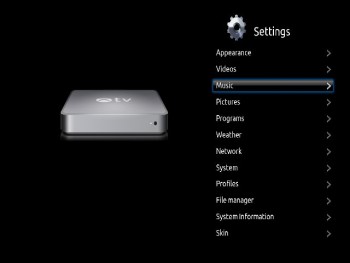
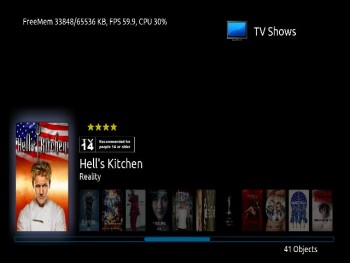
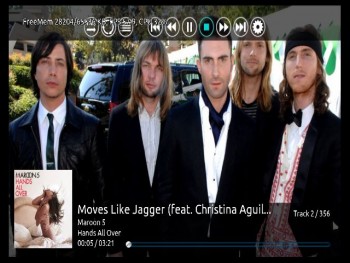
[MOD] xTV SAF (Spouse Acceptance Factor)
Martijn
Team-XBMC Joined: Jul 2011 Reputation: 115 Location: Dawn of time |
2012-01-08 15:18
Post: #631
Always read the XBMC online-manual, FAQ and search the forums before posting. Do NOT e-mail Team-XBMC members asking for support. Read/follow the forum rules. For troubleshooting and bug reporting, make sure you read this first For your mediacenter artwork go to ![]() |
| find quote |
wyrm
Skilled Skinner Joined: Nov 2007 Reputation: 6 Location: Perth, Australia (GMT +8) |
2012-01-08 16:48
Post: #632
Martijn Wrote:For your Eden version see that you have logo-downloader as dependency:Martijn, Again thank you, known issue. If you check out my development branch for v1.2.0 you will see I don't have any dependency's as I got burnt by them early in Eden cycle. Will fix for release with Artwork downloader instead of Logo downloader and redo the various other dependencies at the same time. Thank you for your work on Artwork downloader, it's much appreciated by me and the other skinners. Wyrm (xTV-SAF) When postings problems, please provide build details. If required a FULL debug log can now be submitted from the skin in settings->appearance->skin->settings>support. Ensure debug logging has been set in settings->system->debugging (or from the support menu). FAQ's located at :- http://wiki.xbmc.org/index.php?title=Add-on:XTV-SAF |
| find quote |
Martijn
Team-XBMC Joined: Jul 2011 Reputation: 115 Location: Dawn of time |
2012-01-08 16:55
Post: #633
I see
![]() I just downloaded .zip file so i saw it was there so i thought i'd just mention it. Always read the XBMC online-manual, FAQ and search the forums before posting. Do NOT e-mail Team-XBMC members asking for support. Read/follow the forum rules. For troubleshooting and bug reporting, make sure you read this first For your mediacenter artwork go to ![]() |
| find quote |
wyrm
Skilled Skinner Joined: Nov 2007 Reputation: 6 Location: Perth, Australia (GMT +8) |
2012-01-08 16:59
Post: #634
lipo Wrote:yup fanart still dont appearLipo, Thanks mate, will work on these issues for next push to SVN. That clearart that you are talking about video or music? Have not made a big deal of it but have included support for music artist logos on the music visualisation screen. Try placing an apropriate logo.png file in your artists directory and see what you think. Wyrm (xTV-SAF) When postings problems, please provide build details. If required a FULL debug log can now be submitted from the skin in settings->appearance->skin->settings>support. Ensure debug logging has been set in settings->system->debugging (or from the support menu). FAQ's located at :- http://wiki.xbmc.org/index.php?title=Add-on:XTV-SAF |
| find quote |
wyrm
Skilled Skinner Joined: Nov 2007 Reputation: 6 Location: Perth, Australia (GMT +8) |
2012-01-08 17:06
Post: #635
Martijn Wrote:I seeMate, feel free to point these things out. I use this thread as a todo list, so it does not hurt to have someone point things out here. You might find that the skin is much more stable from the Passion repo as the posted .zip file was from much, much earlier in the skins (and Eden's) development cycle. Also have a number of nice features (horizontal home menu for one) that is available from my dev SVN. Wyrm (xTV-SAF) When postings problems, please provide build details. If required a FULL debug log can now be submitted from the skin in settings->appearance->skin->settings>support. Ensure debug logging has been set in settings->system->debugging (or from the support menu). FAQ's located at :- http://wiki.xbmc.org/index.php?title=Add-on:XTV-SAF |
| find quote |
lipo
Senior Member Joined: Jul 2009 Reputation: 0 Location: Indonesia |
2012-01-17 15:57
Post: #636
been using the latest svn xbox ver 437
the profiles setting is back but still no game saves setting fanart still dont appear heres the debug log started when i enable fanart oprtion http://pastebin.com/zDqiLRxE setting button on music full screen osd dont work, no visualization buttonseeking indicator stuck at begining, & visualization no show on full screen http://pastebin.com/V2dGUXMu blank video menu http://pastebin.com/6KgiKJem no player osd for music & vid http://pastebin.com/RHPVSXFT
(This post was last modified: 2012-01-17 16:14 by lipo.)
|
| find quote |
wyrm
Skilled Skinner Joined: Nov 2007 Reputation: 6 Location: Perth, Australia (GMT +8) |
2012-01-17 17:04
Post: #637
lipo Wrote:been using the latest svn xbox ver 437So, in previous versions of the skin there was a entry in the settings menu called "Game Saves"? I have never used any games on the XBox, so I would never of even registered if this was there. Will take a further look. Quote:fanart still dont appearOk all of these things appear in your log files, Again will take yet another look and see what I can do. Quote:blank video menuNothing in the log, but I now think I know what I have done here, hopefully should not be too hard to fix. Quote:no player osd for music & vidNot sure what you are saying is wrong here (nothing showing in the log file at any rate). Can you not bring up the OSD with the "appropriate" menu key? Wyrm (xTV-SAF) When postings problems, please provide build details. If required a FULL debug log can now be submitted from the skin in settings->appearance->skin->settings>support. Ensure debug logging has been set in settings->system->debugging (or from the support menu). FAQ's located at :- http://wiki.xbmc.org/index.php?title=Add-on:XTV-SAF |
| find quote |
wyrm
Skilled Skinner Joined: Nov 2007 Reputation: 6 Location: Perth, Australia (GMT +8) |
2012-01-29 17:39
Post: #638
wyrm Wrote:Javalsu, Javalsu Wrote:Great job, I (and my wife) love this skin.Javalsu, Just push an update to my SVN that fixes this issue, will be available tomorrow morning on Passion repo. Good new is that by changing how I show the fanart the opacity is now handled correctly, bad new is that skin is now a little slower than it was before. Not so bad news is that the skin is now showing about the same frame rate as Quartz and Confluence. Let me know if you spot any other issues like this one. Wyrm (xTV-SAF) When postings problems, please provide build details. If required a FULL debug log can now be submitted from the skin in settings->appearance->skin->settings>support. Ensure debug logging has been set in settings->system->debugging (or from the support menu). FAQ's located at :- http://wiki.xbmc.org/index.php?title=Add-on:XTV-SAF |
| find quote |
joselbcn33
Junior Member Posts: 42 Joined: Feb 2010 Reputation: 0 |
2012-03-06 12:05
Post: #639
Hi there , just congratulations for the new version!!!
Just a small question. I have realized that in this new one there is no option to install themes ( I love the blue one in the old version). How can I install new themes? |
| find quote |
wyrm
Skilled Skinner Joined: Nov 2007 Reputation: 6 Location: Perth, Australia (GMT +8) |
2012-03-06 15:44
Post: #640
joselbcn33 Wrote:Hi there , just congratulations for the new version!!!joselbcn33, Install themes is still supported by the skin, but is about to be removed as 1 - Nobody seemed to care about the function as witness the lack of response in the other stickied thread in this sub forum. 2 - It is the major reason why the skin is not in the official repo. For the moment navigate to settings/skin settings/general and scroll down to 2nd last item of that sub menu. At some point this option will be removed (but hopefully it will have a easyish way to add it back for those that really want it). If you visit my googlecode page you will see under the source tab the browse option. Click that and then click the 'trunk' tab in the file list. Drill down from there and I'm sure you can figure it out. Note .xml file needs to go into the colors sub directory of the skin and the .xbt file needs to go into the media sub directory. Wyrm (xTV-SAF) When postings problems, please provide build details. If required a FULL debug log can now be submitted from the skin in settings->appearance->skin->settings>support. Ensure debug logging has been set in settings->system->debugging (or from the support menu). FAQ's located at :- http://wiki.xbmc.org/index.php?title=Add-on:XTV-SAF |
| find quote |

![[Image: fanarttv.png]](http://trakt.us/images/thanks/fanarttv.png)


Search
Help