
2009-11-26, 02:51
Version 2 - 11/28/09
Changes
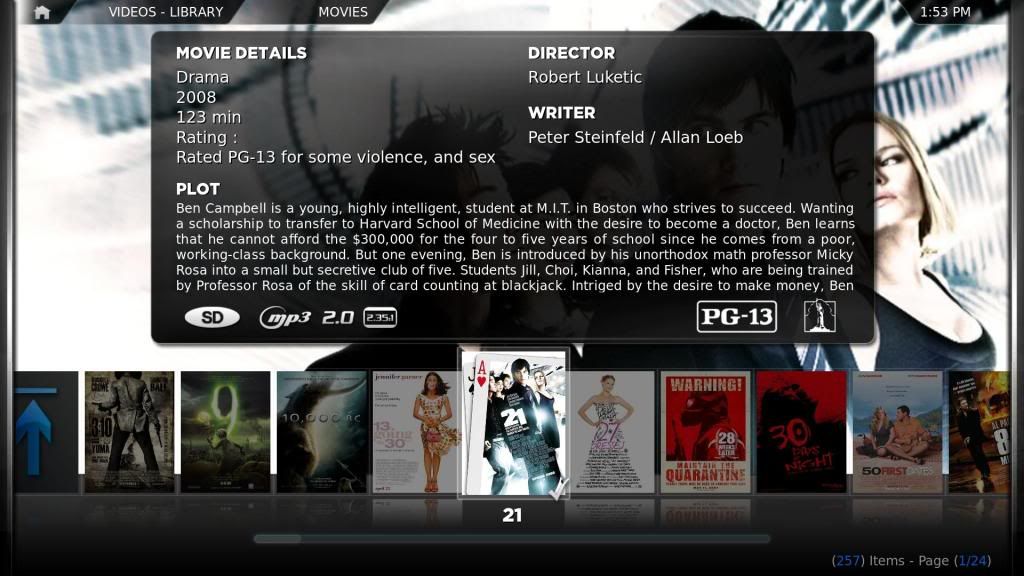
Added Rating under movie details. (shows more details of the mpaa.)
Added Studio icons in the bottom right.
Changed the position of the mpaa to the bottom right.
Enlarged mpaa Icons (easier to read).
Added the smaller white icons. (smaller in width.)
Moved movie details down a tad to accommodate for the addition of mpaa in Movie details.
Download
Download smaller white icons with silver gradient. - Added 11/30/09
Colored mpaa.

Smaller white. (smaller width)
INSTRUCTIONS
1. Place the flags folder in the media folder of Confluence.
2. Replace the old IncludesCodecFlagging.xml and ViewsVideoLibrary.xml (backup just in case it doesn't work) with the new one in the 720P folder of Confluence.
OPTIONS
How to use white or small white instead of colors. Colors are easier to distingish at a glance. Just replace the images in the flags folder with the one in the flags-white and flags-small white folder.
INFO for default
G - Green
PG - Yellow
PG 13 - Orange
R - Red
NC-17 - Dark Red
Note: Always backup all files. I'm not responsible for anything that doesn't work. USA Ratings only. This is for Confluence skin only. I would like to thank migueld for the small mpaa icons.
Enjoy. Comments welcome.
Version 1 - 11/25/09
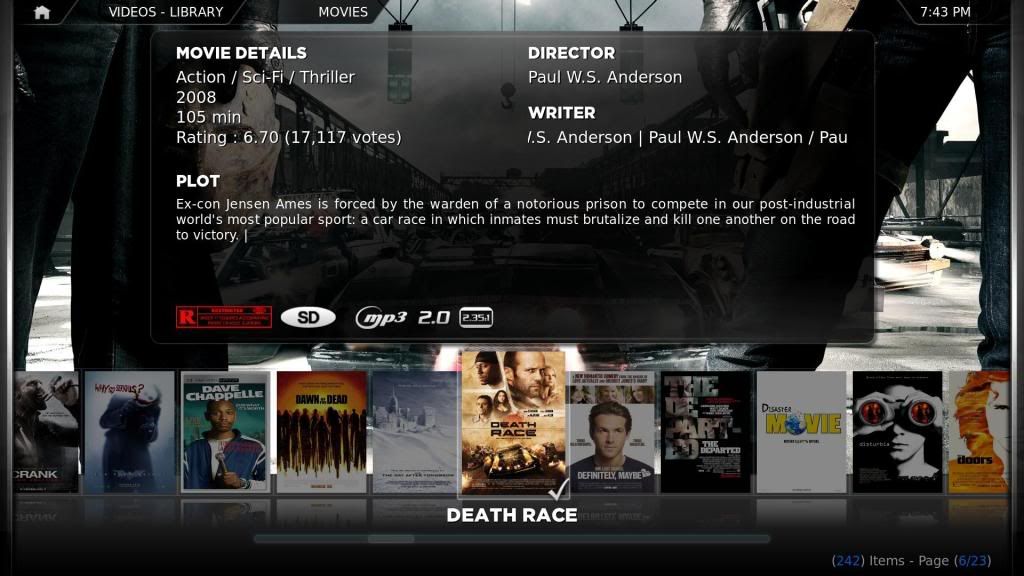
I like knowing the rating for when I have family over and for my son. Here is my solution. I included color and white images. Default is color. You have to replace them with the ones in the other folder to have white.
Download
INSTRUCTIONS
1. Place the flags folder in the media folder of Confluence.
2. Replace the old IncludesCodecFlagging.xml (backup just in case it doesn't work) with the new one in the 720P folder of Confluence.
OPTIONS
How to use white instead of colors. Colors are easier to distingish at a glance. Just replace the images in the flags folder with the one in the flags-white folder.
INFO
G - Green
PG - Yellow
PG 13 - Orange
R - Red
NC-17 - Dark Red
Note: Always backup all files. I'm not responsible for anything that doesn't work.
USA Ratings.
Enjoy. Comments welcome.
Changes
Added Rating under movie details. (shows more details of the mpaa.)
Added Studio icons in the bottom right.
Changed the position of the mpaa to the bottom right.
Enlarged mpaa Icons (easier to read).
Added the smaller white icons. (smaller in width.)
Moved movie details down a tad to accommodate for the addition of mpaa in Movie details.
Download
Download smaller white icons with silver gradient. - Added 11/30/09
Colored mpaa.
Smaller white. (smaller width)
INSTRUCTIONS
1. Place the flags folder in the media folder of Confluence.
2. Replace the old IncludesCodecFlagging.xml and ViewsVideoLibrary.xml (backup just in case it doesn't work) with the new one in the 720P folder of Confluence.
OPTIONS
How to use white or small white instead of colors. Colors are easier to distingish at a glance. Just replace the images in the flags folder with the one in the flags-white and flags-small white folder.
INFO for default
G - Green
PG - Yellow
PG 13 - Orange
R - Red
NC-17 - Dark Red
Note: Always backup all files. I'm not responsible for anything that doesn't work. USA Ratings only. This is for Confluence skin only. I would like to thank migueld for the small mpaa icons.
Enjoy. Comments welcome.
Version 1 - 11/25/09
I like knowing the rating for when I have family over and for my son. Here is my solution. I included color and white images. Default is color. You have to replace them with the ones in the other folder to have white.
Download
INSTRUCTIONS
1. Place the flags folder in the media folder of Confluence.
2. Replace the old IncludesCodecFlagging.xml (backup just in case it doesn't work) with the new one in the 720P folder of Confluence.
OPTIONS
How to use white instead of colors. Colors are easier to distingish at a glance. Just replace the images in the flags folder with the one in the flags-white folder.
INFO
G - Green
PG - Yellow
PG 13 - Orange
R - Red
NC-17 - Dark Red
Note: Always backup all files. I'm not responsible for anything that doesn't work.
USA Ratings.
Enjoy. Comments welcome.





 i colored the icons and then edited the includecodecsflagging so they were 100x45 seems to work ok but there not quite in the right position(X-Y kind of position) to line up with the others where does that value come from? is it set in another xml? hmmmm..... i might i have to go digging lol


