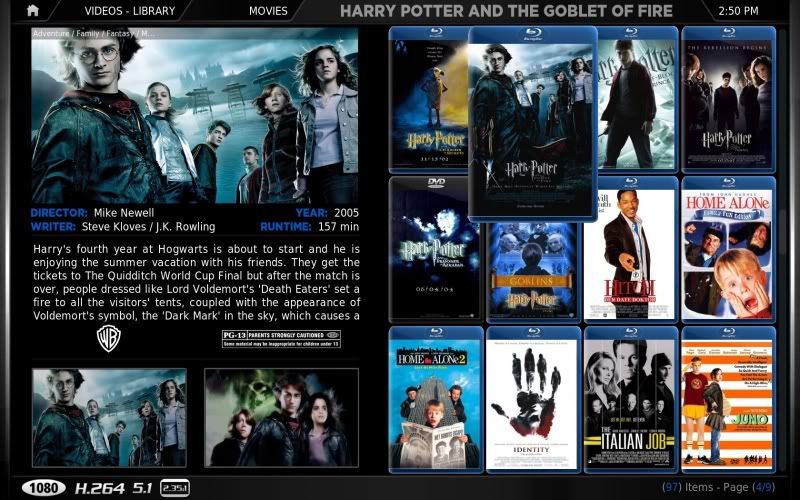
With cases enabled:
![[Image: wallstreamwithcases.jpg]](http://img196.imageshack.us/img196/640/wallstreamwithcases.jpg)
With cases disabled:
![[Image: wallstreamwithoutcases.jpg]](http://img132.imageshack.us/img132/8201/wallstreamwithoutcases.jpg)
Wallstream 2 view:
![[Image: screenshot000-1.jpg]](http://i108.photobucket.com/albums/n10/igotdvds/screenshot000-1.jpg)
Installation:
1) Unzip Confluence folder from rar file over your existing confluence folder
Download file here
aphillippe
Member Posts: 50 Joined: Jul 2009 Reputation: 0 |
2010-01-04 16:30
Post: #1
V2 Now combined with IgotDVDs' half wall view.
With cases enabled: ![]() With cases disabled: ![]() Wallstream 2 view: ![]() Installation: 1) Unzip Confluence folder from rar file over your existing confluence folder Download file here

(This post was last modified: 2010-01-10 01:24 by aphillippe.)
|
| find quote |
mcborzu
Skilled Skinner Joined: Feb 2009 Reputation: 15 Location: dsf |
2010-01-04 16:46
Post: #2
If you want to have your view without overwriting anything give the top section of the view a new id.
These are the view id's that confluence is using: Quote:<views>50,500,501,508,504,503,505,511</views>Give your view new id, like maybe... 55, 506, 512 then add it to the <views> tag at the top of MyVideoNav.xml 5) This is the code, at the top of MyVideoNav.xml that is controlling fanart: PHP Code: <control type="image">If your view, lets say has a id of 508, add this to get rid of fanart for that view: Quote:<visible>Container.Content(Movies) | !Control.IsVisible(508)</visible> |
| find quote |
aphillippe
Member Posts: 50 Joined: Jul 2009 Reputation: 0 |
2010-01-04 16:50
Post: #3
Nice one. Thanks for the pointers. I'll give it a shot.
|
| find quote |
aphillippe
Member Posts: 50 Joined: Jul 2009 Reputation: 0 |
2010-01-04 17:26
Post: #4
Ok, I've had a go at changing the above. I've got the new view sorted, except I can't figure out where to define the label for the view selection control. It still says "Thumbnail", I want to change it to "Wallstream". Any ideas?
Also, after adding the line to the fanart control, fanart is still showing. Reading the code though, it looks like a list of when to show fanart, not when to hide it (i.e. when skin has setting, when in any movies container). Is there something that I should be using to tell the skin not to show fanart (<notvisible> tag or similar)? Or am I just doing it wrong? Code as is (not working): Code: <control type="image"> |
| find quote |
igotdvds
Skilled Skinner Joined: Jul 2009 Reputation: 11 |
2010-01-04 17:39
Post: #5
How does it know to apply the blu ray case? Also, will it do HDTV cases?
|
| find quote |
aphillippe
Member Posts: 50 Joined: Jul 2009 Reputation: 0 |
2010-01-04 18:26
Post: #6
igotdvds Wrote:How does it know to apply the blu ray case? Also, will it do HDTV cases? It picks up the video resolution from the media info and displays BD case if resolution is 720 or 1080, DVD if 480, 540 or if the info hasn't been found yet. You could do similar with the filename, rename all the files to contain ".BD.", ".HDDVD.", ".HDTV." etc. and have a corresponding .png file in the media folder. You could use whatever naming convention you wanted. Only problem is that you would have to manually rename all your files, and any new files that are added. Doing it my way limits to HD/SD, but is completely automatic. |
| find quote |
igotdvds
Skilled Skinner Joined: Jul 2009 Reputation: 11 |
2010-01-04 18:32
Post: #7
Well since most HDTV stuff for me is 720. Could you give me the psd for the 720 image and let me change it to be a HDTV cover?
|
| find quote |
mcborzu
Skilled Skinner Joined: Feb 2009 Reputation: 15 Location: dsf |
2010-01-04 19:26
Post: #8
This should work, the bottom half should look like this:
Quote:<fadetime>FanartCrossfadeTime</fadetime> The ! operator means not To change "Thumbnail" to "Wallstream" change the bolded part: Quote:<viewtype label="$LOCALIZE[544] 2">list</viewtype>It has that weird $LOCALIZE[544] 2 for translations, if you replace $LOCALIZE[544] 2 with the word "bob" the view will now say "bob". |
| find quote |
aphillippe
Member Posts: 50 Joined: Jul 2009 Reputation: 0 |
2010-01-04 19:45
Post: #9
mcborzu Wrote:This should work, the bottom half should look like this: That all works now. Thanks for the help. I'll redo the mod and upload later this evening. Quote:Well since most HDTV stuff for me is 720. Could you give me the psd for the 720 image and let me change it to be a HDTV cover? I've uploaded the .png and .psd for HDTV, here. Just rename it to 720case.png. |
| find quote |
igotdvds
Skilled Skinner Joined: Jul 2009 Reputation: 11 |
2010-01-04 21:00
Post: #10
|
| find quote |