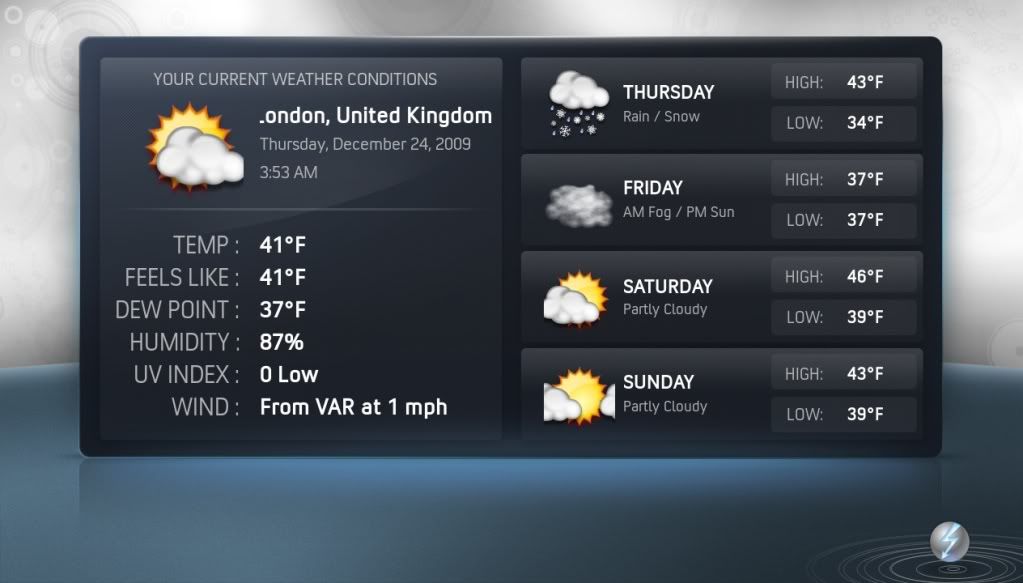
I was wondering, if , or How I can change the default weather icons? They´re animated and I don´t want such a thing, I already made my own weather icons(static) and want to put it on this skin. Can anybody say me How?
emal011
Senior Member Posts: 194 Joined: Nov 2008 Reputation: 0 Location: Munich |
2010-02-05 16:29
Post: #1
Well, I have to say, that this Skin hat a great design. Beautiful, modern, exotic layers, but use the old and ugly weather icons.
I was wondering, if , or How I can change the default weather icons? They´re animated and I don´t want such a thing, I already made my own weather icons(static) and want to put it on this skin. Can anybody say me How?
Plataform: AMD 6000+ Athlon X2 (3,1Ghz) | Nvidia GT8800 512Mb | 4Gb Kingston | 500Gb Samsung + 320Gb + 1,5Tb | Windows 7 Home Premium 64Bits | Creative Sound Blaster X-Fi Titanium| Creative Inspire T6160 5.1 | XBMC mit Night | Philips 220SW 1680 x 1050 60Hz :sniffle:
(This post was last modified: 2010-02-06 12:04 by emal011.)
|
| find quote |
MarkTaunton
Senior Member Posts: 266 Joined: Dec 2009 Reputation: 0 Location: Taunton, Somerset, England |
2010-02-05 16:40
Post: #2
I would imagine that you just need to find the animated icons for the weather, and then just replace them with your images.
I might be wrong, but I would try that first, making sure you back up the original icons. |
| find quote |
emal011
Senior Member Posts: 194 Joined: Nov 2008 Reputation: 0 Location: Munich |
2010-02-05 17:14
Post: #3
MarkTaunton Wrote:I would imagine that you just need to find the animated icons for the weather, and then just replace them with your images. I don´t know why, but, for a simple animated weather icon, exist around 15 icon. Are you trying to say, that I could delete all icons and reemplaze it with a unic Icon? Plataform: AMD 6000+ Athlon X2 (3,1Ghz) | Nvidia GT8800 512Mb | 4Gb Kingston | 500Gb Samsung + 320Gb + 1,5Tb | Windows 7 Home Premium 64Bits | Creative Sound Blaster X-Fi Titanium| Creative Inspire T6160 5.1 | XBMC mit Night | Philips 220SW 1680 x 1050 60Hz :sniffle: |
| find quote |
paul
Posting Freak Joined: Oct 2008 Reputation: 4 Location: Planet Earth |
2010-02-06 01:59
Post: #4
The existing textures can be found in XBMC\skin\Xperience\media\animations\weather.
I would imagine you would just rename each of your single images to that of the first image in each of those folders then delete the rest, if you understand what i mean. This should work ok, but do make sure you back up the existing folder in case it screws up
XBMC Frodo 12 - Windows 7 - Asrock Ion 330HT - Aeon Nox |
| find quote |
Rocky5
Alaska Group Joined: Jun 2008 Location: Scotland |
2010-02-06 03:13
Post: #5
the new version (beta) you can pick from static or animated icons static are the default XBMC ones and animated are the ones in the weather folder so holed off the now till the new beta is out.
|
| find quote |
emal011
Senior Member Posts: 194 Joined: Nov 2008 Reputation: 0 Location: Munich |
2010-02-06 12:03
Post: #6
Yeah, I was thinking the same, just delete it all the files. And works great!
Old Weather Screen: ![]() New Weather screen: ![]() Just a question, Why the animated icons are many PNG´s? and not gif ?
Plataform: AMD 6000+ Athlon X2 (3,1Ghz) | Nvidia GT8800 512Mb | 4Gb Kingston | 500Gb Samsung + 320Gb + 1,5Tb | Windows 7 Home Premium 64Bits | Creative Sound Blaster X-Fi Titanium| Creative Inspire T6160 5.1 | XBMC mit Night | Philips 220SW 1680 x 1050 60Hz :sniffle: |
| find quote |
Rocky5
Alaska Group Joined: Jun 2008 Location: Scotland |
2010-02-06 18:00
Post: #7
emal011 Wrote:Yeah, I was thinking the same, just delete it all the files. And works great! Gifs are only 256 colours so they would look naff lol |
| find quote |