jeepcook
Senior Member Posts: 183 Joined: Feb 2007 Reputation: 0 |
2010-06-01 22:59
Post: #21
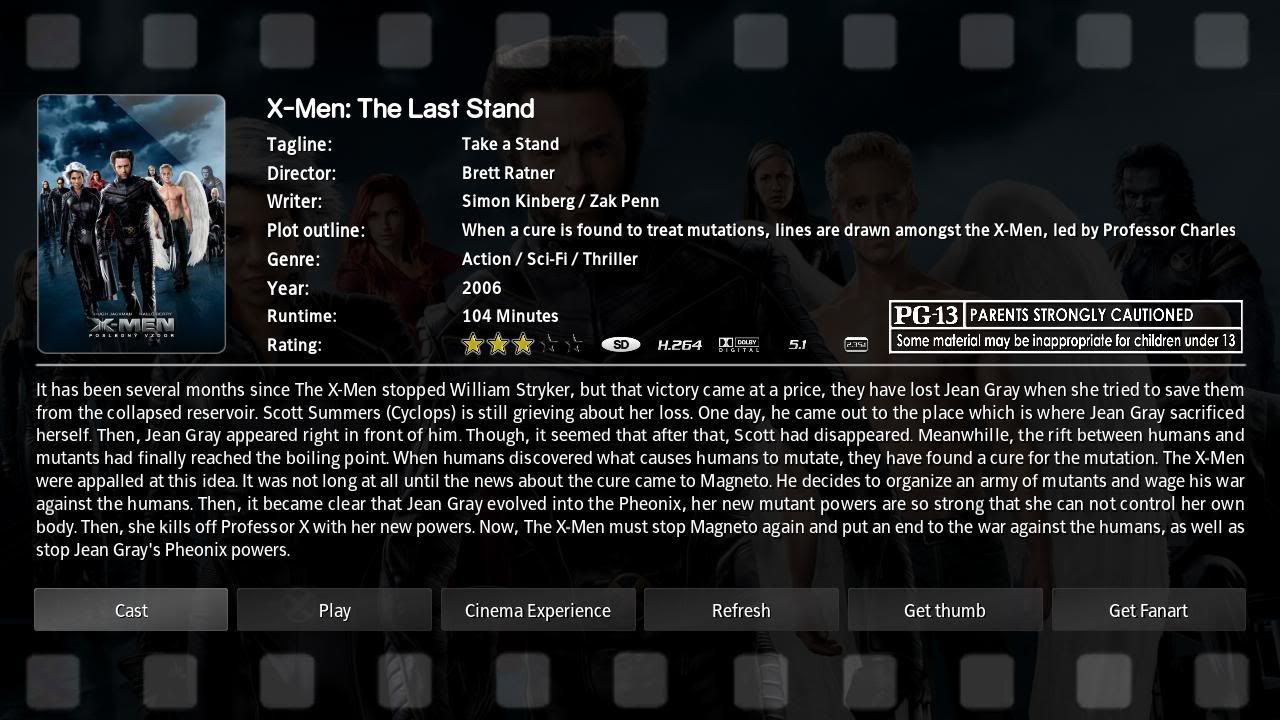
Great skin, but no french translation available and the localisation of the file is not showned when you press info ...
|
| find quote |
djdafreund
Skilled Skinner Joined: Dec 2005 Reputation: 0 Location: Atlanta |
2010-06-02 05:54
Post: #22
Do you know french?? If so, would you be able to help add a French one? You will be given proper credit. I personally only know like 2-3 things to say i learned in high school like 20+ years ago.
|
| find quote |
jeepcook
Senior Member Posts: 183 Joined: Feb 2007 Reputation: 0 |
2010-06-02 07:19
Post: #23
djdafreund Wrote:Do you know french?? If so, would you be able to help add a French one? You will be given proper credit. I personally only know like 2-3 things to say i learned in high school like 20+ years ago. Yes I am french and I know English !! so I can translate strings.xml !! But I love this skin but as I said in my previous post, Back row doesn't show the path where the video file is (after clicking on Info button). I need this information !! So if there isn't this information, I will not use this skin , so I will translate it but later latre later ... Regards !! |
| find quote |
eternalsword
Member Posts: 52 Joined: May 2010 Reputation: 0 |
2010-06-02 18:10
Post: #24
I second the request for file path in the info. Sometimes it's necessary to edit associated nfo files.
xbmc from https://github.com/eternalsword/xbmc/tree/delta, transparency 4.0.3 (svn), gentoo kernel 3.2.0-rc7 |
| find quote |
djdafreund
Skilled Skinner Joined: Dec 2005 Reputation: 0 Location: Atlanta |
2010-06-03 05:27
Post: #25
So other skins do this then? If so, maybe when Sharpe get's some time (he's the coder), he might be able to look at it and add the change to do this.
EDIT- Wow is Sharpe FAAAST!!!! He's already added this request as of today. How's THAT for speed with requests!??!!?? CrAzy mAn. LOL. "Update: Added File path info to video info dialog"
(This post was last modified: 2010-06-03 06:44 by djdafreund.)
|
| find quote |
jeepcook
Senior Member Posts: 183 Joined: Feb 2007 Reputation: 0 |
2010-06-03 22:54
Post: #26
Thanks !!
Another request: is backrow compatible with pvr-testing branch ?? Thanks |
| find quote |
Sharpe
Skilled Skinner Joined: Jul 2006 Reputation: 12 Location: North West England |
2010-06-04 01:48
Post: #27
No I've not really looked at the pvr branch
|
| find quote |
kiboy6
Fan Posts: 609 Joined: Mar 2009 Reputation: 0 |
2010-06-04 02:02
Post: #28
djdafreund Wrote:So other skins do this then? If so, maybe when Sharpe get's some time (he's the coder), he might be able to look at it and add the change to do this. Thanks for the speedy update as usual Sharpe - I remember in the past you were understandably against this feature, as you felt that XBMC should remain an opaque front-end. I for one still wanted it in, but given your previous stance I'm a bit surprised how prominent the path now is on the info page....IMO it might be better tucked away amongst the rest of the info in the top half of the screen, so you only really see it if your looking for it. What do you think? Is that feasible? ----- I see that this thread, and the .bat are now titled 28276+
|
| find quote |
Sharpe
Skilled Skinner Joined: Jul 2006 Reputation: 12 Location: North West England |
2010-06-04 08:30
Post: #29
kiboy6 Wrote:Thanks for the speedy update as usual Sharpe - Yep you're spot on - my main objection to putting the file path up amongst the movie info labels was that it didn't really have anything at all to do with the scraped metadata and it would mean another long scrolling label to distract the eye but this time comprised of a load of spurious network path info as opposed to actual movie information. That's the problem with the way I've currently set the diaglog up. You can't simply tuck it away with the other labels because it would mean having to move the film classification images, resizing the movie thumb, resizing the plot info area, resizing the cast thumbs and resizing the cast controls area. This was an attempt to avoid having to change the whole design (which I like) just to put a label on saying that the movie was on my hard drive! But as you say it's perhaps too prominent now - Yeah I'm thinking that I probably need to play around with PS a bit more and mock up a whole new redesign. For which suggestions are always very welcome.
(This post was last modified: 2010-06-04 08:37 by Sharpe.)
|
| find quote |
jeepcook
Senior Member Posts: 183 Joined: Feb 2007 Reputation: 0 |
2010-06-04 09:24
Post: #30
Sharpe Wrote:Yep you're spot on - my main objection to putting the file path up amongst the movie info labels was that it didn't really have anything at all to do with the scraped metadata and it would mean another long scrolling label to distract the eye but this time comprised of a load of spurious network path info as opposed to actual movie information. That's the problem with the way I've currently set the diaglog up. You can't simply tuck it away with the other labels because it would mean having to move the film classification images, resizing the movie thumb, resizing the plot info area, resizing the cast thumbs and resizing the cast controls area. This was an attempt to avoid having to change the whole design (which I like) just to put a label on saying that the movie was on my hard drive! But as you say it's perhaps too prominent now - Yeah I'm thinking that I probably need to play around with PS a bit more and mock up a whole new redesign. For which suggestions are always very welcome. How to have the same view like yours .. if I choose Movie information I have this view ...
|
| find quote |

![[Image: Back-Row-1.png]](http://img.photobucket.com/albums/0903/Sharpe/front%20row/Back-Row-1.png)
Search
Help