(2012-03-22 07:19)TheFonz Wrote:(2012-03-21 23:09)elitegamer360 Wrote: This sounds like a messed up Keyboard.xml ! I am using XBMC RC2 and I just tested thinking that the script is broken, but it is not! It is working absolutely fineBut before you attempt this I advise you to backup your current Keyboard.xml to a safe place first. Now I would advise you to Download this Temp Keyboard.xml and place it in %AppData%\XBMC\userdata\keymaps in this folder you should have just one Keyboard.xml!
This Keyboard.xml is exactly the same as the one in xbmccustomregis v1.2.14 with one fix at the moment, which I added for "Jumpsms" only. I will be adding other fixes but it will be released with the next setup build.
Tried that, didn't workWell I will keep thinking. I am very much against formatting and reinstalling windows for a simple GSB fix. I can live with the back button for now.
Was just uber convenient to be able to press the GSB to go to the home screen.
This might be the hard way, but keep on trouble shooting

(2012-03-29 08:06)djcorvus Wrote: Hey guys,
I'm upgrading from Dharma to Eden.
Currently, the remote config found in xbmccustomregis.sourceforge.net has been perfect, no complaints.
Will it work the same for Eden when I install it, and repeat the steps found on the website? (provided I install it to the same directory). Just thought I'd ask on here first in case there's still a few bugs or incompatibilities.
Thanks, and keep up the good work!
If you installed version 1.2.14 it should work fine but keyboard.xml has some issues due to Eden update, now you can install the updated xbmccustomregis v1.2.18 or just simply replace your current keyboard.xml with the new Keyboard.xml v1.84. all files available on site

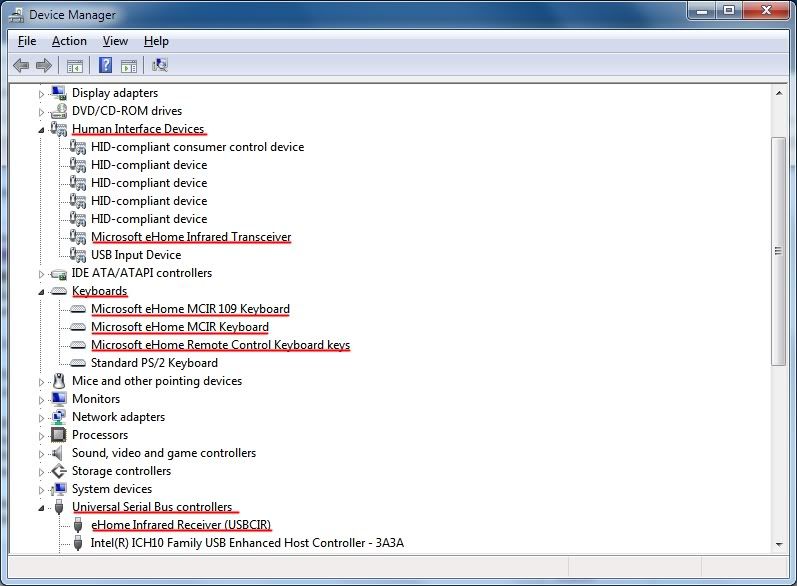
(2012-03-30 04:31)WHOAA Wrote: Got this Rosewill RHRC-11002 remote and it doesn't even open windows media center let alone XBMC. The eHome is installed in dev mgr, tried multiple usb plugs, see red in the receiver blink 3 times after plugging in. Still nothing. There is a led at the top of the remote, does it turn red when you press a button (just curious cause mine doesn't). Anyone have any suggestions?
This might sound as a stupid question but did you check that you have batteries in your remote? Did you check that the batteries polarisation are aligned correctly according to the remote "+, -" signs?
If all the above is checked then you have a faulty remote the red light on the remote must flash when buttons are pressed.
Cheers all,
EG.

Well I will keep thinking. I am very much against formatting and reinstalling windows for a simple GSB fix. I can live with the back button for now.![[Image: elitegamer360.jpg]](http://gamercard.zaamit.com/sgrey/elitegamer360.jpg)
![[Image: newsigxbox05_3.png]](http://i157.photobucket.com/albums/t45/EliteGamer360/newsigxbox05_3.png)
![[Image: driv.jpg]](http://i157.photobucket.com/albums/t45/EliteGamer360/driv.jpg)
I will update the first page to make it more obvious 
Search
Help