I have all the files correct now. That was a lot of work!
I will upload later. Hogfan, I am relying on you to test it out.
[NEW UPLOAD] 1.1.1 is on the repo! Go test it out!
igotdvds
Skilled Skinner Joined: Jul 2009 Reputation: 11 |
2010-10-14 19:07
Post: #21
|
| find quote |
hogfan
Fan Joined: Nov 2009 Reputation: 0 |
2010-10-14 22:18
Post: #22
I'll be happy to test it out. Just let me know when the changes have been uploaded to GIT. I'll test it out and report back ASAP. TheUni's report from the script he wrote was a big help I bet.
-hogfan |
| find quote |
igotdvds
Skilled Skinner Joined: Jul 2009 Reputation: 11 |
2010-10-14 22:29
Post: #23
hogfan Wrote:I'll be happy to test it out. Just let me know when the changes have been uploaded to GIT. I'll test it out and report back ASAP. TheUni's report from the script he wrote was a big help I bet. I will upload when I get home (3 hours). PM me some form of chat contact (gmail) and I can notify you when its done. |
| find quote |
hogfan
Fan Joined: Nov 2009 Reputation: 0 |
2010-10-14 22:41
Post: #24
PM sent.
|
| find quote |
hogfan
Fan Joined: Nov 2009 Reputation: 0 |
2010-10-15 05:11
Post: #25
I did a rebase from the Git and reboot my XBMC box. Looks like you have corrected all the issues I reported with file-renaming. Only two things I can find questionable after testing:
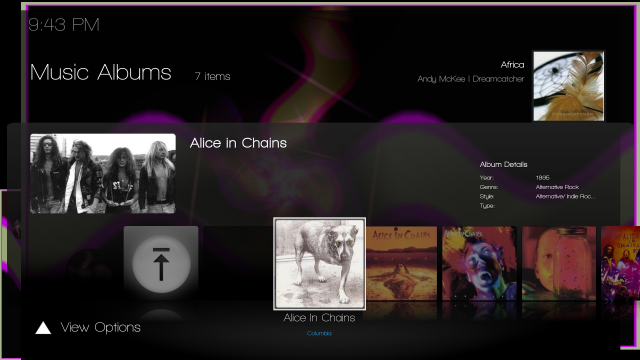
1.) Configure Skin Settings --> Home Menu - the image is showing up now so I can see which item I have selected, however, within this on menu (Home Screen) only, the selector is acting kind of weird. In the other menus (ie. General) when I choose General I can arrow down to start setting my options. Seems like this is inconsistent on the "Home Menu" heading. In order to select something in this menu I have to hit up rather than down. Nothing major but kind of odd. (looks more like a code than image issue) 2.) The only missing images I could find were in the screenshot below. Isn't there supposed to be a box with album thumbs (or actors) in front of the first album in this view? ![]() Other than those two things, I can't find anything else wrong. Thanks for getting this fixed so quickly. I love this skin! -hogfan |
| find quote |
dan1son
Fan Posts: 608 Joined: Dec 2008 Reputation: 0 |
2010-10-15 05:19
Post: #26
Just chiming in as well. The new views are stellar. I'm having the same selection problem in the settings screen as well. I can scroll through them, but no indication of selection is showing... I can click on things and change the settings, but I can't tell what I'm on
This is also in Linux btw. The music now playing screen is nice, but I'd LOVE to see it on the bottom left or top left of the list views for artists, albums, and songs. And if you could put it in the old home screen layout too that'd be nice. I prefer the feel of the old one (the new one only showing three choices at once is rough). Thanks for continuing to make this the best skin, by far in my opinion. I just went through all the other options again tonight, and ended up back at Shade! |
| find quote |
igotdvds
Skilled Skinner Joined: Jul 2009 Reputation: 11 |
2010-10-15 05:59
Post: #27
dan1son Wrote:Just chiming in as well. The new views are stellar. I'm having the same selection problem in the settings screen as well. I can scroll through them, but no indication of selection is showing... I can click on things and change the settings, but I can't tell what I'm on Can you take a screenshot of the screen that isnt showing the selection bar. |
| find quote |
hogfan
Fan Joined: Nov 2009 Reputation: 0 |
2010-10-15 15:52
Post: #28
If da1nson does grab a screenshot, I'll get you one tonight from my box. Like I said in my previous post, I do see the selected item now, but I have to push up/down arrows randomly then all of sudden I see an item selected. That's why I think it maybe the code in this specific menu. Since your upload to GIT last night, I only see this issue in the following menu:
Settings --> Skin Settings --> Home Screen (the one where you can change to the altermate home screen view) Any thoughts on 2.) from my post above? do those images still exist or were removed in the latest updates? -hogfan |
| find quote |
igotdvds
Skilled Skinner Joined: Jul 2009 Reputation: 11 |
2010-10-15 16:30
Post: #29
hogfan Wrote:If da1nson does grab a screenshot, I'll get you one tonight from my box. Like I said in my previous post, I do see the selected item now, but I have to push up/down arrows randomly then all of sudden I see an item selected. That's why I think it maybe the code in this specific menu. Since your upload to GIT last night, I only see this issue in the following menu: The second issue looks like you dont have any album art for that album. As far as the first one. I didnt change any code for the settings screen that I can remember. I'll look again. If one of you can capture video for this, that would be helpful too. Also, make sure the scrollbar isnt selected. |
| find quote |
dan1son
Fan Posts: 608 Joined: Dec 2008 Reputation: 0 |
2010-10-15 20:42
Post: #30
igotdvds Wrote:The second issue looks like you dont have any album art for that album. I won't be able to get a screenshot until tomorrow or Sunday sometime. The scrollbar is not selected. The highlighting just doesn't work anymore on the settings screens for me. If it matters, I did a full delete of the skin.shade directory before unzipping the GIT file. Also, as mentioned somewhere above, the music "Info list" shows the current playing info (which is great), but it's plopped over the top right of the list. If that could be moved to the bottom left or something that'd be great. Thanks! |
| find quote |

![[Image: sigpic_51354_dedd3c5dac45dcc8f6b4ccc9d9ad3429.png]](http://forum.xbmc.org/uploads/signatures//sigpic_51354_dedd3c5dac45dcc8f6b4ccc9d9ad3429.png)
![[Image: screenshot009.png]](http://i13.photobucket.com/albums/a262/jsgates/Shade_Bugs/screenshot009.png)
This is also in Linux btw.
Search
Help