Sky_Stryker
Junior Member Posts: 14 Joined: Oct 2010 Reputation: 0 Location: United States |
2011-01-03 05:47
Post: #1
Was not sure whether to post this here or in the forum for the script. But I downloaded the random Items script put it into my addons folder labeled script.randomitems but I get nothing am I missing a step somewhere. I really love this skin I just can't seem to get that script to work for me. I know its a user error so any help would be appreciated. I am using the latest version of dharma and the fusion skin. Thanks...
|
| find quote |
>>X<<
Alaska Group Joined: Jun 2009 Location: On a farm trying to catch a fox |
2011-01-03 13:32
Post: #2
The script is already included you just need to go to Settings > Fusion > Home Settings > Extras, uncheck "hide recently added"
|
| find quote |
Sky_Stryker
Junior Member Posts: 14 Joined: Oct 2010 Reputation: 0 Location: United States |
2011-01-03 23:14
Post: #3
I am actually getting recently added just not the featured Items on the home page. I did check my settings and it is turned on is there anything else I can check...Thanks for the help.
|
| find quote |
Hitcher
Skilled Skinner Joined: Aug 2007 Reputation: 67 Location: Eastleigh, UK |
2011-01-03 23:29
Post: #4
It only runs at startup right now but I'm sure it'll be added to run on Home soon enough.
![]() |
| find quote |
Sky_Stryker
Junior Member Posts: 14 Joined: Oct 2010 Reputation: 0 Location: United States |
2011-01-04 03:45
Post: #5
Awesome thanks.
|
| find quote |
MilhouseVH
Posting Freak Posts: 1,059 Joined: Jan 2011 Reputation: 21 |
2011-01-07 04:12
Post: #6
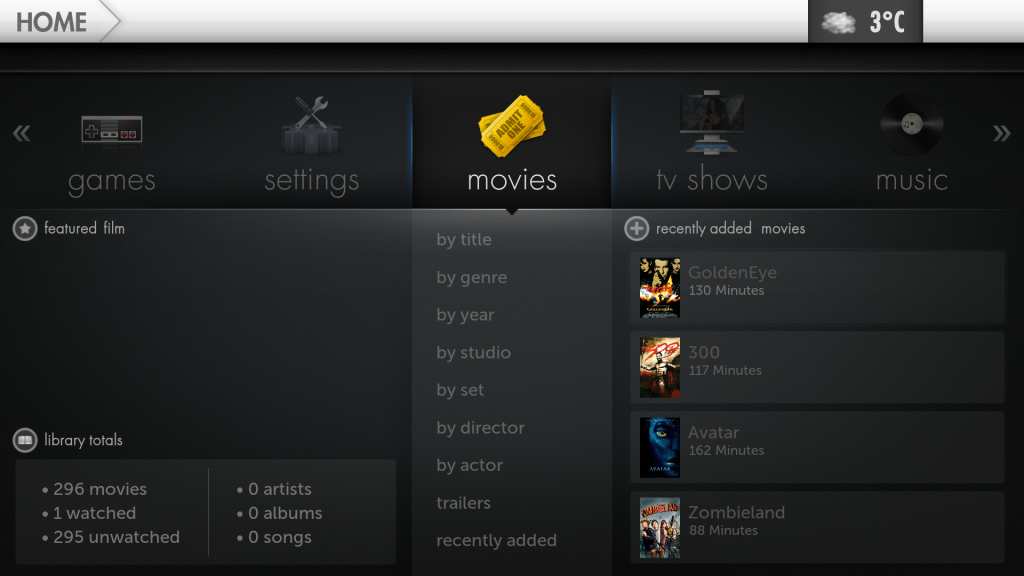
Strange, the "Featured Film"/"Featured TV Show" section doesn't seem to be working for me - I just get a blank space where the image should be appearing, eg.
![]() I do have this worrying entry in my ~/.xbmc/temp/xbmc.log: Code: 01:53:16 T:139924479641600 M:1967947776 ERROR: Python script "script.randomitems" does not existeven though I do have a script named RandomItems.py installed: Code: root ~/.xbmc/addons/skin.fusion/extras/scripts # ls -laThis is a stock install of the frellAn's MOD - I've selected the Fusion skin, rebooted several times, but nothing ever appears. Anyone have any ideas? This is on OpenELEC, so Linux based (in case that matters). |
| find quote |
Japaja
Fan Joined: May 2010 Reputation: 2 Location: Croatia |
2011-01-08 05:34
Post: #7
Ye, the script should go to \addons\script.randomitems -> folder inside the two .py files
|
| find quote |
MilhouseVH
Posting Freak Posts: 1,059 Joined: Jan 2011 Reputation: 21 |
2011-01-08 06:51
Post: #8
Japaja Wrote:Ye, the script should go to \addons\script.randomitems -> folder inside the two .py files Thanks, your suggestion was enough to give me a clue... I downloaded the randomitems script from here, just copying the RandomItems.py file provided by the Fusion skin into the script.randomitems directory wasn't enough to get it to load, it also needed the addons.xml file which is in Zip file from the authors site. Now I have Featured Films working, but not TV Shows. And if I use the original RandomItems.py file (not that provided by Fusion), I have TV Shows but not Films... my investigation continues. ![]() Edit: Another couple of reboots and both Featured Films AND Featured TV Shows are working using the original randomitems script, not the one supplied with Fusion skin. Thanks again Japaja for giving me the clues I needed!
(This post was last modified: 2011-01-08 07:26 by MilhouseVH.)
|
| find quote |
paul
Posting Freak Joined: Oct 2008 Reputation: 5 Location: Planet Earth |
2011-01-08 11:29
Post: #9
MilhouseVH Wrote:Thanks, your suggestion was enough to give me a clue... I downloaded the randomitems script from here, just copying the RandomItems.py file provided by the Fusion skin into the script.randomitems directory wasn't enough to get it to load, it also needed the addons.xml file which is in Zip file from the authors site.Cheers guys this has been driving me nuts for some time now but i now have featured songs as well as movies and tv shows, and it worked first time
XBMC Frodo 12 - Windows 7 - Asrock Ion 330HT - Aeon Nox |
| find quote |
Japaja
Fan Joined: May 2010 Reputation: 2 Location: Croatia |
2011-01-08 20:16
Post: #10
Glad I could help.
|
| find quote |

![[Image: sig_zps3af3b48e.jpg]](http://i620.photobucket.com/albums/tt289/Arcanthur/Celestium/sig_zps3af3b48e.jpg)
![[Image: screenshot003.png]](http://i225.photobucket.com/albums/dd119/MilhouseVH/AV/screenshot003.png)

Search
Help