
+- Kodi Community Forum (https://forum.kodi.tv)
+-- Forum: Support (https://forum.kodi.tv/forumdisplay.php?fid=33)
+--- Forum: Skins Support (https://forum.kodi.tv/forumdisplay.php?fid=67)
+---- Forum: Confluence (https://forum.kodi.tv/forumdisplay.php?fid=125)
+---- Thread: Add MPAA image to movie info [Added to SVN] (/showthread.php?tid=62552)
Add MPAA image to movie info [Added to SVN] - dhrandy - 2009-11-26
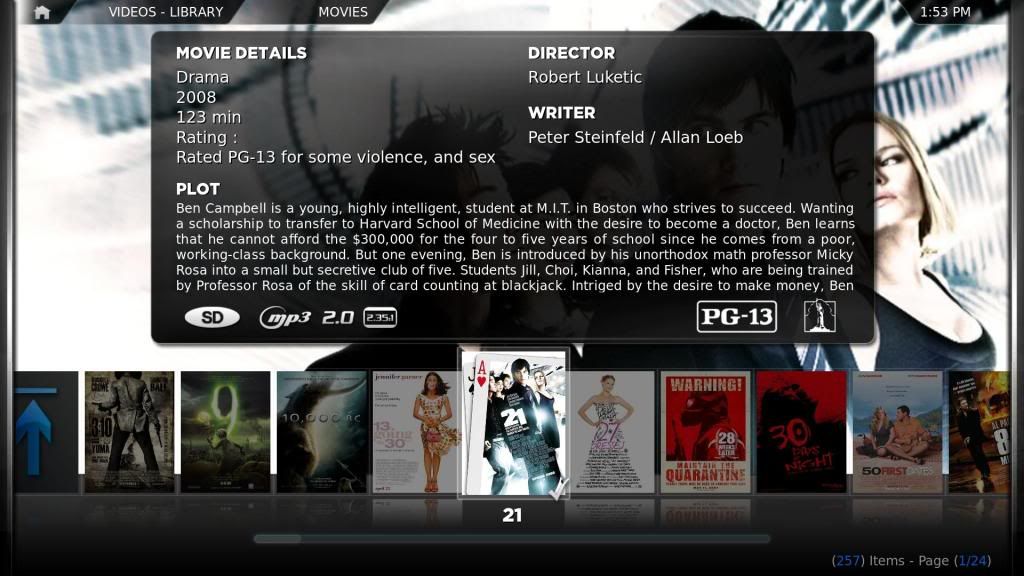
Version 2 - 11/28/09
Changes
Added Rating under movie details. (shows more details of the mpaa.)
Added Studio icons in the bottom right.
Changed the position of the mpaa to the bottom right.
Enlarged mpaa Icons (easier to read).
Added the smaller white icons. (smaller in width.)
Moved movie details down a tad to accommodate for the addition of mpaa in Movie details.
Download
Download smaller white icons with silver gradient. - Added 11/30/09
Colored mpaa.

Smaller white. (smaller width)
INSTRUCTIONS
1. Place the flags folder in the media folder of Confluence.
2. Replace the old IncludesCodecFlagging.xml and ViewsVideoLibrary.xml (backup just in case it doesn't work) with the new one in the 720P folder of Confluence.
OPTIONS
How to use white or small white instead of colors. Colors are easier to distingish at a glance. Just replace the images in the flags folder with the one in the flags-white and flags-small white folder.
INFO for default
G - Green
PG - Yellow
PG 13 - Orange
R - Red
NC-17 - Dark Red
Note: Always backup all files. I'm not responsible for anything that doesn't work. USA Ratings only. This is for Confluence skin only. I would like to thank migueld for the small mpaa icons.
Enjoy. Comments welcome.
Version 1 - 11/25/09
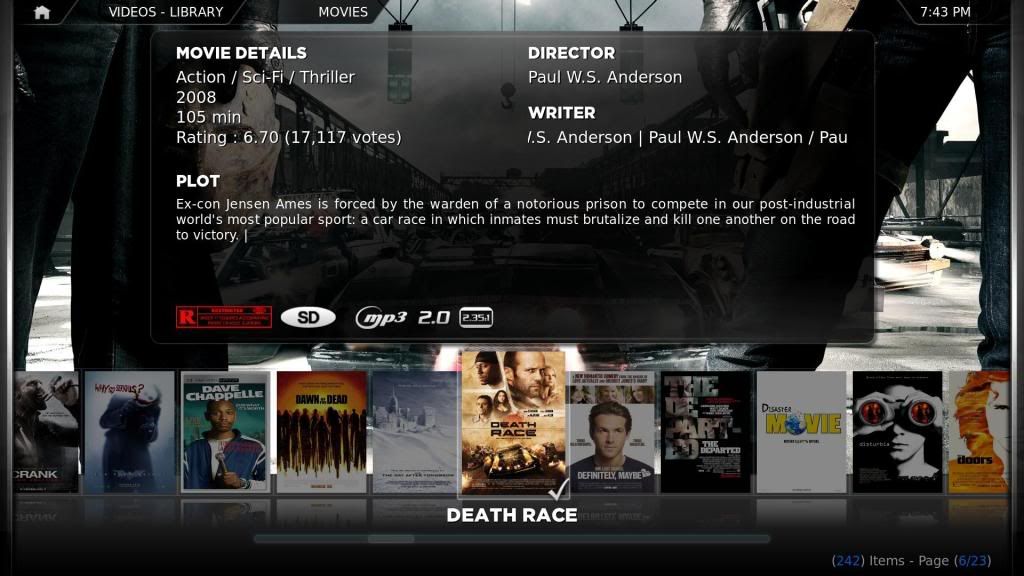
I like knowing the rating for when I have family over and for my son. Here is my solution. I included color and white images. Default is color. You have to replace them with the ones in the other folder to have white.
Download
INSTRUCTIONS
1. Place the flags folder in the media folder of Confluence.
2. Replace the old IncludesCodecFlagging.xml (backup just in case it doesn't work) with the new one in the 720P folder of Confluence.
OPTIONS
How to use white instead of colors. Colors are easier to distingish at a glance. Just replace the images in the flags folder with the one in the flags-white folder.
INFO
G - Green
PG - Yellow
PG 13 - Orange
R - Red
NC-17 - Dark Red
Note: Always backup all files. I'm not responsible for anything that doesn't work.
USA Ratings.
Enjoy. Comments welcome.
well done - User 56649 - 2009-11-26
Sweet! works like a charm!
- Jezz_X - 2009-11-26
Props for the first MOD of Confluence
I personally though find the images way to hard to read which makes then look messy plus they are hard coded english too. If someone can come up with some nicer generic looking ones that fit the skin I'll look into adding them officially
- dhrandy - 2009-11-26
Jezz_X Wrote:Props for the first MOD of Confluence
I personally though find the images way to hard to read which makes then look messy plus they are hard coded english too. If someone can come up with some nicer generic looking ones that fit the skin I'll look into adding them officially
Thanks. I was thinking of just doing some square ones. The reason I color coded them was because they were hard to read.
- mcborzu - 2009-11-26
I use these on a bunch of little mods I do....

Here's in action:

***If you'd like here are the images***
- Jezz_X - 2009-11-26
mcborzu Wrote:I use these on a bunch of little mods I do....
Here's in action:
I like this one seems like it would fit the theme better
- User 56649 - 2009-11-26
I agree that they would look better i still like the color code idea, are they the right size and format to just replace the ones from the original mod? i am very new to all this but i want to try

EDIT: I just jumped in feet first
 i colored the icons and then edited the includecodecsflagging so they were 100x45 seems to work ok but there not quite in the right position(X-Y kind of position) to line up with the others where does that value come from? is it set in another xml? hmmmm..... i might i have to go digging lol
- migueld - 2009-11-26
I made these in vector format which should be easier to manipulate:

Download svg source:
http://www.mediafire.com/?gmeyomkulgc
- User 56649 - 2009-11-26
Cool!... but way over my head lol how do these make it easier?
- dtviewer - 2009-11-26
dhrandy Wrote:I like knowing the rating for when I have family over and for my son. Here is my solution. I included color and white images. Default is color. You have to replace them with the ones in the other folder to have white.
Download
INSTRUCTIONS
1. Place the flags folder in the media folder of Confluence.
2. Replace the old IncludesCodecFlagging.xml (backup just in case it doesn't work) with the new one in the 720P folder of Confluence.
OPTIONS
How to use white instead of colors. Colors are easier to distingish at a glance. Just replace the images in the flags folder with the one in the flags-white folder.
INFO
G - Green
PG - Yellow
PG 13 - Orange
R - Red
NC-17 - Dark Red
Note: Always backup all files. I'm not responsible for anything that doesn't work. This is for Confluence only.
USA Ratings.
Enjoy. Comments welcome.
Thanks for this!
It was one feature I was hoping for!!
- kcmedic - 2009-11-27
I was wondering if there is a way to add flags to Not Rated or Unrated films as well. I realize those are not official mpaa ratings, but I would like a way to differentiate between Not Rated and Unrated vs. ones that are missing info. Thanks.
- dhrandy - 2009-11-28
kcmedic Wrote:I was wondering if there is a way to add flags to Not Rated or Unrated films as well. I realize those are not official mpaa ratings, but I would like a way to differentiate between Not Rated and Unrated vs. ones that are missing info. Thanks.
Jess will probably have to answer that one. I'm not sure.
Here is an update on what I'm working on. I'll probably include the other mpaa rating images in the previous couple post too.
I've added mpaa rating in the top left (it's scrolling on the screenshot) under movie details and studio flags on the bottom right. As well as making the mpaa image in the bottom right larger so that it's easier to read. I've also moved the plot down just a little to improve the appearance.
- dtviewer - 2009-11-28
BTW, thanks again for this mod.
Works great!!
- dhrandy - 2009-11-28
Updated first post.
Version 2
Changes
Added Rating under movie details. (shows more details of the mpaa.)
Added Studio icons in the bottom right.
Changed the position of the mpaa to the bottom right.
Enlarged mpaa Icons (easier to read).
Added the smaller white icons. (smaller in width.)
Moved movie details down a tad to accommodate for the addition of mpaa in Movie details.
Download
Colored mpaa.
Smaller white. (smaller width)
INSTRUCTIONS
1. Place the flags folder in the media folder of Confluence.
2. Replace the old IncludesCodecFlagging.xml and ViewsVideoLibrary.xml (backup just in case it doesn't work) with the new one in the 720P folder of Confluence.
OPTIONS
How to use white or small white instead of colors. Colors are easier to distingish at a glance. Just replace the images in the flags folder with the one in the flags-white and flags-small white folder.
INFO for default
G - Green
PG - Yellow
PG 13 - Orange
R - Red
NC-17 - Dark Red
Note: Always backup all files. I'm not responsible for anything that doesn't work. USA Ratings.
Enjoy. Comments welcome.
- mcborzu - 2009-11-29
Anyone kind enough to put those rating .svg's into .png format and upload them it'll be much appreciated thx....
**Nevermind, I overlooked that dhrandy had a download link, thx dhrandy**