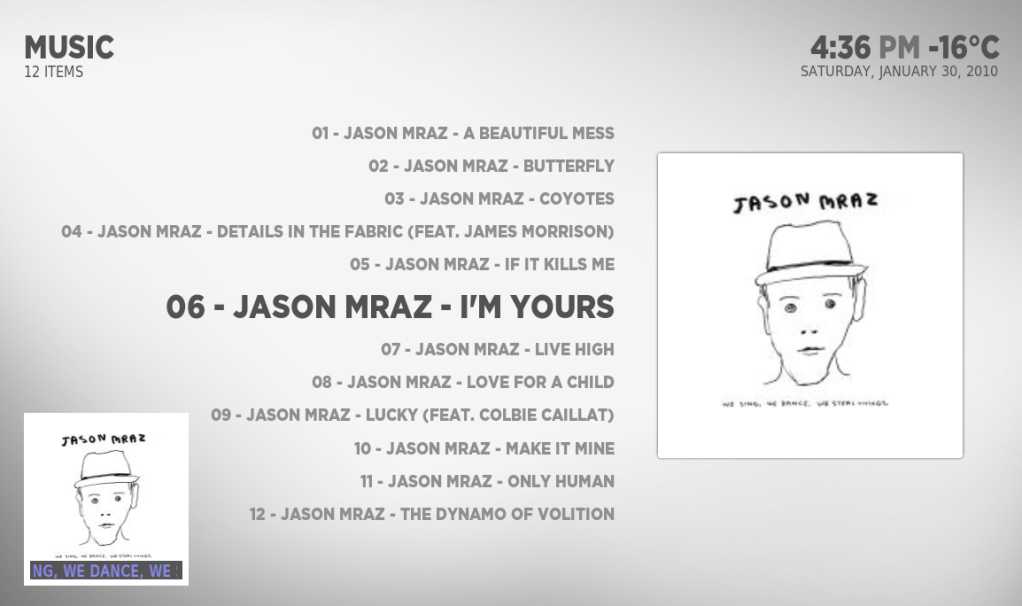
[MOD] simple mod for static music info + fanart + record label logo

  Thread Rating:
  • 2 Votes - 3 Average
  • 1
  • 2
  • 3
  • 4
  • 5
Post Reply
ichAlex Offline
Member
Posts: 66
Joined: Dec 2009
Reputation: 0
Post: #11
what about adding this:

http://www.youtube.com/watch?v=wFyuRsIsbAE

http://forum.xbmc.org/showthread.php?tid=53242
find quote
ichAlex Offline
Member
Posts: 66
Joined: Dec 2009
Reputation: 0
Post: #12
itchy_balls Wrote:Love this mod.

It's working for me except for a minor issue. The album cover on the lower left hand corner is square instead of the rounded edges on your screenshot.

same here. but i dont get fanart, i just get the old open_gl. still - if it would workd - pretty awesome
(This post was last modified: 2010-01-30 20:15 by ichAlex.)
find quote
reaven Offline
Skilled Skinner
Posts: 1,101
Joined: May 2009
Reputation: 20
Post: #13
itchy_balls Wrote:Love this mod.

It's working for me except for a minor issue. The album cover on the lower left hand corner is square instead of the rounded edges on your screenshot.

because in musicoverlay.xml instead of
Quote:<texture>$INFO[MusicPlayer.Cover]</texture>
I use this, which I get from Aeon cause Alaska dont have the thumb_matte.png
Quote:<texture diffuse="common/thumb_matte.png">$INFO[MusicPlayer.Cover]</texture>
I will update the mod to include the png and the code.

Quote:same here. but i dont get fanart, i just get the old open_gl. still
visualization need to be set to none.

MOD updated !!
(This post was last modified: 2010-01-30 22:01 by reaven.)
find quote
joebanana Offline
Member
Posts: 96
Joined: Nov 2009
Reputation: 0
Post: #14
Still nothing.
Of course I had restarted XMBC and reloaded the skin, I tried in Library mode (I prefer File mode), still nothing but the default Now Playing...
Visualization is set to None

Sad
find quote
reaven Offline
Skilled Skinner
Posts: 1,101
Joined: May 2009
Reputation: 20
Post: #15
can you post your musicvisualization.xml after you edited with your info.

you can use http://pastebin.com/
find quote
joebanana Offline
Member
Posts: 96
Joined: Nov 2009
Reputation: 0
Post: #16
This is the only thing I changed for now:

<texture fallback="smb://fileserver/Backdrops/Music/fanart.jpg">smb://fileserver/Backdrops/Music/$INFO[MusicPlayer.Artist].jpg</texture>

There is a fanart.jpg as well as an Artist.jpg file in the same folder. I chose not to use 1 subfolder per artist.
find quote
reaven Offline
Skilled Skinner
Posts: 1,101
Joined: May 2009
Reputation: 20
Post: #17
the only thing you dont see is the fanart ? you can still see the cover the bottom bar with the album/artist/track and time info ?

do you see the fallback fanart cause the other path is wrong. the other path assume you have an image in the music folder name Ex. jason mraz.jpg not inside the artist folder.

if your fanart is name Artist.jpg inside the artist folder you are missing info in the path, it would be something like
Code:
smb://fileserver/Backdrops/Music/$INFO[MusicPlayer.Artist]/artist.jpg

the error seems in how you music folder is organized which I still dont know.
find quote
joebanana Offline
Member
Posts: 96
Joined: Nov 2009
Reputation: 0
Post: #18
I don't even see the bar. All I see is the default Now Playing, nothing like your screenshots.

As far as the path goes, it looks like this:

smb://fileserver/Backdrops/Music/fanart.jpg (default)
smb://fileserver/Backdrops/Music/Jay-Z.jpg
smb://fileserver/Backdrops/Music/Jason Mraz.jpg
and so on...

But I guess the problem is that it seems the whole mod is not even being loaded... not sure why.
find quote
reaven Offline
Skilled Skinner
Posts: 1,101
Joined: May 2009
Reputation: 20
Post: #19
ichAlex Wrote:what about adding this:

http://www.youtube.com/watch?v=wFyuRsIsbAE

http://forum.xbmc.org/showthread.php?tid=53242

you mean my cdArt Aeon mod to Alaska.

I didn't port it to Alaska cause am using an AppleTV with Alaska and the apple tv choke on the cdart mod it wont play smoothly.
find quote
joebanana Offline
Member
Posts: 96
Joined: Nov 2009
Reputation: 0
Post: #20
Is there something specific to do to "reload" the skin? I tried changing to another skin then back to Alaska but is that enough? Or are the files cached somehow?
find quote
Post Reply