Poll: Most Desired Feature To Be Added
Other Movie Ratings
Download Movie Trailers
Home Automation scripting
Other Movie Streaming Location
Trivia Intro Fixed
Cartoon Video Option
More Videos for before Feature(s) - Specify how many
[Show Results]
 

[RELEASE] Cinema Experience - the new Home Theater Experience Script

  Thread Rating:
  • 20 Votes - 5 Average
  • 1
  • 2
  • 3
  • 4
  • 5
Post Reply
giftie Online
Skilled Python Coder
Posts: 2,036
Joined: Mar 2010
Reputation: 35
Thumbs Up  [RELEASE] Cinema Experience - the new Home Theater Experience Script Post: #1
Cinema Experience
Formerly known as Home Theatre Experience or HTE

Visit the Wiki page: http://wiki.xbmc.org/index.php?title=Add...Experience

A few of us, along with help from Nuka1195, are now maintaining the script to work with Dharma, and beyond if need be. This new thread will hopefully help old and new users...

Post any questions, problems, or discoveries on this thread. I will try to post all relevant information from the old thread here.

What is Cinema Experience?(for those who never used HTE)
This scripts will add the wow factor to your home theatre and give you the true cinema experience you deserve(except you still have to supply the popcorn and drinks)

This script allows you to play slides, previews(trailers) and other videos that give the full cinema feel(Intro's and Outro's) Slides can consist in almost any jpg picture(many Movie Q&A, Movie Stills, Movie Fact packs already exist). The Feature Presentation Movie(s) must be in your Video Library.

It integrates with the script Apple Movie Trailers to stream trailers directly from the web, or play locally stored trailer that are on you system.


Skins that have built-in integration:

Transparency! - http://forum.xbmc.org/showthread.php?tid=82435 http://forum.xbmc.org/showthread.php?tid=83643
Night - http://forum.xbmc.org/showthread.php?tid=82628
The Carmichael - http://forum.xbmc.org/showthread.php?tid=84970
Neon - http://forum.xbmc.org/showthread.php?tid=83337
Night Purity - http://forum.xbmc.org/showthread.php?tid=86753
Alaska Revisited - http://forum.xbmc.org/showthread.php?tid=87399
Backrow - http://forum.xbmc.org/showthread.php?tid=63773 - http://forum.xbmc.org/showthread.php?tid=87387You will need to disable 'Enable Music Now Playing Screen' in Skin Options
Aeon MQ 2 - http://forum.xbmc.org/showthread.php?tid=81601
Cirrus Extended - http://forum.xbmc.org/showthread.php?tid=90693
Metropolis - http://forum.xbmc.org/forumdisplay.php?fid=162
Any others, please post so I can add to this message

How to Get it?
Here are some new test versions...

Dharma Version 1.0.53 -> http://www.mediafire.com/file/6r7d1pqnfe...1.0.53.zip
Eden Version 2.0.57 -> https://www.dropbox.com/s/9xqnclvosuhm2o...2.0.57.zip
Frodo Version 3.0.3 -> http://www.mediafire.com/file/aod1erp3gb....3.0.3.zip

home_automation.py for triggering EventGhost(for version 3.0.1 and newer of the script) -> http://www.mediafire.com/file/j84f35o85d...tion(2).py - be sure to place this in the userdata/addon_data/script.cinema.experience/ha_scripts folder and named home_automation.py

Cinema Experience Sequence - Thanks SlaveUnit for posting this

1. Trivia Intro Video(s)
2. Slides w/ music playlist
3. Trivia Outro Video(s)
4. Movie Theater Intro Video(s)
5. Coming Attractions Intro Video(s)
6. Trailer(s)
7. Coming Attractions Outro Video(s)
8. Feature Presentation Intro Video(s)
9. Rating
10. Audio (DD/DTS/THX etc)
11. Countdown Video
12. Movie Starts
13. Intermission Video(s) - If selected
14. Rating Video - if selected
15. Audio Format Video - if selected
16. Next Movie Starts
.
. The last three can repeat up to 3 more times
.
17. Feature Presentation Outro Video(s)
18. Movie Theatre Outro Video(s)

[Image: e4f63e45ba34fe4695b3bb08eb2499d8e4ee484e...4c076g.jpg]
For troubleshooting and bug reporting please make sure you read this first you can also use XBMC Log Uploader Script.
Cinema Experience
Cinema Experience Wiki
cdART Manager
fanart.tv


(This post was last modified: 2013-03-18 04:02 by giftie.)
find quote
giftie Online
Skilled Python Coder
Posts: 2,036
Joined: Mar 2010
Reputation: 35
Post: #2
Interesting threads


Full Packs - Slides and Videos


Slave Unit's HTE Pack(a lot of good stuff here)
http://forum.xbmc.org/showthread.php?tid=69270


Video Packs


Slide Packs

RagnaroktA's Slides -> http://forum.xbmc.org/showthread.php?tid=156908


Tips and Tricks


How to add Cinema Experience to Confluence (Thanks Harro)
http://forum.xbmc.org/showthread.php?tid=87883


Related Websites

HD-Trailers.net Downloader:- improved by ljourneaux
http://hdtrailersdler.codeplex.com/

Demo-world - good selection of Audio Format Videos, trailers and much more You can find DD, DTS, DTS-MA and THX Videos here
http://www.demo-world.eu/


I'll try to keep any files available as well here - http://www.mediafire.com/?5qsgsgm6ugqcs

[Image: e4f63e45ba34fe4695b3bb08eb2499d8e4ee484e...4c076g.jpg]
For troubleshooting and bug reporting please make sure you read this first you can also use XBMC Log Uploader Script.
Cinema Experience
Cinema Experience Wiki
cdART Manager
fanart.tv


(This post was last modified: 2013-03-07 03:21 by giftie.)
find quote
giftie Online
Skilled Python Coder
Posts: 2,036
Joined: Mar 2010
Reputation: 35
Post: #3
Steps for reporting problems/bugs


I'm not trying to be rude, or negative, but when reporting a bug or a problem you are having please follow the following....

Step 1: Put XBMC into Debug Mode - link
Step 2: Restart XBMC
Step 3: If you have addons that run automatically at start of XBMC(Sharethe.TV, Weather.com Plus, etc.) wait a few minutes for these scripts to run
Step 4: Run Cinema Experience
Step 5: Upload your FULL xbmc.log file to pastebin.com(or similar)

Method 1:
Use the Debug Log Script

Method 2:
Manually locate your xbmc.log file - see Here for location
Copy and paste xbmc.log to pastebin.com(or similar)

If you feel you have private information that you don't want the public be able to see, setup an account on pastebin.com and store it as a private paste.


Step 6: Create a new forum message on this thread, which contains steps to reproduce, your pastebin url


Using these steps will allow me to find the problem and repair it for the next release.


Latest 5 Versions

As with most updates to addons, it is a good idea to check and verify your settings, as sometimes a new or fixed feature means there may be a new or changed setting.

1.0.51
- Moved Property "CinemaExperienceRunning" to the start of the script. This allows skin developers to use as a conditional for starting TV Tunes

1.0.48 - 1.0.50
- Many updates for use with Eden
- Added skin Property "CinemaExperienceRunning" to window 10025(MyVideoNav.xml)
[INDENT]This allows the skinner to Disable the Busy/Buffering dialog or also to Disable the TV Tunes script(I haven't found a way to get the scripts to play nicely)
Usage: !SubString(Window(10025).Property(CinemaExperienceRunning),True)
[/INDENT]

1.0.47
- more Ede-pre upgrades
- separated Dharma code and Eden code
- Moved Countdown Video to proper placement
- a lot of internal reworking

1.0.46
- Fixed - Added missing movie details
- Enhancement - Improved Debug logging
- Enhancement - Added Pre-Eden code and Dharma code files to support Dharma and forward moving Git
- Enhancement - Added 'Enable Pre-Eden' Setting in Misc Settings for those that like being on the Bleeding Edge. - Defaulted off
- Fixed - Make various changes to script to be valid for Dharma and Pre-Eden
- Fixed - Corrected mode coding for using Movie Quiz script in place of Trivia
- Fixed - Added back Slide MPAA Rating
- Enhancement - Added and MPAA Equivilent Rating for various purposes(Slides, Trailers)
[INDENT]- BBFC Rating = MPAA Rating
- 12, 12A = PG-13
- 15 = R
- U = G
- 18, R18, MA = NC-17
[/INDENT]
Used the following page http://en.wikipedia.org/wiki/Motion_pict...ing_system

1.0.45
- Fixed - Full Movie details now show when info overlay is shown during movie playback
- Fixed - Script had a habit of crashing XBMC if the last video is skipped
- Fixed - Trailers should not be causing errors now
- Fixed - Script now properly ends(HA script was causing improper ending)

1.0.44
- Fixed - Single music file for trivia now works
- Fixed - Non Download trailers

1.0.43
- Enhancement - Added Paused & Resumed Triggers for Home Automation
- Fixed - Script now handles being stopped(cleanly shuts script down)
- Fixed - Properly use thumbnail images when HD-Trailers.net Downloader is used

1.0.42
- Fixed - the DefaultVideo.png thumbnail was showing up instead of the Movie Trailer thumbnail
- Fixed - added error catching if user does not have the proper version of Movie Quiz installed and has the Trivia Mode set to Movie Quiz
- Enhancement - Trailer Downloader now downloads Movie Trailer Posters
- Fixed - Home Automation module was left out of last version.

[Image: e4f63e45ba34fe4695b3bb08eb2499d8e4ee484e...4c076g.jpg]
For troubleshooting and bug reporting please make sure you read this first you can also use XBMC Log Uploader Script.
Cinema Experience
Cinema Experience Wiki
cdART Manager
fanart.tv


(This post was last modified: 2012-06-09 02:19 by giftie.)
find quote
giftie Online
Skilled Python Coder
Posts: 2,036
Joined: Mar 2010
Reputation: 35
Post: #4
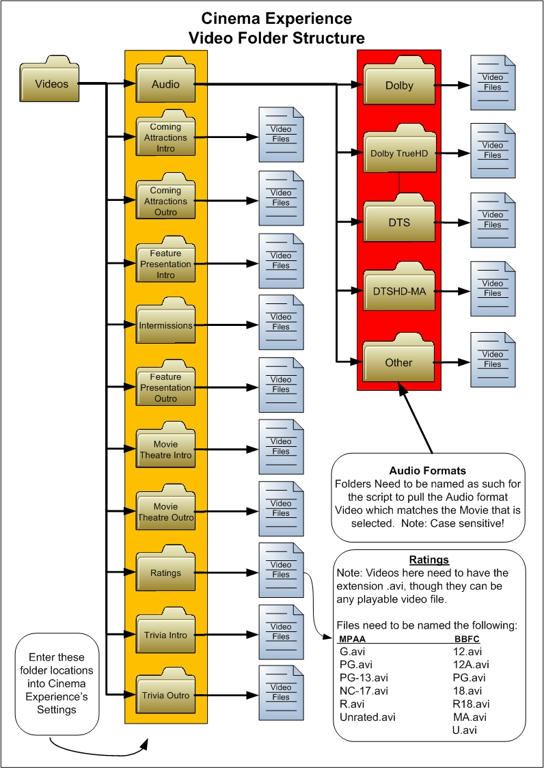
Videos

[Image: 6cf7d951224d1cf8b83bfd2eb8dbb22984d85122...97746g.jpg]

Trivia

Slide XMLs

These are important files when using quizzes. They allow the quizzes to follow the proper order: Question -> Clue -> Answer or Question -> Answer(depending on how they need to flow)

PHP Code:
<slides>
    <
slide>
        <
slide rating="R">
        <
question format=".([0-9]{1,3})+_q.jpg" />
        <
clue format=".([0-9]{1,3})+_c.jpg" />
        <
answer format=".([0-9]{1,2})+_a.jpg" />
    </
slide>
</
slides

<slide rating=> - allows the ability to specify a 'age' rating similar to movies, this can be used to match the rating of the movie being played or to set a limit on which slides are played based on value set in the Settings)
<question format= /> - provides the format that matches slides as a question slide
<clue format= /> - provides the format that matches slides as a clue slide
<answer format= /> - provides the format that matches slides as an answer slide

Breakdown of ".([0-9]{1,3})+_q.jpg"

. <- provides matching of any alpha characters(letters) ie: matches "stills" in "stills20_q.jpg"
([0-9]{1,3}) <- provides matching of any number from 0 - 999 ie: matches "20" in "stills20_q.jpg"
+_q <- allows the script to determine if it is a question ie: "stills20_q.jpg" is a question, but "stills20_c" is not.
^ this can be any letter or combination of letters as long as the pattern is kept. For example:

<question format=".([0-9]{1,3})+a.jpg" /> - the question
<clue format=".([0-9]{1,3})+b.jpg" /> - the clue
<answer format=".([0-9]{1,3})+c.jpg" /> - the answer

The next example of a slides.xml is for a two part trivia question(question and answer):

PHP Code:
<slides>
    <
slide>
        <
slide rating="R">
        <
question format=".([0-9]{1,3})+_q.jpg" />
        <
clue format="N/A" />
        <
answer format=".([0-9]{1,2})+_a.jpg" />
    </
slide>
</
slides

If your Q&A do not have any ordering numbers (ie slide1_q, the 1 is the ordering number) just use the following:
PHP Code:
<slides>
    <
slide>
        <
slide rating="G">
        <
question format=".+_a.jpg" />
        <
clue format="N/A" />
        <
answer format=".+_b.jpg" />
    </
slide>
</
slides
This works for the Screenshot Shot Quiz( Pack 0.1 and Pack 2 0.2 Alpha) contained in one or more of the stills pack available for download.


Trailer videos

Trailer Scraper(found in Settings)

Modes:

- Apple Movie Trailers (database)
Uses the Apple Movie Trailers Video Addon(not Lite) to find and then streams the trailers
- Apple Movie Trailers (newest)
Requests the newest trailers from Apple Movie Trailers(the site) and then streams the trailers
- Local Folder
Selects trailers from your downloaded trailers(which can be obtained many different ways) and plays the trailers


Local Folder(downloaded trailers)

The saved video files used for trailers need to have "-trailer" as part of the file name. For example:

The Girl Who Kicked the Hornet's Nest-trailer.mov

Trailer .nfo sample - for Local Folder to match genre/rating
Code:
<?xml version="1.0" encoding="utf-8" standalone="yes"?>
<movieinfo id="5961">
    <title>A Good Day to Die Hard</title>
    <quality>1080p</quality>
    <runtime>2:30</runtime>
    <releasedate>2013-02-14</releasedate>
    <mpaa>R</mpaa>
    <genre>Action and Adventure</genre>
    <studio>20th Century Fox</studio>
    <director>John Moore</director>
    <cast></cast>
    <plot>Iconoclastic, take-no-prisoners cop John McClane, for the first time, finds himself on foreign soil after traveling to Moscow to help his wayward son Jack, unaware that Jack is really a highly-trained CIA operative out to stop a nuclear weapons heist. With the Russian underworld in pursuit, and battling a countdown to war, the two McClanes discover that their opposing methods make them unstoppable heroes.</plot>
    <thumb>/media/hte_files/Trailers/agooddaytodiehard-tlr2_h720p-trailer.tbn</thumb>
</movieinfo>

[Image: e4f63e45ba34fe4695b3bb08eb2499d8e4ee484e...4c076g.jpg]
For troubleshooting and bug reporting please make sure you read this first you can also use XBMC Log Uploader Script.
Cinema Experience
Cinema Experience Wiki
cdART Manager
fanart.tv


(This post was last modified: 2013-02-19 05:10 by giftie.)
find quote
giftie Online
Skilled Python Coder
Posts: 2,036
Joined: Mar 2010
Reputation: 35
Post: #5
Integration...(these instructions still need some work)

The script has been modified to allow the script to be integrated better into XBMC. Using the following the script can be started at a specific window of the Movie Library. The movie needs to be queue into a play list for the script to start. This also allows the ability to queue up multiple movies(see Feature Presentation settings)

Code:
RunScript(script.cinema.experience,WINDOW)
      WINDOW can be:
                              movietitles                
                              moviegenres              
                              movieyears                
                              movieactors              
                              moviedirectors          
                              moviestudios
                              moviesets    
                              moviecountries
                              recentlyaddedmovies

The script still has the ability to be run from the DialogVideoInfo.xml file using RunScript(script.cinema.experience), though this button should be hidden if the script is started using the command above. I think ronie has the best layout by adding an option to the Skin Settings that allows the user to Enable/Disable the Home Window integration.

I have also added the ability for web remotes to start specific movies using the following:

Special way to start the script from HTTP API:
Using the argument 'command<li>movie_title=' a specific movie can selected.
For example:
ExecBuiltIn(RunScript(script.cinema.experience,command<li>movie_title=Avatar)
will start the movie Avatar. Important note: movie name must match how movie is found in the Database

Queuing of multiple movies, separate the movies by <li>:
ExecBuiltIn(RunScript(script.cinema.experience,command<li>movie_title=Avatar<li>Titanic<li>The%20Terminator)
will queue up the movies Avatar, Titanic and The Terminator

Home Automation(home_automation.py)

http://forum.xbmc.org/showthread.php?tid...#pid790523

New Skin Property Available

I have added a method to the script to inform skins that it is running. This can be used to disable the Busy/Buffering dialog that some users feel that it breaks the flow of the script. It can also be used to disable TV Tunes(the only script I have found that Cinema Experience does not play well with) while Cinema Experience is running.

Skin Developers take note: The property is called 'CinemaExperienceRunning'. To test to see if CE is running:
Code:
SubString(Window(10025).Property(CinemaExperienceRunning),True)

For example, to disable TV Tunes being run when window is loaded: (taken from Transparency!)
Code:
<onload condition="Skin.HasSetting(TvTunes) + !SubString(Window(10025).Property(CinemaExperienceRunning),True)">RunScript(script.tvtunes,backend=True)</onload>

Things That Are Not Working:The bad list.....

As Of 6/23/2011

- Streamed Trailers may fail if there is a video played before they are


If you spot anything please post...

Important Links to Important information:

Home Automation Setup - Using Event Ghost
(This post was last modified: 2012-05-22 22:07 by giftie.)
find quote
giftie Online
Skilled Python Coder
Posts: 2,036
Joined: Mar 2010
Reputation: 35
Post: #6
Cinema Experience Skin Support

How to add support for Cinema Experience to your skin
Introduction

To make the end-user experience seamless, skinners can add support for Cinema Experience directly to their skins.

Details

We recommend that you add a button to DialogVideoInfo?.xml similar to this (taken from Night skin)
old method(still works)
PHP Code:
<control type="button" id="49">
     <
description>Home Theatre</description>
     <include>
ButtonInfoDialogsCommonValues</include>
     <
label>Cinema</label>
     <
onclick>Dialog.Close(MovieInformation)</onclick>
     <
onclick>XBMC.RunScript(script.cinema.experience)</onclick>
     <
visible>system.hasaddon(script.cinema.experience) + Container.Content(movies)</visible>
</
control

New method(Frodo version 3.0.1+)
PHP Code:
<control type="button" id="49">
     <
description>Home Theatre</description>
     <include>
ButtonInfoDialogsCommonValues</include>
     <
label>Cinema</label>
     <
onclick>Dialog.Close(MovieInformation)</onclick>
     <
onclick>RunScript(script.cinema.experience,movieid=$INFO[ListItem.DBID])</onclick>
     <
visible>system.hasaddon(script.cinema.experience) + Container.Content(movies)</visible>
</
control

Additional Discussion

mcborzu started a discussion regarding the recommended way for skinners to integrate this script into their themes: http://forum.xbmc.org/showthread.php?tid=87945

Harro posts a mod for Confluence to add support for Cinema Experience: http://forum.xbmc.org/showthread.php?tid...Experience

Steppedup has posted a mod for Media Stream Redux to add support for Cinema Experience, including a modified DialogVideoInfo.xml that you can download for easy install: http://forum.xbmc.org/showthread.php?p=6...post683875

[Image: e4f63e45ba34fe4695b3bb08eb2499d8e4ee484e...4c076g.jpg]
For troubleshooting and bug reporting please make sure you read this first you can also use XBMC Log Uploader Script.
Cinema Experience
Cinema Experience Wiki
cdART Manager
fanart.tv


(This post was last modified: 2013-02-19 05:12 by giftie.)
find quote
acegutta22 Offline
Member
Posts: 57
Joined: Aug 2010
Reputation: 0
Post: #7
i just installed it how do i get it working i am willing to change skins i am currently using dharma rc2 and aeon 65 skin
find quote
rflores2323 Offline
Posting Freak
Posts: 1,950
Joined: Jan 2009
Reputation: 2
Post: #8
what skins does this work on with no modding/hacking? that should be a question/answer in the first post i think. just a suggestion.

ATV1 with crystalbuntu V1 (11.eden). Theater remote URC MX-810, droidx wtih xbmc remote, or transformer tf101 with YATSE. 2 x ATV2 (V12.0 Eden).

find quote
quebert Offline
Senior Member
Posts: 294
Joined: Sep 2008
Reputation: 0
Post: #9
rflores2323 Wrote:what skins does this work on with no modding/hacking? that should be a question/answer in the first post i think. just a suggestion.

You can set a shortcut in keyboard.xml and it'll work with any skin with the following

XBMC.RunScript(script.cinema.experience)
find quote
giftie Online
Skilled Python Coder
Posts: 2,036
Joined: Mar 2010
Reputation: 35
Post: #10
We need a new Icon for this script. Who wants to take a stab at itConfused

[Image: e4f63e45ba34fe4695b3bb08eb2499d8e4ee484e...4c076g.jpg]
For troubleshooting and bug reporting please make sure you read this first you can also use XBMC Log Uploader Script.
Cinema Experience
Cinema Experience Wiki
cdART Manager
fanart.tv


find quote
Post Reply